

OpsPilot: Tasks & Workflows vs StoreOps | Store Management
Two Shopify apps, side by side: detected stores, momentum, reviews, plans, listed features and who runs each. Store counts as of Jun 5, 2026 for OpsPilot, Sep 23, 2026 for StoreOps.
The short answer
- Only StoreOps lists a free plan.
- OpsPilot lists 10 features StoreOps’s listing doesn’t mention, including Auto-sync data, Custom workflows, Email responses.
Head to head


Standard
- · Up to 5 boards, 1GB storage, priority or
Premium
- · Unlimited boards, unlimited storage, adv
Coverage counts what each App Store listing names. Every feature, checked off app by app, is in Shoplist.
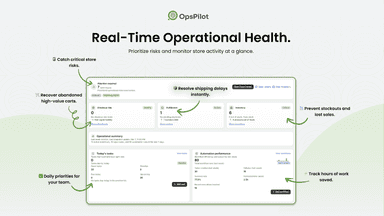
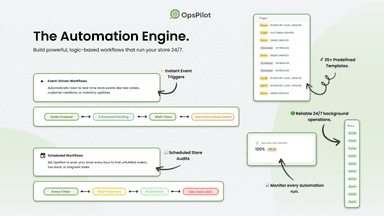
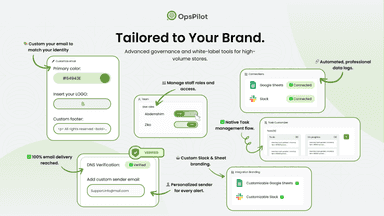
See every featureOpsPilot is a Shopify operations workspace for follow-up work. Turn orders, inventory, abandoned checkouts, customers, and product changes into assigned tasks, Slack or email alerts, and Google Sheets logs. Use templates or custom rules to route work to the right person, add comments and files, track workflow runs, and keep a clear history of what happened after each store event.
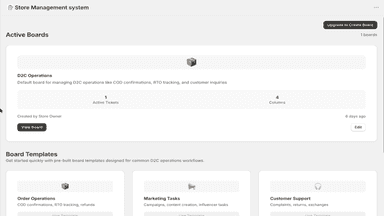
This app converts Shopify orders into tickets to help merchants manage operations more efficiently. Teams can organize tasks using boards, track progress, and handle order-related issues without switching tools. Automated workflows create and prioritize tickets based on order conditions, reducing manual work and improving internal coordination.
- Build workflows for orders, inventory, customers, and checkouts.
- Schedule checks for low stock, orders, and team follow-ups.
- Send Slack or email alerts when store conditions match.
- Send store and workflow data to Google Sheets.
- View order, customer, and fulfillment details within each ticket
- Manage tasks using customizable boards and workflow stages
- Organize and filter tickets using tags and priority levels



All the numbers
Every figure, side by side
A green dot marks the app ahead on a measured figure. Estimates, gaps and apps that leave no storefront trace never take the lead.
Adoption
| Measure |  OpsPilot |  StoreOps |
|---|---|---|
| Detected stores | Not published | Not published |
| Net store change, 28 days | 0 | 0 |
| Stores added, 28 days | Not enough data | Not enough data |
| Big-brand share | Not enough data | Not enough data |
| Top store categories | Not published | Not published |
| Top store countries | Not published | Not published |
Reviews
| Measure | OpsPilot | StoreOps |
|---|---|---|
| App Store rating | Not published | 5.0 ★ |
| App Store reviews | Not published | 1 |
| New reviews, 28 days | Not enough data | Not enough data |
| Reviewers a year or more in | Not enough data | Not enough data |
FAQ
OpsPilot and StoreOps: common questions
- Is OpsPilot or StoreOps cheaper?
- Only StoreOps lists a free plan. Shoplist compares base prices only between monthly plans in the same currency; usage charges and annual plans vary, so check each plan’s limits.
- What features does each app list that the other doesn’t?
- OpsPilot lists 10 the others don’t mention, such as Auto-sync data, Custom workflows, Email responses, Inventory levels. StoreOps lists 4 the others don’t mention, such as Escalation, Rule-based triggers, Tagging, Ticketing. A feature missing from a listing may still be supported; this compares what each App Store listing says.
- Where does this comparison’s data come from?
- Shoplist crawls Shopify storefronts to detect which apps each store runs, and reads each app’s Shopify App Store listing for reviews, pricing, features and integrations. Store counts are as of Jun 5, 2026 for OpsPilot, Sep 23, 2026 for StoreOps; estimated figures are labeled.
How Shoplist compares apps
Store counts come from Shoplist’s crawl of Shopify storefronts, which detects the apps each store runs; they are as of Jun 5, 2026 for OpsPilot, Sep 23, 2026 for StoreOps. Reviews, ratings, plans, features and integrations come from each app’s Shopify App Store listing. 28-day figures are labeled when estimated, and a figure that is missing or estimated never decides who leads. Read the methodology.