

Notify Rush vs Orderly ‑ Order Notifier
Two Shopify apps, side by side: detected stores, momentum, reviews, plans, listed features and who runs each. Store counts as of Oct 14, 2026 for Notify Rush, Nov 2, 2026 for Orderly.
The short answer
- On the Shopify App Store: Notify Rush 5.0 from 1 reviews and Orderly 4.7 from 35 reviews.
- Only Orderly lists a free plan. Paid plans start at $14.99/month for Notify Rush and $4.99/month for Orderly.
- Orderly lists 11 features Notify Rush’s listing doesn’t mention, including Attachments, Batch notifications, Custom alerts.
Head to head


Fulfilment delay email. Unfulfilled orders report Email, Slack
Momentum
New reviews each month
Review pace is the clearest public read on how fast an app is winning new merchants.
Notify Max
- · Custom email templates
- · Order tracking emails
- · Priority support
- · Public order tracking URL
- · Unlimited bulk emails
Notify Max Plus
- · Advanced settings
- · Automated email rules
- · Everything in Notify Max
- · Notifications
- · Pre-order tracking
- · Priority support
Notify Pro Max
- · Address change requests
- · Customer Facing Order Edit
- · Customer order modifications
- · Everything in Notify Max
- · Grace Period Self-Edit Portal
- · Order cancellation portal
Free
- · 1 team order list
- · Filter by status, tags, products & more
- · Ready-made and custom email templates
- · Send from your own email domain
- · Up to 1 recipients per list
- · on-demand runs
Essential
- · 500 customer emails every 30 days
- · Daily, weekly, monthly or on-demand runs
- · Everything in Free, plus:
- · Order status and delay emails to buyers
- · Unlimited team order lists
- · Up to 50 recipients per list
Pro
- · 2,500 customer emails every 30 days
- · Everything in Essential, plus:
- · For stores that email most customers
Business
- · 10,000 customer emails every 30 days
- · Everything in Pro, plus:
- · Priority support
Coverage counts what each App Store listing names. Every feature, checked off app by app, is in Shoplist.
See every featureNotify Rush helps merchants keep customers informed and reduce support requests. Customers can edit orders, fix addresses, swap variants or cancel within a grace period before fulfillment. Send bulk emails about delays, backorders or shipping changes with custom templates. Set up automated workflows triggered by order tags or status. Get alerts for refunds and flagged orders.
As a store owner, you want to make sure your customers get their orders on time, But there are always a chance that some of the orders are not fulfilled due to human mistakes, due to not finding the product on time, due to forgotten or are not fulfilled by external fulfilment company.
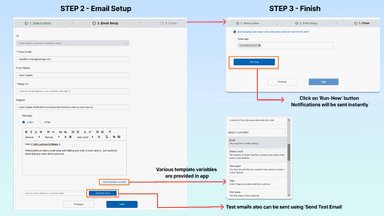
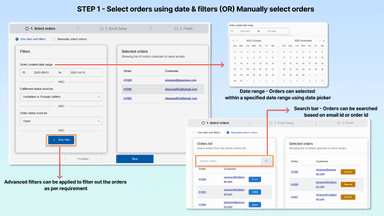
- Effortlessly send bulk email updates to customers about orders and backorders.
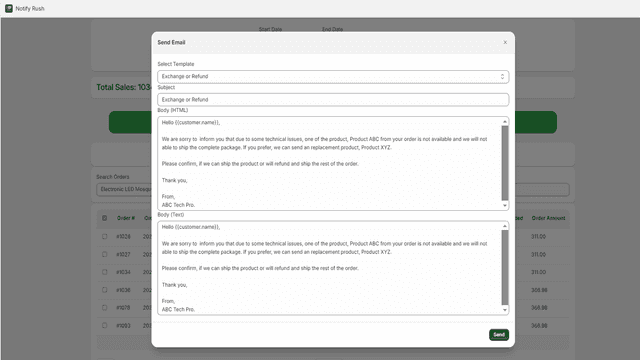
- Quickly search products, filter by date or status, and update affected customers
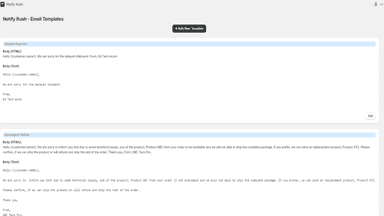
- Personalize emails for each scenario, aligning content with your brand & message
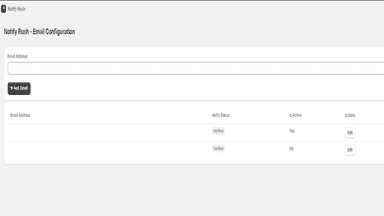
- Access all communication needs in one dashboard for easy management and updates.
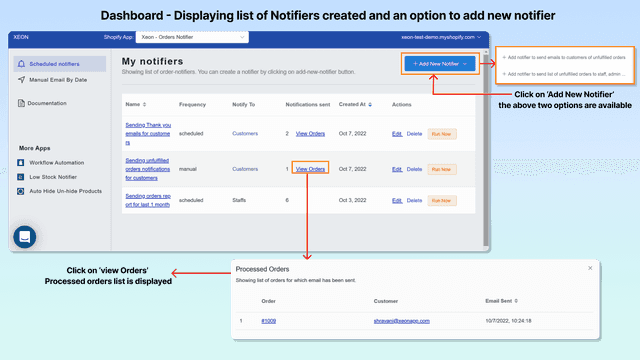
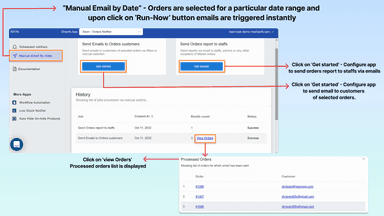
- Automate sending email to customers about their orders status
- Automate sending orders report to staffs/admin via email or slack
- Send bulk emails to customers for delay shipments of unfulfilled orders
- Sending order reports in a CSV file to staff/admin
All the numbers
Every figure, side by side
A green dot marks the app ahead on a measured figure. Estimates, gaps and apps that leave no storefront trace never take the lead.
Adoption
| Measure |  Notify Rush |  Orderly |
|---|---|---|
| Detected stores | Not published | Not published |
| Net store change, 28 days | 0 | 0 |
| Stores added, 28 days | Not enough data | Not enough data |
| Big-brand share | Not enough data | Not enough data |
| Top store categories | Not published | Not published |
| Top store countries | Not published | Not published |
Reviews
| Measure | Notify Rush | Orderly |
|---|---|---|
| App Store rating | 5.0 ★(ahead) | 4.7 ★ |
| App Store reviews | 1 | 35(ahead) |
| New reviews, 28 days | Not enough data | Not enough data |
| Reviewers a year or more in | Not enough data | Not enough data |
Pricing
| Measure | Notify Rush | Orderly |
|---|---|---|
| Free plan | Not listed | Yes |
| Lowest paid monthly plan | $14.99/month | $4.99/month(ahead) |
| Longest free trial | 7 days | 7 days |
| Plans listed | 3 | 4 |
Listing
| Measure | Notify Rush | Orderly |
|---|---|---|
| Shopify category rank | #36 | #117 |
| Shopify App Charts | Not on this week’s charts | #3 on Pricing moves in Orders - Other |
| Built for Shopify | No | No |
| Launched | Oct 18, 2024 | Feb 6, 2019 |
| Languages | 1 | 1 |
| Developer | Creative Apps | Xeon Apps |
FAQ
Notify Rush and Orderly: common questions
- Is Notify Rush or Orderly cheaper?
- Only Orderly lists a free plan. Paid plans start at $14.99/month for Notify Rush and $4.99/month for Orderly. Shoplist compares base prices only between monthly plans in the same currency; usage charges and annual plans vary, so check each plan’s limits.
- Which has better reviews, Notify Rush or Orderly?
- On the Shopify App Store: Notify Rush 5.0 from 1 reviews and Orderly 4.7 from 35 reviews.
- What features does each app list that the other doesn’t?
- Orderly lists 11 the others don’t mention, such as Attachments, Batch notifications, Custom alerts, Customer notifications. A feature missing from a listing may still be supported; this compares what each App Store listing says.
- Where does this comparison’s data come from?
- Shoplist crawls Shopify storefronts to detect which apps each store runs, and reads each app’s Shopify App Store listing for reviews, pricing, features and integrations. Store counts are as of Oct 14, 2026 for Notify Rush, Nov 2, 2026 for Orderly; estimated figures are labeled.
How Shoplist compares apps
Store counts come from Shoplist’s crawl of Shopify storefronts, which detects the apps each store runs; they are as of Oct 14, 2026 for Notify Rush, Nov 2, 2026 for Orderly. Reviews, ratings, plans, features and integrations come from each app’s Shopify App Store listing. 28-day figures are labeled when estimated, and a figure that is missing or estimated never decides who leads. Read the methodology.