

Ninja Importer vs SENPAI! CSV |【日本製】CSV 一括登録
Two Shopify apps, side by side: detected stores, momentum, reviews, plans, listed features and who runs each. Store counts as of Oct 13, 2026.
The short answer
- Both list a free plan. Paid plans start at $9.99/month for Ninja Importer and $20/month for SENPAI! CSV |【日本製】CSV 一括登録.
- SENPAI! CSV |【日本製】CSV 一括登録 lists 6 features Ninja Importer’s listing doesn’t mention, including Bulk export, Bulk updates, Collections.
Head to head


Basic
- · Background imports
- · CSV & Excel support
- · Detailed error logs
- · Import up to 1,000 customers per upload
- · Import up to 100 products per upload
- · Import up to 500 orders per upload
Pro
- · Background imports
- · CSV & Excel support
- · Detailed error logs
- · Import up to 4,000 orders per upload
- · Import up to 5,000 customers per upload
- · Import up to 8,000 products per upload
freeplan
ProPlan
Coverage counts what each App Store listing names. Every feature, checked off app by app, is in Shoplist.
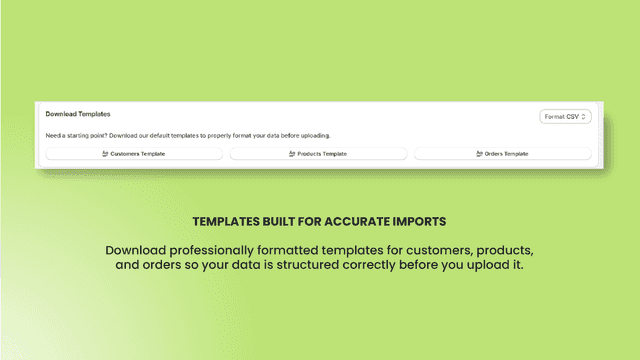
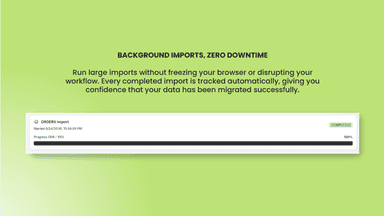
See every featureNinja Importer lets you bulk import customers, products, and orders from standard CSV and Excel files. Eliminate slow, error-prone manual data entry with preformatted templates that ensure your data is correctly structured before upload. Imports run in the background, so you can continue working while large files process.
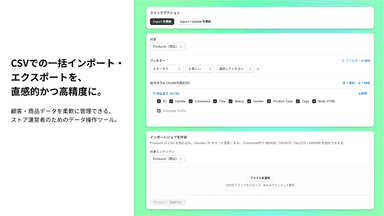
Shopifyストアの運営において、データ管理は時間と手間がかかる重要な業務です。 本アプリは、顧客情報や商品情報をCSV形式で簡単にインポート・エクスポートできる機能を提供し、日々の運用を大幅に効率化します。 高度なフィルタリング機能により、必要なデータだけを抽出して出力可能。 さらに、出力項目も柔軟に選択できるため、分析・移行・バックアップなど、さまざまな用途に対応できます。 また、処理中はステータスバーで進捗状況をリアルタイムに確認できるため、大量データでも安心して操作できます。 「使いやすさ」と「柔軟性」を兼ね備えた、実務に寄り添うCSV管理アプリです。
- Bulk-import customers, products, and orders from CSV or Excel files.
- Download preformatted templates for CSV and Excel imports.
- Imports run in the background, so you keep working while large files
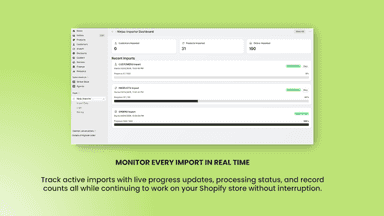
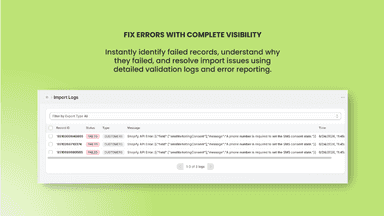
- Live dashboard tracks progress and logs every failed record with its reason.
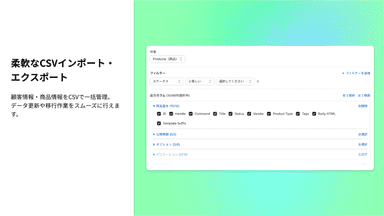
- 柔軟なCSVインポート・エクスポートで顧客情報・商品情報をCSVで一括管理。データ更新や移行作業をスムーズに行えます。
- 高度なフィルタリング&豊富な出力項目により、条件を細かく指定して必要なデータだけ抽出。出力項目も自由に選べるため、分析やレポート作成にも最適です。
- 処理状況をステータスバーでリアルタイム表示する進捗が見える安心設計。大規模データでもストレスなく操作できます。


All the numbers
Every figure, side by side
A green dot marks the app ahead on a measured figure. Estimates, gaps and apps that leave no storefront trace never take the lead.
Adoption
| Measure |  Ninja Importer |  SENPAI! CSV |【日本製】CSV 一括登録 |
|---|---|---|
| Detected stores | Not published | Not published |
| Net store change, 28 days | 0 | 0 |
| Stores added, 28 days | Not enough data | Not enough data |
| Big-brand share | Not enough data | Not enough data |
| Top store categories | Not published | Not published |
| Top store countries | Not published | Not published |
Reviews
| Measure | Ninja Importer | SENPAI! CSV |【日本製】CSV 一括登録 |
|---|---|---|
| App Store rating | 5.0 ★ | Not published |
| App Store reviews | 1 | Not published |
| New reviews, 28 days | Not enough data | Not enough data |
| Reviewers a year or more in | Not enough data | Not enough data |
Pricing
| Measure | Ninja Importer | SENPAI! CSV |【日本製】CSV 一括登録 |
|---|---|---|
| Free plan | Yes | Yes |
| Lowest paid monthly plan | $9.99/month(ahead) | $20/month |
| Longest free trial | Not listed | 14 days |
| Plans listed | 2 | 2 |
Listing
| Measure | Ninja Importer | SENPAI! CSV |【日本製】CSV 一括登録 |
|---|---|---|
| Shopify category rank | #232(ahead) | #359 |
| Shopify App Charts | Not on this week’s charts | Not on this week’s charts |
| Built for Shopify | No | No |
| Launched | Jul 7, 2026 | May 15, 2026 |
| Languages | 1 | 1 |
| Developer | TheShopNinjas | 株式会社ツーサイドアップ |
FAQ
Ninja Importer and SENPAI! CSV |【日本製】CSV 一括登録: common questions
- Is Ninja Importer or SENPAI! CSV |【日本製】CSV 一括登録 cheaper?
- Both list a free plan. Paid plans start at $9.99/month for Ninja Importer and $20/month for SENPAI! CSV |【日本製】CSV 一括登録. Shoplist compares base prices only between monthly plans in the same currency; usage charges and annual plans vary, so check each plan’s limits.
- What features does each app list that the other doesn’t?
- Ninja Importer lists 1 the others don’t mention, such as Customers. SENPAI! CSV |【日本製】CSV 一括登録 lists 6 the others don’t mention, such as Bulk export, Bulk updates, Collections, Inventory. A feature missing from a listing may still be supported; this compares what each App Store listing says.
- Where does this comparison’s data come from?
- Shoplist crawls Shopify storefronts to detect which apps each store runs, and reads each app’s Shopify App Store listing for reviews, pricing, features and integrations. Store counts are as of Oct 13, 2026; estimated figures are labeled.
How Shoplist compares apps
Store counts come from Shoplist’s crawl of Shopify storefronts, which detects the apps each store runs; they are as of Oct 13, 2026. Reviews, ratings, plans, features and integrations come from each app’s Shopify App Store listing. 28-day figures are labeled when estimated, and a figure that is missing or estimated never decides who leads. Read the methodology.