

Morning Pulse ‑ Daily Reports vs OptionPulse: Option Reports
Two Shopify apps, side by side: detected stores, momentum, reviews, plans, listed features and who runs each. Store counts as of Oct 13, 2026 for Morning Pulse, Oct 14, 2026 for OptionPulse.
The short answer
- Only Morning Pulse lists a free plan. Paid plans start at $24/month for Morning Pulse and $29/month for OptionPulse.
- Morning Pulse lists 1 features OptionPulse’s listing doesn’t mention, including Report scheduling.
Head to head


Free forever
- · 3 key metrics in your daily email
- · Delivered at 7 AM in your timezone
- · No card required, no trial clock
Pro
- · 14-day trial before your first charge
- · 7-day trend on every metric
- · All metrics in every daily email
- · Cancel anytime from Shopify admin
- · Email support with human replies
OptionPulse
Coverage counts what each App Store listing names. Every feature, checked off app by app, is in Shoplist.
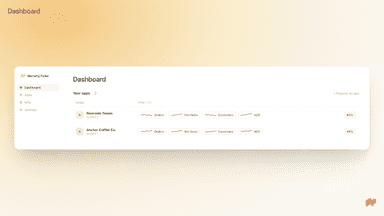
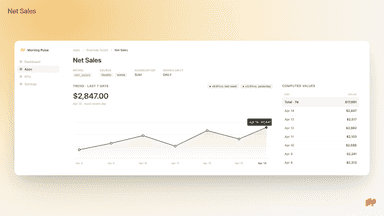
See every featureMorning Pulse is a daily email report for your store. Every morning, the report summarizes your previous-day performance — orders, net sales, and unique customers — with a seven-day trend comparison for each metric. Most analytics tools assume you will open a dashboard. Morning Pulse takes the opposite approach: the numbers come to you. If things look normal, a glance is enough.
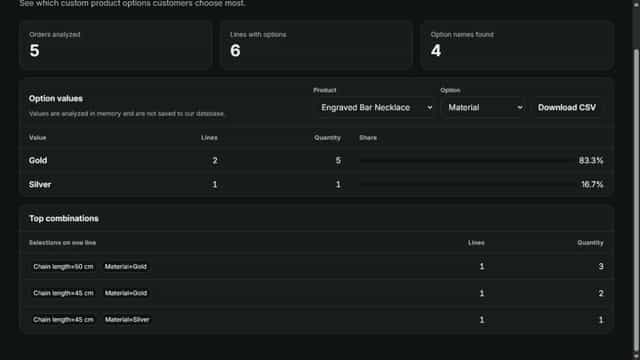
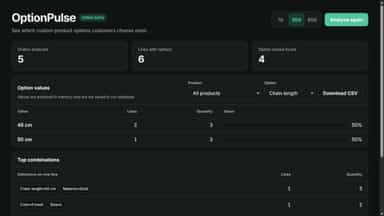
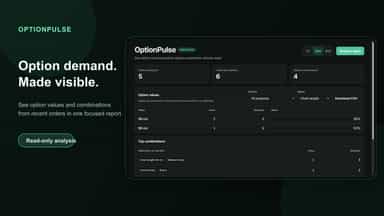
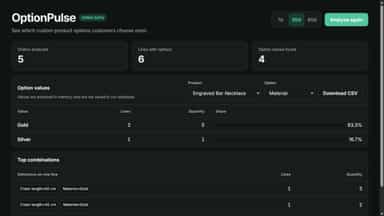
OptionPulse reads public custom attributes on recent order line items and groups them by product, option, value, and combination. Use date and product filters to focus the report, then export the visible option-value table to CSV. Internal or empty attributes are excluded. Raw orders and option values are processed for the active analysis and are not stored.
- Daily email recap of yesterday's orders, net sales, and unique customers
- Delivered at 7 AM in your local time — no dashboards to open
- Seven-day trend for every metric, shown in the same email
- Connect once; the first report arrives the next morning
- See custom option demand grouped by product, option, and value
- Find frequently selected option combinations
- Filter the report by product and recent date range
- Export the visible option-value report to CSV


All the numbers
Every figure, side by side
A green dot marks the app ahead on a measured figure. Estimates, gaps and apps that leave no storefront trace never take the lead.
Adoption
| Measure |  Morning Pulse |  OptionPulse |
|---|---|---|
| Detected stores | Not published | Not published |
| Net store change, 28 days | 0 | 0 |
| Stores added, 28 days | Not enough data | Not enough data |
| Big-brand share | Not enough data | Not enough data |
| Top store categories | Not published | Not published |
| Top store countries | Not published | Not published |
Reviews
| Measure | Morning Pulse | OptionPulse |
|---|---|---|
| App Store rating | Not published | Not published |
| App Store reviews | Not published | Not published |
| New reviews, 28 days | Not enough data | Not enough data |
| Reviewers a year or more in | Not enough data | Not enough data |
Pricing
| Measure | Morning Pulse | OptionPulse |
|---|---|---|
| Free plan | Yes | Not listed |
| Lowest paid monthly plan | $24/month(ahead) | $29/month |
| Longest free trial | 14 days | 14 days |
| Plans listed | 2 | 1 |
Listing
| Measure | Morning Pulse | OptionPulse |
|---|---|---|
| Shopify category rank | #1514(ahead) | #1591 |
| Shopify App Charts | Not on this week’s charts | Not on this week’s charts |
| Built for Shopify | No | No |
| Launched | May 22, 2026 | Jul 15, 2026 |
| Languages | 1 | 1 |
| Developer | FRENCHMOB | OptionPulse |
FAQ
Morning Pulse and OptionPulse: common questions
- Is Morning Pulse or OptionPulse cheaper?
- Only Morning Pulse lists a free plan. Paid plans start at $24/month for Morning Pulse and $29/month for OptionPulse. Shoplist compares base prices only between monthly plans in the same currency; usage charges and annual plans vary, so check each plan’s limits.
- What features does each app list that the other doesn’t?
- Morning Pulse lists 1 the others don’t mention, such as Report scheduling. OptionPulse lists 1 the others don’t mention, such as Data export. A feature missing from a listing may still be supported; this compares what each App Store listing says.
- Where does this comparison’s data come from?
- Shoplist crawls Shopify storefronts to detect which apps each store runs, and reads each app’s Shopify App Store listing for reviews, pricing, features and integrations. Store counts are as of Oct 13, 2026 for Morning Pulse, Oct 14, 2026 for OptionPulse; estimated figures are labeled.
How Shoplist compares apps
Store counts come from Shoplist’s crawl of Shopify storefronts, which detects the apps each store runs; they are as of Oct 13, 2026 for Morning Pulse, Oct 14, 2026 for OptionPulse. Reviews, ratings, plans, features and integrations come from each app’s Shopify App Store listing. 28-day figures are labeled when estimated, and a figure that is missing or estimated never decides who leads. Read the methodology.