
Modura Waitlist vs Waitly
Two Shopify apps, side by side: detected stores, momentum, reviews, plans, listed features and who runs each. Store counts as of Nov 10, 2026 for Modura Waitlist, Oct 13, 2026 for Waitly.
The short answer
- Only Waitly lists a free plan.
- Waitly lists 3 features Modura Waitlist’s listing doesn’t mention, including Auto-alerts, Notification button, Notification templates.
Head to head

Pay as you go
- · First 50 waitlist requests included
- · No fixed monthly subscription fee
- · Pay based on monthly request volume
Free
- · Sign-up form, dashboard, send log
- · Small "Powered by Waitly" line
- · Unlimited notifications, no cap
- · Your own subject and message
Waitly
- · Everything in the Free plan
- · No Waitly branding in e-mails
- · Unlimited notifications, no cap
Coverage counts what each App Store listing names. Every feature, checked off app by app, is in Shoplist.
See every featureModura Waitlist helps merchants capture customer interest when products are unavailable. Add a customizable waitlist form to your storefront, collect customer and product information, monitor demand by product, and export requests when needed. Connect RD Station CRM, Bevean CRM, or both to send waitlist leads to your existing sales and customer relationship workflows.
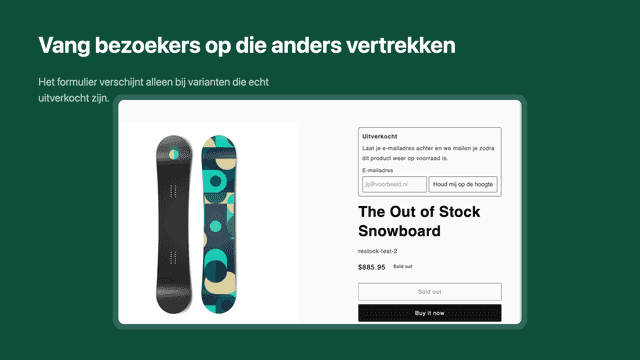
Every sold-out product page is a sale that walked away. Waitly catches those shoppers: when a variant hits zero, a small form appears on your product page, and the moment you restock, everyone waiting gets an e-mail with a link to the product. You write the sender name, subject and message yourself. Your dashboard shows who is waiting and which products are most in demand, so you know what to reorder.
- Capture waitlist requests directly from your storefront
- Track customer demand by product from your app dashboard
- Send waitlist leads to RD Station CRM and Bevean CRM
- Customize waitlist form fields, labels, colors, and button settings
- Sign-up form appears on sold-out variants and hides when back in stock
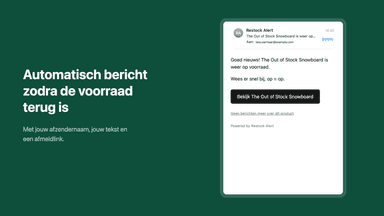
- Automatic e-mail with a direct product link the moment stock returns
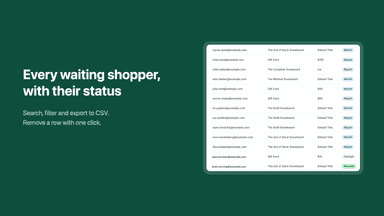
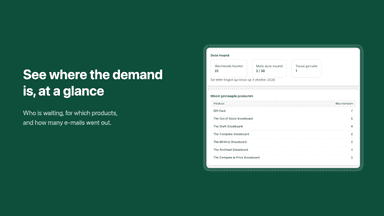
- Dashboard with your waiting list and the products most in demand
- Your own sender name, subject and message, in Dutch or English
All the numbers
Every figure, side by side
A green dot marks the app ahead on a measured figure. Estimates, gaps and apps that leave no storefront trace never take the lead.
Adoption
| Measure |  Waitly | |
|---|---|---|
| Detected stores | Not published | Not published |
| Net store change, 28 days | 0 | 0 |
| Stores added, 28 days | Not enough data | Not enough data |
| Big-brand share | Not enough data | Not enough data |
| Top store categories | Not published | Not published |
| Top store countries | Not published | Not published |
Reviews
| Measure | Waitly | |
|---|---|---|
| App Store rating | Not published | Not published |
| App Store reviews | Not published | Not published |
| New reviews, 28 days | Not enough data | Not enough data |
| Reviewers a year or more in | Not enough data | Not enough data |
Pricing
| Measure | Waitly | |
|---|---|---|
| Free plan | Not listed | Yes |
| Lowest paid monthly plan | No monthly plan listed | $9/month |
| Longest free trial | Not listed | Not listed |
| Plans listed | 1 | 2 |
Listing
| Measure | Waitly | |
|---|---|---|
| Shopify category rank | Not enough data | #84 |
| Shopify App Charts | Not on this week’s charts | Not on this week’s charts |
| Built for Shopify | No | No |
| Launched | Nov 10, 2026 | Oct 1, 2026 |
| Languages | 1 | 2 |
| Developer | Modura | Jayden |
FAQ
Modura Waitlist and Waitly: common questions
- Is Modura Waitlist or Waitly cheaper?
- Only Waitly lists a free plan. Shoplist compares base prices only between monthly plans in the same currency; usage charges and annual plans vary, so check each plan’s limits.
- What features does each app list that the other doesn’t?
- Modura Waitlist lists 1 the others don’t mention, such as Performance reports. Waitly lists 3 the others don’t mention, such as Auto-alerts, Notification button, Notification templates. A feature missing from a listing may still be supported; this compares what each App Store listing says.
- Where does this comparison’s data come from?
- Shoplist crawls Shopify storefronts to detect which apps each store runs, and reads each app’s Shopify App Store listing for reviews, pricing, features and integrations. Store counts are as of Nov 10, 2026 for Modura Waitlist, Oct 13, 2026 for Waitly; estimated figures are labeled.
How Shoplist compares apps
Store counts come from Shoplist’s crawl of Shopify storefronts, which detects the apps each store runs; they are as of Nov 10, 2026 for Modura Waitlist, Oct 13, 2026 for Waitly. Reviews, ratings, plans, features and integrations come from each app’s Shopify App Store listing. 28-day figures are labeled when estimated, and a figure that is missing or estimated never decides who leads. Read the methodology.