

Modelize: AI Image Generator vs PixForge AI Image Generator
Two Shopify apps, side by side: detected stores, momentum, reviews, plans, listed features and who runs each. Store counts as of Nov 3, 2026 for Modelize, Oct 14, 2026 for PixForge AI Image Generator.
The short answer
- Both list a free plan. Paid plans start at $19/month for Modelize and $14.99/month for PixForge AI Image Generator.
- Modelize lists 3 features PixForge AI Image Generator’s listing doesn’t mention, including Alt text, Auto-optimization, File upload.
Head to head


Momentum
New reviews each month
Review pace is the clearest public read on how fast an app is winning new merchants.
Free
- · 10 AI images (one-time)
- · Built-in models
- · Built-in presets
- · Standard resolution (2k)
Starter
- · 100 AI images/month
- · 3 custom models/month (AI)
- · 3 custom presets/month (AI)
- · All built-in presets & models
- · Email support
- · Standard resolution (2K)
Pro
- · 10 custom models/month (AI)
- · 10 custom presets/month (AI)
- · 250 AI images/month
- · All built-in presets & models
- · High resolution (up to 4K)
- · Priority support
Enterprise
- · 500 Al images/month included
- · All built-in presets & models
- · Dedicated support
- · Maximum resolution (4K)
- · Unlimited custom presets & models
Free
- · Create ads with Pixforge Ad Studio
- · Get 15 free image credits instantly
- · Review images before publishing
- · Use ready-made visual presets
Basic
- · 80 credits/month (20-80 images)
- · AI-powered image generation
- · Auto-improve your prompts
- · Save and reuse your Flows
- · Use preset models for shoots
- · Use ready-made visual presets
Pro
- · 300 credits/month (200-300 images)
- · AI-powered image generation
- · Auto-improve your prompts
- · Generate 8-10 second premium videos
- · Save and reuse your Flows
- · Use preset models for shoots
Enterprise
- · 1,000 credits/month (300-1,000 images)
- · AI-powered image generation
- · Auto-improve your prompts
- · Generate 8-10 second premium videos
- · Save and reuse your Flows
- · Use preset models for shoots
Coverage counts what each App Store listing names. Every feature, checked off app by app, is in Shoplist.
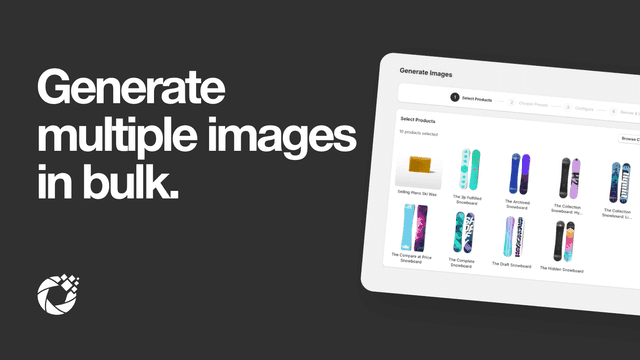
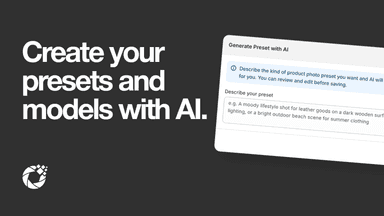
See every featureAI image generator for Shopify: create AI product photos and studio-quality product image visuals in bulk. Bulk image edit your entire catalog with Nano Banana 2, ready presets, on-model AI image shots and text-to-AI image prompts. Our AI product image tool turns every raw product image into a high-converting AI image, then auto-publishes it to your listings.
PixForge AI helps you create, edit, and generate product photos in bulk from a single workflow. Remove, clean, or replace backgrounds, generate lifestyle and on-model photoshoot images, and apply the same edits across a whole collection. Save a Flow once and reuse it to keep your catalog consistent. Build ad creative in Ad Studio and generate short product videos on higher plans.
- Bulk AI image generation across your entire product catalog with Nano Banana 2
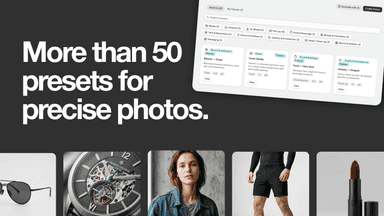
- Ready-made presets for lifestyle, studio, and flat lay scenes
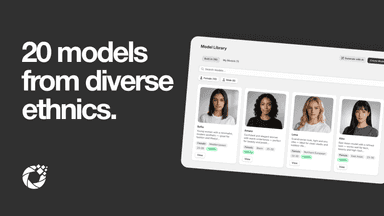
- On-model photography with diverse AI human models
- Generate from text prompts — describe any scene you envision
- Bulk image editing with reusable workflows
- Generate lifestyle and on-model product photos
- Maintain consistent visual style across your catalog
- Save time with one workflow for multiple images


All the numbers
Every figure, side by side
A green dot marks the app ahead on a measured figure. Estimates, gaps and apps that leave no storefront trace never take the lead.
Adoption
| Measure |  Modelize |  PixForge AI Image Generator |
|---|---|---|
| Detected stores | Not published | Not published |
| Net store change, 28 days | 0 | 0 |
| Stores added, 28 days | Not enough data | Not enough data |
| Big-brand share | Not enough data | Not enough data |
| Top store categories | Not published | Not published |
| Top store countries | Not published | Not published |
Reviews
| Measure | Modelize | PixForge AI Image Generator |
|---|---|---|
| App Store rating | 4.8 ★ | Not published |
| App Store reviews | 28 | Not published |
| New reviews, 28 days | Not enough data | Not enough data |
| Reviewers a year or more in | 0% | Not enough data |
Pricing
| Measure | Modelize | PixForge AI Image Generator |
|---|---|---|
| Free plan | Yes | Yes |
| Lowest paid monthly plan | $19/month | $14.99/month(ahead) |
| Longest free trial | Not listed | Not listed |
| Plans listed | 4 | 4 |
Listing
| Measure | Modelize | PixForge AI Image Generator |
|---|---|---|
| Shopify category rank | #20(ahead) | #276 |
| Shopify App Charts | #4 on Rookies in Image editor | Not on this week’s charts |
| Built for Shopify | Yes | No |
| Launched | Apr 20, 2026 | Sep 21, 2026 |
| Languages | 7 | 1 |
| Developer | Optify | Zolux Solutions (PVT) LTD |
FAQ
Modelize and PixForge AI Image Generator: common questions
- Is Modelize or PixForge AI Image Generator cheaper?
- Both list a free plan. Paid plans start at $19/month for Modelize and $14.99/month for PixForge AI Image Generator. Shoplist compares base prices only between monthly plans in the same currency; usage charges and annual plans vary, so check each plan’s limits.
- What features does each app list that the other doesn’t?
- Modelize lists 3 the others don’t mention, such as Alt text, Auto-optimization, File upload. A feature missing from a listing may still be supported; this compares what each App Store listing says.
- Where does this comparison’s data come from?
- Shoplist crawls Shopify storefronts to detect which apps each store runs, and reads each app’s Shopify App Store listing for reviews, pricing, features and integrations. Store counts are as of Nov 3, 2026 for Modelize, Oct 14, 2026 for PixForge AI Image Generator; estimated figures are labeled.
How Shoplist compares apps
Store counts come from Shoplist’s crawl of Shopify storefronts, which detects the apps each store runs; they are as of Nov 3, 2026 for Modelize, Oct 14, 2026 for PixForge AI Image Generator. Reviews, ratings, plans, features and integrations come from each app’s Shopify App Store listing. 28-day figures are labeled when estimated, and a figure that is missing or estimated never decides who leads. Read the methodology.