

Miko Bulk Image Resizer vs Pixly
Two Shopify apps, side by side: detected stores, momentum, reviews, plans, listed features and who runs each. Store counts as of Oct 14, 2026 for Miko Bulk Image Resizer, Oct 13, 2026 for Pixly.
The short answer
- Only Pixly lists a free plan.
- Pixly lists 6 features Miko Bulk Image Resizer’s listing doesn’t mention, including Background removal, Compression, Download.
Head to head


Free
- · 30 days of backup for all images
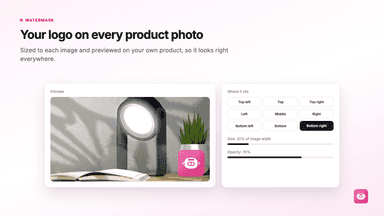
- · Add watermark to your product images
- · Audit report on entire catalog
- · Bulk SEO image alt text from a template
- · First 100 images Free
- · See real-time before and after
Free
- · 1:1 square crop and rotate
- · 69 tokens / month
- · AI renaming and alt text
- · AI upscaling for low-res images
- · Bulk approve and rotate
- · Shopify sync (1 store)
Starter Plan
- · 1,000 tokens / month
- · 1:1 square crop and rotate
- · AI renaming and alt text
- · AI upscaling for low-res images
- · Bulk approve and rotate
- · Shopify sync (1 store)
Growth Plan
- · 2,500 tokens / month
- · Background removal
- · Everything in Starter
- · Priority processing queue
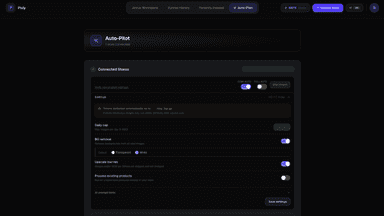
- · Semi-Autopilot up to 100 images/d
- · Store Audit: scan your full catalog
Scale Plan
- · 6,000 tokens / month
- · CSV export of all image data
- · Everything in Growth
- · Full Auto-Pilot: up to 500 images/day
- · Priority support
- · Semi-auto mode: review before sync
Coverage counts what each App Store listing names. Every feature, checked off app by app, is in Shoplist.
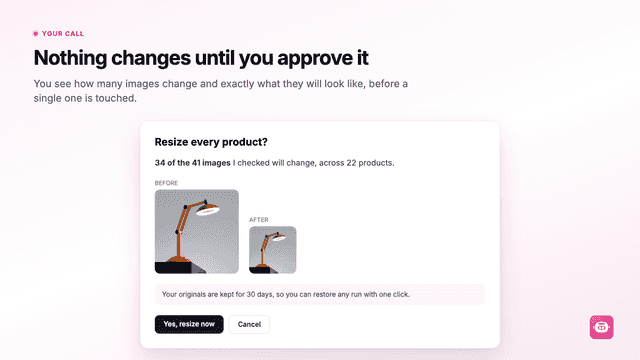
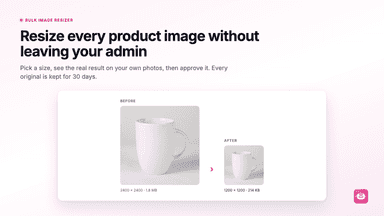
See every featureLarge product images slow a store down, and resizing them by hand means exporting every file and uploading it again. Miko bulk resizes, compresses and watermarks product and collection images where they already live. Choose a size, see a real before and after built from your own photos, and approve it before anything changes. Every original is kept 30 days so any run can be undone.
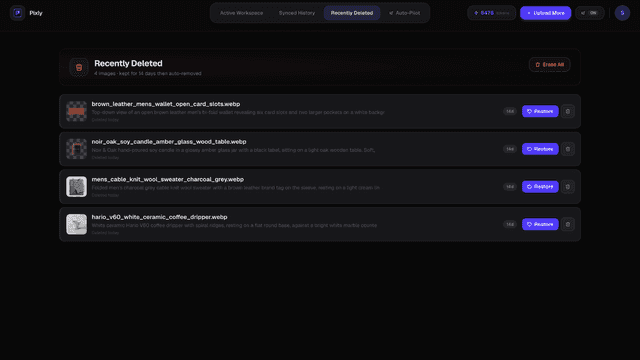
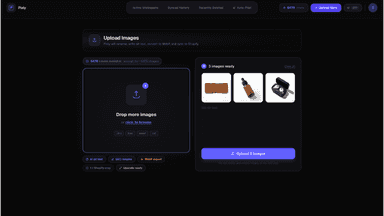
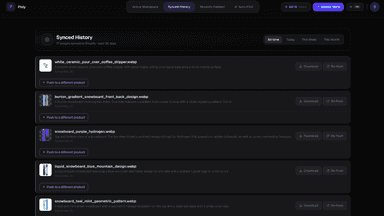
Product images often go live with blank alt text, generic filenames, and heavy JPEG files. That makes them harder to find in image search and slows your store. Pixly uses AI to read each photo, propose alt text and descriptive filenames, turn to WebP, and crop to a consistent square. You review every suggestion and approve in bulk, then sync approved images back to your catalog.
- See a real before and after of your own images before anything is changed
- Every original kept for 30 days, so any run can be undone in one click
- Bulk alt text from a template you preview, written across your catalogue
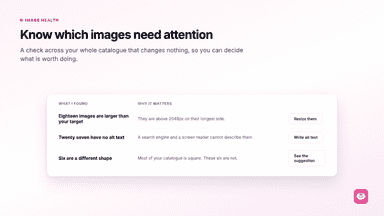
- Image health check finds oversized files, missing alt text and odd shapes
- AI writes alt text and filenames based on what is actually in each photo.
- Review and approve every image before anything goes live in your store
- Auto-Pilot queues new product images for optimization as you add them.
- Store Audit scans your catalog for missing alt text and heavy image files.
All the numbers
Every figure, side by side
A green dot marks the app ahead on a measured figure. Estimates, gaps and apps that leave no storefront trace never take the lead.
Adoption
| Measure |  Miko Bulk Image Resizer |  Pixly |
|---|---|---|
| Detected stores | Not published | Not published |
| Net store change, 28 days | 0 | 0 |
| Stores added, 28 days | Not enough data | Not enough data |
| Big-brand share | Not enough data | Not enough data |
| Top store categories | Not published | Not published |
| Top store countries | Not published | Not published |
Reviews
| Measure | Miko Bulk Image Resizer | Pixly |
|---|---|---|
| App Store rating | Not published | Not published |
| App Store reviews | Not published | Not published |
| New reviews, 28 days | Not enough data | Not enough data |
| Reviewers a year or more in | Not enough data | Not enough data |
Pricing
| Measure | Miko Bulk Image Resizer | Pixly |
|---|---|---|
| Free plan | Not listed | Yes |
| Lowest paid monthly plan | No monthly plan listed | $19/month |
| Longest free trial | Not listed | Not listed |
| Plans listed | 1 | 4 |
Listing
| Measure | Miko Bulk Image Resizer | Pixly |
|---|---|---|
| Shopify category rank | #251 | #192(ahead) |
| Shopify App Charts | Not on this week’s charts | Not on this week’s charts |
| Built for Shopify | No | No |
| Launched | Aug 4, 2026 | May 26, 2026 |
| Languages | 1 | 1 |
| Developer | Tripster Developers | Pixly |
FAQ
Miko Bulk Image Resizer and Pixly: common questions
- Is Miko Bulk Image Resizer or Pixly cheaper?
- Only Pixly lists a free plan. Shoplist compares base prices only between monthly plans in the same currency; usage charges and annual plans vary, so check each plan’s limits.
- What features does each app list that the other doesn’t?
- Miko Bulk Image Resizer lists 1 the others don’t mention, such as Watermarks. Pixly lists 6 the others don’t mention, such as Background removal, Compression, Download, File names. A feature missing from a listing may still be supported; this compares what each App Store listing says.
- Where does this comparison’s data come from?
- Shoplist crawls Shopify storefronts to detect which apps each store runs, and reads each app’s Shopify App Store listing for reviews, pricing, features and integrations. Store counts are as of Oct 14, 2026 for Miko Bulk Image Resizer, Oct 13, 2026 for Pixly; estimated figures are labeled.
How Shoplist compares apps
Store counts come from Shoplist’s crawl of Shopify storefronts, which detects the apps each store runs; they are as of Oct 14, 2026 for Miko Bulk Image Resizer, Oct 13, 2026 for Pixly. Reviews, ratings, plans, features and integrations come from each app’s Shopify App Store listing. 28-day figures are labeled when estimated, and a figure that is missing or estimated never decides who leads. Read the methodology.