

Makeready: Made to Order vs Restock:ize Inventory + POs
Two Shopify apps, side by side: detected stores, momentum, reviews, plans, listed features and who runs each. Store counts as of Oct 25, 2026 for Makeready, Oct 14, 2026 for Restock:ize Inventory + POs.
The short answer
- Restock:ize Inventory + POs lists 17 features Makeready’s listing doesn’t mention, including Analytics, Auto-processing, Auto-restock.
Head to head


Pro
- · Pay annually for 2 months free
- · Purchase orders with payments
- · Reorder alerts by supplier
- · Supplier lead times built in
Coverage counts what each App Store listing names. Every feature, checked off app by app, is in Shoplist.
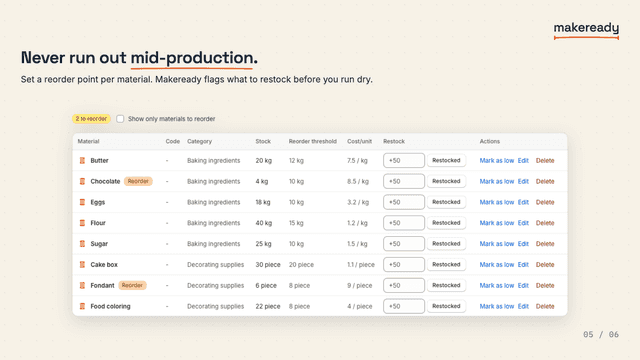
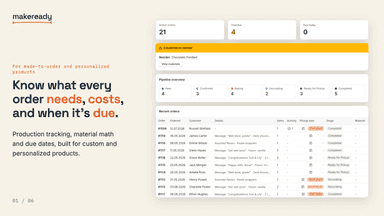
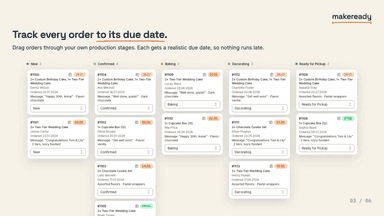
See every featureMakeready helps makers and made-to-order shops turn orders into production jobs. It keeps customer options, raw materials, stock, stages, and due dates together so teams know what to make and when. Product recipes work out the material use, production time, and cost of each order, whether the item is personalized or made in batches.
Restock:ize reads your store's real sales history to tell you what's running low, how urgent it is, and how much to order — organized by supplier so reordering takes minutes, not hours. Create, send, and track purchase orders with payments, partial receiving, and backorders built in. Set supplier lead times once, and every suggestion accounts for them automatically. Moving off Stocky or another inventory app?
- Automatically calculate material needs and stock use per made-to-order sale
- Set realistic due dates from your own production lead times
- Flag orders that are short on materials before you start making them
- Track every open job and its deadline on one production dashboard
- Reorder points calculated from real sales velocity, not guesswork
- Purchase orders with payments, partial receiving, and backorders
- Supplier lead times and payment terms built into every suggestion
- See lost revenue by product and vendor before it costs you sales



All the numbers
Every figure, side by side
A green dot marks the app ahead on a measured figure. Estimates, gaps and apps that leave no storefront trace never take the lead.
Adoption
| Measure |  Makeready |  Restock:ize Inventory + POs |
|---|---|---|
| Detected stores | Not published | Not published |
| Net store change, 28 days | 0 | 0 |
| Stores added, 28 days | Not enough data | Not enough data |
| Big-brand share | Not enough data | Not enough data |
| Top store categories | Not published | Not published |
| Top store countries | Not published | Not published |
Reviews
| Measure | Makeready | Restock:ize Inventory + POs |
|---|---|---|
| App Store rating | Not published | Not published |
| App Store reviews | Not published | Not published |
| New reviews, 28 days | Not enough data | Not enough data |
| Reviewers a year or more in | Not enough data | Not enough data |
Pricing
| Measure | Makeready | Restock:ize Inventory + POs |
|---|---|---|
| Free plan | Not listed | Not listed |
| Lowest paid monthly plan | No monthly plan listed | $39/month |
| Longest free trial | Not listed | 14 days |
| Plans listed | Not published | 1 |
Listing
| Measure | Makeready | Restock:ize Inventory + POs |
|---|---|---|
| Shopify category rank | #279 | #435 |
| Shopify App Charts | #17 on Pricing moves in Workflow automation | Not on this week’s charts |
| Built for Shopify | No | No |
| Launched | Jul 27, 2026 | Aug 12, 2019 |
| Languages | 2 | 1 |
| Developer | Readyhaus | Xeio Ltd |
FAQ
Makeready and Restock:ize Inventory + POs: common questions
- What features does each app list that the other doesn’t?
- Makeready lists 1 the others don’t mention, such as Order tags. Restock:ize Inventory + POs lists 17 the others don’t mention, such as Analytics, Auto-processing, Auto-restock, Auto-sync data. A feature missing from a listing may still be supported; this compares what each App Store listing says.
- Where does this comparison’s data come from?
- Shoplist crawls Shopify storefronts to detect which apps each store runs, and reads each app’s Shopify App Store listing for reviews, pricing, features and integrations. Store counts are as of Oct 25, 2026 for Makeready, Oct 14, 2026 for Restock:ize Inventory + POs; estimated figures are labeled.
How Shoplist compares apps
Store counts come from Shoplist’s crawl of Shopify storefronts, which detects the apps each store runs; they are as of Oct 25, 2026 for Makeready, Oct 14, 2026 for Restock:ize Inventory + POs. Reviews, ratings, plans, features and integrations come from each app’s Shopify App Store listing. 28-day figures are labeled when estimated, and a figure that is missing or estimated never decides who leads. Read the methodology.