
Madgic Order Limits Quantity vs Soply Purchase Limits Quantity
Two Shopify apps, side by side: detected stores, momentum, reviews, plans, listed features and who runs each. Store counts as of Nov 2, 2026 for Madgic Order Limits Quantity, Nov 3, 2026 for Soply Purchase Limits Quantity.
The short answer
- On the Shopify App Store: Madgic Order Limits Quantity 4.9 from 226 reviews and Soply Purchase Limits Quantity 5.0 from 3 reviews.
- Only Madgic Order Limits Quantity lists a free plan.
- Soply Purchase Limits Quantity lists 9 features Madgic Order Limits Quantity’s listing doesn’t mention, including Collection-specific, Custom messages, Customer tags.
Head to head


- United Kingdom
- Belgium
- Canada
Momentum
New reviews each month
Review pace is the clearest public read on how fast an app is winning new merchants.
Free
- · All target options for limit purchase
- · Block purchase in all page
- · Customize message
- · Limited number of rules
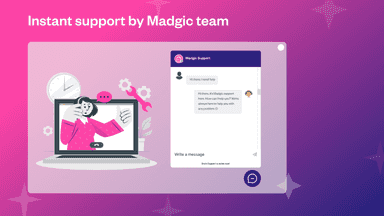
- · Live Chat & Technical Support
Standard
- · All target options for limit purchase
- · Block purchase in all page
- · Customize message
- · Live Chat 24/7 & Technical Support
- · Unlimited number of rules
Coverage counts what each App Store listing names. Every feature, checked off app by app, is in Shoplist.
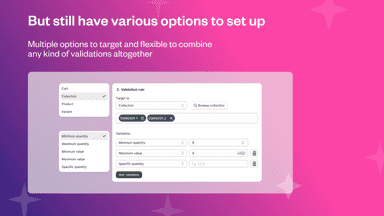
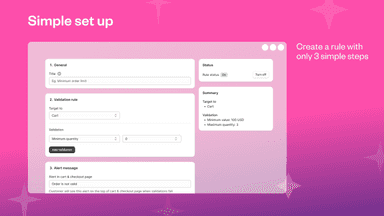
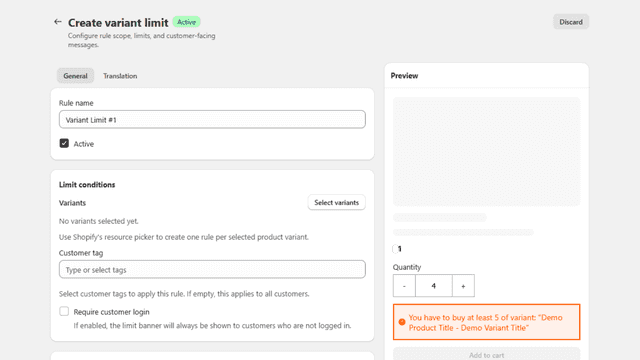
See every featureMadgic Order Limits App helps you set minimum order quantity (MOQ), maximum quantity, add to cart limit value, weight, multiples, and exact quantity rules for products, variants, collections for B2B stores. Customize messages on product pages, cart page then strictly validate orders at checkout.
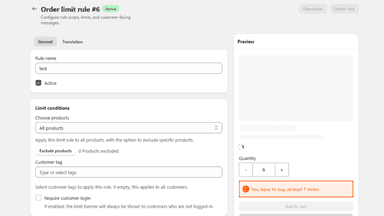
Enforce bulletproof purchase limits using native Shopify Checkout Validation. Set min/max order limits for products, variants, collections, or whole orders by quantity, value, or weight. Stop bots and resellers with advanced per-customer lifetime rules, email blacklists, and tag whitelists. Fully customize warning messages with dynamic variables and multi-language support.
- Build custom checkout validation rules: min/max quantities, specific quantity
- Target to all product level: cart, collection, product and variant
- Add custom error messaging for order limit, minimum order quantity (MOQ)
- Customize checkout behavior with conditional checkout rules
- Manage order-level purchase rules from one admin
- Set multilingual rule messages for different markets
- Configure store preferences for weight, currency, and timezone
- Check Theme App Embed and Checkout Validation status




All the numbers
Every figure, side by side
A green dot marks the app ahead on a measured figure. Estimates, gaps and apps that leave no storefront trace never take the lead.
Adoption
| Measure |  Madgic Order Limits Quantity |  Soply Purchase Limits Quantity |
|---|---|---|
| Detected stores | Not published | 15 |
| Net store change, 28 days | 0 | +1 |
| Stores added, 28 days | Not enough data | 1 |
| Big-brand share | Not enough data | Not enough data |
| Top store categories | Not published | Toys & Games, Apparel & Accessories, Home & Garden |
| Top store countries | Not published | United Kingdom, Belgium, Canada |
Reviews
| Measure | Madgic Order Limits Quantity | Soply Purchase Limits Quantity |
|---|---|---|
| App Store rating | 4.9 ★ | 5.0 ★(ahead) |
| App Store reviews | 226(ahead) | 3 |
| New reviews, 28 days | Not enough data | Not enough data |
| Reviewers a year or more in | 10% | Not enough data |
Pricing
| Measure | Madgic Order Limits Quantity | Soply Purchase Limits Quantity |
|---|---|---|
| Free plan | Yes | Not listed |
| Lowest paid monthly plan | $4.99/month | No monthly plan listed |
| Longest free trial | 7 days | Not listed |
| Plans listed | 2 | Not published |
Listing
| Measure | Madgic Order Limits Quantity | Soply Purchase Limits Quantity |
|---|---|---|
| Shopify category rank | #5(ahead) | #30 |
| Shopify App Charts | Not on this week’s charts | #17 in Order limits |
| Built for Shopify | Yes | No |
| Launched | Aug 9, 2024 | May 12, 2026 |
| Languages | 1 | 1 |
| Developer | Madgic | SoplyApp |
FAQ
Madgic Order Limits Quantity and Soply Purchase Limits Quantity: common questions
- Is Madgic Order Limits Quantity or Soply Purchase Limits Quantity cheaper?
- Only Madgic Order Limits Quantity lists a free plan. Shoplist compares base prices only between monthly plans in the same currency; usage charges and annual plans vary, so check each plan’s limits.
- Which has better reviews, Madgic Order Limits Quantity or Soply Purchase Limits Quantity?
- On the Shopify App Store: Madgic Order Limits Quantity 4.9 from 226 reviews and Soply Purchase Limits Quantity 5.0 from 3 reviews.
- What features does each app list that the other doesn’t?
- Soply Purchase Limits Quantity lists 9 the others don’t mention, such as Collection-specific, Custom messages, Customer tags, Multi-language. A feature missing from a listing may still be supported; this compares what each App Store listing says.
- Where does this comparison’s data come from?
- Shoplist crawls Shopify storefronts to detect which apps each store runs, and reads each app’s Shopify App Store listing for reviews, pricing, features and integrations. Store counts are as of Nov 2, 2026 for Madgic Order Limits Quantity, Nov 3, 2026 for Soply Purchase Limits Quantity; estimated figures are labeled.
How Shoplist compares apps
Store counts come from Shoplist’s crawl of Shopify storefronts, which detects the apps each store runs; they are as of Nov 2, 2026 for Madgic Order Limits Quantity, Nov 3, 2026 for Soply Purchase Limits Quantity. Reviews, ratings, plans, features and integrations come from each app’s Shopify App Store listing. 28-day figures are labeled when estimated, and a figure that is missing or estimated never decides who leads. Read the methodology.