
LinkStock: Shared Stock Sync vs OneCount: Shared Inventory
Two Shopify apps, side by side: detected stores, momentum, reviews, plans, listed features and who runs each. Store counts as of Oct 13, 2026 for LinkStock, Nov 3, 2026 for OneCount.
The short answer
- Both list a free plan. Paid plans start at $19/month for LinkStock and $9.99/month for OneCount.
- LinkStock lists 1 features OneCount’s listing doesn’t mention, including Variants.
Head to head

Free
- · 3 groups, up to 3 items per group
- · 30-day activity history
- · Email support
- · Multi-location sync
- · Recovery tools
- · Unlimited automatic sync
Starter
- · 30-day activity history
- · Email support
- · Multi-location sync
- · Recovery tools
- · Unlimited automatic sync
- · Up to 1,000 stock groups
Growth
- · 30-day activity history
- · Email support
- · Multi-location sync
- · Recovery tools
- · Unlimited automatic sync
- · Up to 1,000 stock groups
Pro
- · 30-day activity history
- · Email support
- · Multi-location sync
- · Recovery tools
- · Unlimited automatic sync
- · Up to 1,000 linked inventory items
Business
- · 30-day activity history
- · Email support
- · Multi-location sync
- · Recovery tools
- · Unlimited automatic sync
- · Up to 1,000 stock groups
Free
- · 1 shared stock pool
- · Activity log
- · Multi-pack units per sale
- · Per-location syncing
Pro
- · Everything in Free
- · Unlimited shared stock pools
Coverage counts what each App Store listing names. Every feature, checked off app by app, is in Shoplist.
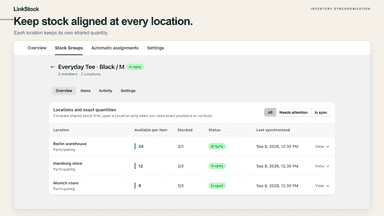
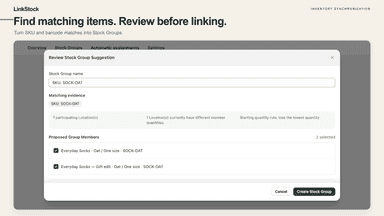
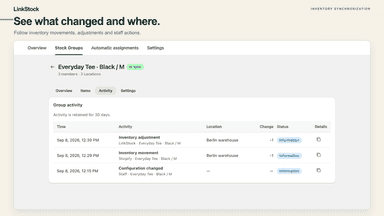
See every featureLinkStock keeps products and variants that share physical stock in sync. Group related inventory items, choose participating locations, and manage a shared available quantity independently at each location. Use it for duplicate listings or variants backed by the same stock. Review starting quantity differences, pause groups when needed, and follow changes in activity history.
Sell the same item as several variants? Different colourway names, a single and a 3-pack, or one product listed twice? OneCount groups them into a pool with one shared stock count. When any of them sells, is refunded, or is edited, every other variant updates within seconds. Set how many units each variant uses, so a 3-pack sale takes 3 from the pool.
- Link products and variants that draw from the same physical stock.
- Keep shared quantities aligned independently at each selected location.
- Review quantity conflicts, pause groups, and follow inventory activity.
- Group any variants, across products, into one shared stock count
- Set units per sale, so a 3-pack sale takes 3 units from the pool
- Sales, refunds, restocks and manual edits sync within seconds

All the numbers
Every figure, side by side
A green dot marks the app ahead on a measured figure. Estimates, gaps and apps that leave no storefront trace never take the lead.
Adoption
| Measure |  LinkStock | |
|---|---|---|
| Detected stores | Not published | Not published |
| Net store change, 28 days | 0 | 0 |
| Stores added, 28 days | Not enough data | Not enough data |
| Big-brand share | Not enough data | Not enough data |
| Top store categories | Not published | Not published |
| Top store countries | Not published | Not published |
Reviews
| Measure | LinkStock | |
|---|---|---|
| App Store rating | Not published | Not published |
| App Store reviews | Not published | Not published |
| New reviews, 28 days | Not enough data | Not enough data |
| Reviewers a year or more in | Not enough data | Not enough data |
FAQ
LinkStock and OneCount: common questions
- Is LinkStock or OneCount cheaper?
- Both list a free plan. Paid plans start at $19/month for LinkStock and $9.99/month for OneCount. Shoplist compares base prices only between monthly plans in the same currency; usage charges and annual plans vary, so check each plan’s limits.
- What features does each app list that the other doesn’t?
- LinkStock lists 1 the others don’t mention, such as Variants. OneCount lists 1 the others don’t mention, such as Real-time. A feature missing from a listing may still be supported; this compares what each App Store listing says.
- Where does this comparison’s data come from?
- Shoplist crawls Shopify storefronts to detect which apps each store runs, and reads each app’s Shopify App Store listing for reviews, pricing, features and integrations. Store counts are as of Oct 13, 2026 for LinkStock, Nov 3, 2026 for OneCount; estimated figures are labeled.
How Shoplist compares apps
Store counts come from Shoplist’s crawl of Shopify storefronts, which detects the apps each store runs; they are as of Oct 13, 2026 for LinkStock, Nov 3, 2026 for OneCount. Reviews, ratings, plans, features and integrations come from each app’s Shopify App Store listing. 28-day figures are labeled when estimated, and a figure that is missing or estimated never decides who leads. Read the methodology.