Shelfworks Labels vs Shelfmark Labels
Two Shopify apps, side by side: detected stores, momentum, reviews, plans, listed features and who runs each. Store counts as of Nov 2, 2026 for Shelfworks Labels, Nov 4, 2026 for Shelfmark Labels.
The short answer
- Both list a free plan. Paid plans start at $9/month for Shelfworks Labels and $5.99/month for Shelfmark Labels.
- Shelfworks Labels lists 2 features Shelfmark Labels’s listing doesn’t mention, including Bulk generation, Custom elements.
Head to head

Free
Standard
Free
- · 250 labels per calendar month
Pro
- · Unlimited labels
Coverage counts what each App Store listing names. Every feature, checked off app by app, is in Shoplist.
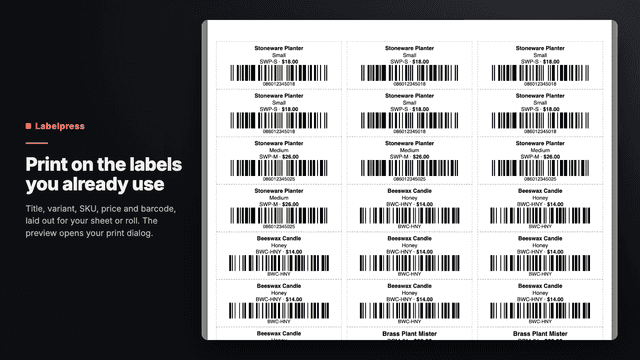
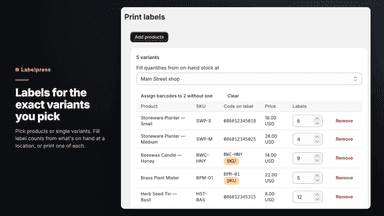
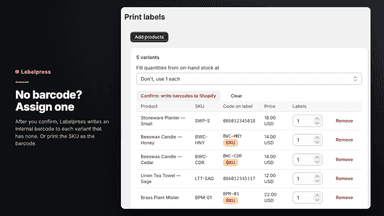
See every featureShelfworks Labels prints barcode labels from your admin. Pick products or single variants and set how many labels each needs, or fill the counts from on-hand stock at a location. Each label carries the variant's own barcode: valid 12- and 13-digit retail codes print as UPC/EAN, anything else as Code 128. A variant with no barcode can print its SKU instead, or get an internal barcode written to it after you confirm.
Shelfmark Labels creates print-ready labels for the products and variants you select in your admin. Choose how many labels you need, pick a predefined or custom label size, and download a PDF with the exact page size of your label stock. Labels can show the title, variant, SKU, barcode and the product's selling and compare-at amounts.
- Each label carries the variant's own barcode, or its SKU if you choose
- Fill label counts from on-hand stock at a location after a delivery
- Assign internal barcodes to variants without one, after you confirm
- Eleven built-in Avery, Dymo and Zebra stocks, plus custom sheets and rolls
- Print on DYMO and Brother rolls, Avery sheets or your own custom label size
- Barcodes in Code 128, EAN-13 and UPC-A with check digit validation
- Start printing on any position of a partially used label sheet
- Calibrate print offset and rotation, saved for each template

All the numbers
Every figure, side by side
A green dot marks the app ahead on a measured figure. Estimates, gaps and apps that leave no storefront trace never take the lead.
Adoption
| Measure |  Shelfworks Labels | |
|---|---|---|
| Detected stores | Not published | Not published |
| Net store change, 28 days | 0 | 0 |
| Stores added, 28 days | Not enough data | Not enough data |
| Big-brand share | Not enough data | Not enough data |
| Top store categories | Not published | Not published |
| Top store countries | Not published | Not published |
Reviews
| Measure | Shelfworks Labels | |
|---|---|---|
| App Store rating | Not published | Not published |
| App Store reviews | Not published | Not published |
| New reviews, 28 days | Not enough data | Not enough data |
| Reviewers a year or more in | Not enough data | Not enough data |
Pricing
| Measure | Shelfworks Labels | |
|---|---|---|
| Free plan | Yes | Yes |
| Lowest paid monthly plan | $9/month | $5.99/month(ahead) |
| Longest free trial | 14 days | Not listed |
| Plans listed | 2 | 2 |
Listing
| Measure | Shelfworks Labels | |
|---|---|---|
| Shopify category rank | #106 | Not enough data |
| Shopify App Charts | Not on this week’s charts | Not on this week’s charts |
| Built for Shopify | No | No |
| Launched | Oct 13, 2026 | Nov 4, 2026 |
| Languages | 1 | 1 |
| Developer | Sam Bartolotta | Tidewell Apps |
FAQ
Shelfworks Labels and Shelfmark Labels: common questions
- Is Shelfworks Labels or Shelfmark Labels cheaper?
- Both list a free plan. Paid plans start at $9/month for Shelfworks Labels and $5.99/month for Shelfmark Labels. Shoplist compares base prices only between monthly plans in the same currency; usage charges and annual plans vary, so check each plan’s limits.
- What features does each app list that the other doesn’t?
- Shelfworks Labels lists 2 the others don’t mention, such as Bulk generation, Custom elements. Shelfmark Labels lists 2 the others don’t mention, such as GTIN, UPC. A feature missing from a listing may still be supported; this compares what each App Store listing says.
- Where does this comparison’s data come from?
- Shoplist crawls Shopify storefronts to detect which apps each store runs, and reads each app’s Shopify App Store listing for reviews, pricing, features and integrations. Store counts are as of Nov 2, 2026 for Shelfworks Labels, Nov 4, 2026 for Shelfmark Labels; estimated figures are labeled.
How Shoplist compares apps
Store counts come from Shoplist’s crawl of Shopify storefronts, which detects the apps each store runs; they are as of Nov 2, 2026 for Shelfworks Labels, Nov 4, 2026 for Shelfmark Labels. Reviews, ratings, plans, features and integrations come from each app’s Shopify App Store listing. 28-day figures are labeled when estimated, and a figure that is missing or estimated never decides who leads. Read the methodology.