
Kerbmap ‑ Store Locator Map vs MAPMIGO: Store Locator & Maps
Two Shopify apps, side by side: detected stores, momentum, reviews, plans, listed features and who runs each. Store counts as of Nov 9, 2026.
The short answer
- MAPMIGO lists 8 features Kerbmap’s listing doesn’t mention, including Autocomplete, Custom branding, Custom CSS.
Head to head

Momentum
New reviews each month
Review pace is the clearest public read on how fast an app is winning new merchants.
Coverage counts what each App Store listing names. Every feature, checked off app by app, is in Shoplist.
See every featureShoppers who want to buy in person need to know where to go, when you are open and whether the item is there. Kerbmap adds a fast store locator to your theme: a map and searchable list of your stores, stockists or dealers, with opening hours, an Open now label and directions. Add locations by hand, import a CSV, or sync them from Shopify Locations. Product pages can show which stores have the variant in stock.
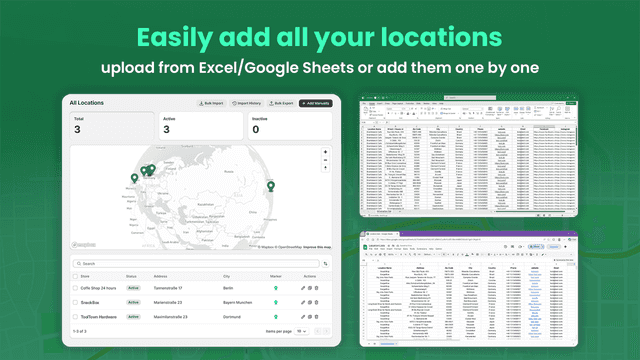
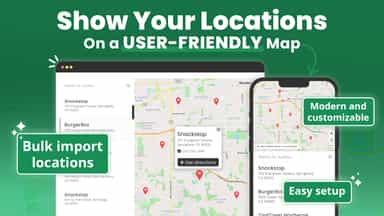
MAPMIGO lets you add a store locator map with a searchable list of locations. Show your stores or your dealer network so customers can find nearby places to buy. Add locations one by one or import them in bulk from Excel or Google Sheets. You can customize the map and list to match your brand. Customers can automatically see the closest locations based on their position. MAPMIGO is easy to set up and works reliably.
- Map and searchable list of your stores with filters and one-tap directions
- Add locations by hand, import a CSV, or sync from Shopify Locations or Sheets
- Opening hours with an Open now label, in each location's own time zone
- Product pages show which of your stores have the selected variant in stock
- Unlimited stores: Bulk import stores from Excel/Sheets or add manually
- Geolocation: Help customers quickly find nearby stores using their location
- Customization: Customize the map, list, and markers to match your brand
- Translations: Use your own texts so it works in any language

All the numbers
Every figure, side by side
A green dot marks the app ahead on a measured figure. Estimates, gaps and apps that leave no storefront trace never take the lead.
Adoption
| Measure |  MAPMIGO | |
|---|---|---|
| Detected stores | Not published | Not published |
| Net store change, 28 days | 0 | 0 |
| Stores added, 28 days | Not enough data | Not enough data |
| Big-brand share | Not enough data | Not enough data |
| Top store categories | Not published | Not published |
| Top store countries | Not published | Not published |
Reviews
| Measure | MAPMIGO | |
|---|---|---|
| App Store rating | Not published | 5.0 ★ |
| App Store reviews | Not published | 135 |
| New reviews, 28 days | Not enough data | Not enough data |
| Reviewers a year or more in | Not enough data | 0% |
FAQ
Kerbmap and MAPMIGO: common questions
- What features does each app list that the other doesn’t?
- Kerbmap lists 2 the others don’t mention, such as Custom filters, Tagging. MAPMIGO lists 8 the others don’t mention, such as Autocomplete, Custom branding, Custom CSS, Custom fields. A feature missing from a listing may still be supported; this compares what each App Store listing says.
- Where does this comparison’s data come from?
- Shoplist crawls Shopify storefronts to detect which apps each store runs, and reads each app’s Shopify App Store listing for reviews, pricing, features and integrations. Store counts are as of Nov 9, 2026; estimated figures are labeled.
How Shoplist compares apps
Store counts come from Shoplist’s crawl of Shopify storefronts, which detects the apps each store runs; they are as of Nov 9, 2026. Reviews, ratings, plans, features and integrations come from each app’s Shopify App Store listing. 28-day figures are labeled when estimated, and a figure that is missing or estimated never decides who leads. Read the methodology.