

Kando1 Variant Bulk Editor vs PriceSafe Bulk Price Editor
Two Shopify apps, side by side: detected stores, momentum, reviews, plans, listed features and who runs each. Store counts as of Oct 13, 2026.
The short answer
- Both list a free plan. Paid plans start at $9.99/month for Kando1 Variant Bulk Editor and $9.99/month for PriceSafe Bulk Price Editor.
- PriceSafe Bulk Price Editor lists 2 features Kando1 Variant Bulk Editor’s listing doesn’t mention, including Rollback, Scheduled tasks.
Head to head


Free Preview
- · 7-day job history
- · Apply up to 100 variants per task
- · Preview bulk variant price changes
- · Rollback for the latest task only
- · Run up to 3 completed tasks per month
Standard
- · 30-day job history
- · Apply up to 5,000 variants per task
- · Preview before every apply
- · Rollback any retained job
- · Run up to 20 completed tasks per month
Free
- · One-click rollback to the original price
- · Rollback skips variants another app chan
- · Scheduling not included
- · Up to 50 variants per price change
Basic
- · Automatic rollback when sales end
- · One-click rollback to original prices
- · Schedule changes to start on time
- · Up to 2,000 variants per change
Pro
- · One-click rollback to the original pric
- · Prices revert automatically when the sal
- · Schedule a change to start at a set time
- · Up to 100,000 variants per price change
Coverage counts what each App Store listing names. Every feature, checked off app by app, is in Shoplist.
See every featureKando1 Variant Bulk Editor focuses on one job: changing variant prices by option value. Build rules such as XL +$3, Black / Large, or Material = Premium, preview the exact variants that match, then apply only the price differences. Use it when a product has many variants and you need a controlled way to adjust prices for selected combinations.
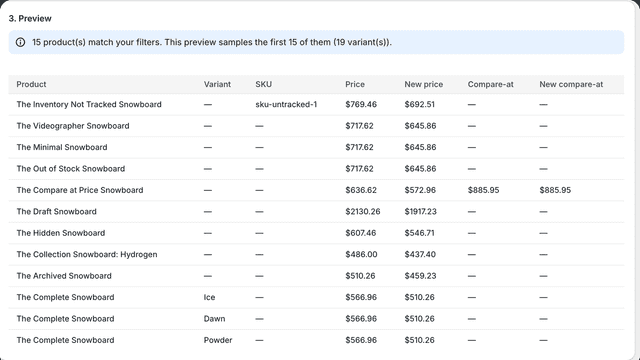
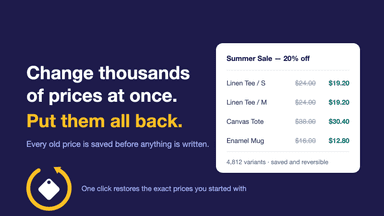
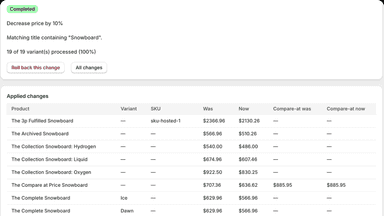
Running a sale means changing prices in bulk. The risky part is changing them back. PriceSafe saves every variant's price before it writes, so a rollback restores the exact numbers you started with instead of recalculating them. If another app moved a price after the snapshot, the rollback holds that variant back and reports it instead of overwriting someone else's work. Filter by collection, tag, vendor or title.
- Save time on repeated variant price updates across option combinations.
- Preview affected variants before committing a bulk change.
- Reduce accidental edits by updating only variants that match your rules.
- Roll back retained jobs when a price change needs to be restored.
- Preview bulk price changes before applying them
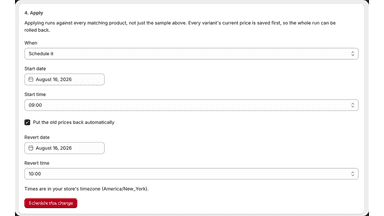
- Schedule sales to start and end automatically
- Restore original prices with snapshot-based rollback
- Detect conflicting price changes before rollback


All the numbers
Every figure, side by side
A green dot marks the app ahead on a measured figure. Estimates, gaps and apps that leave no storefront trace never take the lead.
Adoption
| Measure |  Kando1 Variant Bulk Editor |  PriceSafe Bulk Price Editor |
|---|---|---|
| Detected stores | Not published | Not published |
| Net store change, 28 days | 0 | 0 |
| Stores added, 28 days | Not enough data | Not enough data |
| Big-brand share | Not enough data | Not enough data |
| Top store categories | Not published | Not published |
| Top store countries | Not published | Not published |
Reviews
| Measure | Kando1 Variant Bulk Editor | PriceSafe Bulk Price Editor |
|---|---|---|
| App Store rating | Not published | Not published |
| App Store reviews | Not published | Not published |
| New reviews, 28 days | Not enough data | Not enough data |
| Reviewers a year or more in | Not enough data | Not enough data |
Pricing
| Measure | Kando1 Variant Bulk Editor | PriceSafe Bulk Price Editor |
|---|---|---|
| Free plan | Yes | Yes |
| Lowest paid monthly plan | $9.99/month | $9.99/month |
| Longest free trial | Not listed | Not listed |
| Plans listed | 2 | 3 |
Listing
| Measure | Kando1 Variant Bulk Editor | PriceSafe Bulk Price Editor |
|---|---|---|
| Shopify category rank | #459(ahead) | #567 |
| Shopify App Charts | Not on this week’s charts | Not on this week’s charts |
| Built for Shopify | No | No |
| Launched | Apr 17, 2026 | Aug 27, 2026 |
| Languages | 2 | 1 |
| Developer | kando1 | 10X Studio |
FAQ
Kando1 Variant Bulk Editor and PriceSafe Bulk Price Editor: common questions
- Is Kando1 Variant Bulk Editor or PriceSafe Bulk Price Editor cheaper?
- Both list a free plan. Paid plans start at $9.99/month for Kando1 Variant Bulk Editor and $9.99/month for PriceSafe Bulk Price Editor. Shoplist compares base prices only between monthly plans in the same currency; usage charges and annual plans vary, so check each plan’s limits.
- What features does each app list that the other doesn’t?
- PriceSafe Bulk Price Editor lists 2 the others don’t mention, such as Rollback, Scheduled tasks. A feature missing from a listing may still be supported; this compares what each App Store listing says.
- Where does this comparison’s data come from?
- Shoplist crawls Shopify storefronts to detect which apps each store runs, and reads each app’s Shopify App Store listing for reviews, pricing, features and integrations. Store counts are as of Oct 13, 2026; estimated figures are labeled.
How Shoplist compares apps
Store counts come from Shoplist’s crawl of Shopify storefronts, which detects the apps each store runs; they are as of Oct 13, 2026. Reviews, ratings, plans, features and integrations come from each app’s Shopify App Store listing. 28-day figures are labeled when estimated, and a figure that is missing or estimated never decides who leads. Read the methodology.