
K: Event Calendar vs The Canary Events
Two Shopify apps, side by side: detected stores, momentum, reviews, plans, listed features and who runs each. Store counts as of Nov 12, 2026.
The short answer
- K: Event Calendar lists 12 features The Canary Events’s listing doesn’t mention, including Appointments, Branding, Calendar.
Head to head

Momentum
New reviews each month
Review pace is the clearest public read on how fast an app is winning new merchants.
Coverage counts what each App Store listing names. Every feature, checked off app by app, is in Shoplist.
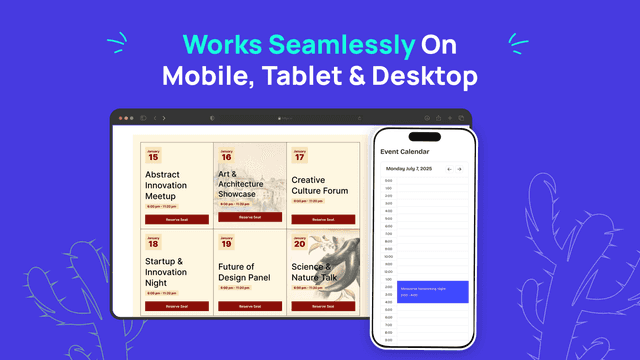
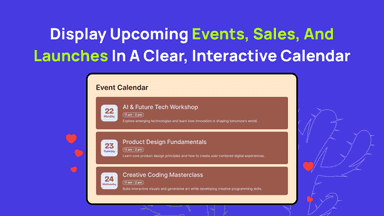
See every featureEvent Calendar widget helps you announce upcoming webinars, product launches, workshops, or in-store events, in a clear, visual way. Add store events, workshops, drops, or online sessions and display them in a monthly or list view. Highlight dates, times, locations, and links so customers always know what’s next. Perfect for brands running regular promos, live events, or community activities.
Connect your The Canary Events account to display it's events on your storefront. Choose grid, list or compact layouts and filter by island and category. Show event dates, locations, images and descriptions, with event content in English, Spanish, German and French. Keep listings updated with scheduled synchronization and choose links to local event pages or the source listing.
- Event Management: Edit, preview, organize, or delete events from one dashboard.
- AI Event Creation: Generate events instantly to save time and simplify setup.
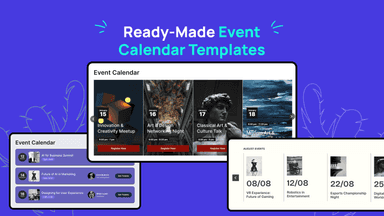
- Custom Styling Options: Control how event cards are styled and arranged.
- Recurring Events: Repeat weekly/monthly events and hide outdated events.
- Display your connected account’s events in grid, list or compact layouts.
- Filter event listings by island and category.
- Show event content in English, Spanish, German and French.
- Keep event listings updated with scheduled synchronization.
All the numbers
Every figure, side by side
A green dot marks the app ahead on a measured figure. Estimates, gaps and apps that leave no storefront trace never take the lead.
Adoption
| Measure |  K: Event Calendar | |
|---|---|---|
| Detected stores | Not published | Not published |
| Net store change, 28 days | 0 | 0 |
| Stores added, 28 days | Not enough data | Not enough data |
| Big-brand share | Not enough data | Not enough data |
| Top store categories | Not published | Not published |
| Top store countries | Not published | Not published |
Reviews
| Measure | K: Event Calendar | |
|---|---|---|
| App Store rating | 5.0 ★ | Not published |
| App Store reviews | 40 | Not published |
| New reviews, 28 days | Not enough data | Not enough data |
| Reviewers a year or more in | 0% | Not enough data |
Pricing
| Measure | K: Event Calendar | |
|---|---|---|
| Free plan | Not listed | Not listed |
| Lowest paid monthly plan | No monthly plan listed | No monthly plan listed |
| Longest free trial | Not listed | Not listed |
| Plans listed | Not published | Not published |
Listing
| Measure | K: Event Calendar | |
|---|---|---|
| Shopify category rank | #13 | Not enough data |
| Shopify App Charts | #2 on Rookies in Event booking | Not on this week’s charts |
| Built for Shopify | No | No |
| Launched | Mar 27, 2026 | Nov 12, 2026 |
| Languages | 2 | 3 |
| Developer | Kaktus | The Canary Events S.L. |
FAQ
K: Event Calendar and The Canary Events: common questions
- What features does each app list that the other doesn’t?
- K: Event Calendar lists 12 the others don’t mention, such as Appointments, Branding, Calendar, Calendar widget. A feature missing from a listing may still be supported; this compares what each App Store listing says.
- Where does this comparison’s data come from?
- Shoplist crawls Shopify storefronts to detect which apps each store runs, and reads each app’s Shopify App Store listing for reviews, pricing, features and integrations. Store counts are as of Nov 12, 2026; estimated figures are labeled.
How Shoplist compares apps
Store counts come from Shoplist’s crawl of Shopify storefronts, which detects the apps each store runs; they are as of Nov 12, 2026. Reviews, ratings, plans, features and integrations come from each app’s Shopify App Store listing. 28-day figures are labeled when estimated, and a figure that is missing or estimated never decides who leads. Read the methodology.