

Jambofy Free Shipping Bar vs ShipLift: Free Shipping Bar
Two Shopify apps, side by side: detected stores, momentum, reviews, plans, listed features and who runs each. Store counts as of Oct 24, 2026 for Jambofy Free Shipping Bar, Oct 14, 2026 for ShipLift.
The short answer
- Only Jambofy Free Shipping Bar lists a free plan. Paid plans start at $8.99/month for Jambofy Free Shipping Bar and $20/month for ShipLift.
Head to head


Basic
- · Countdown timer (new)
- · Customizable progress bar and messages
- · Device and page targeting
- · Display at desired location
- · Emoji support
- · Link the bar to any page
Premium
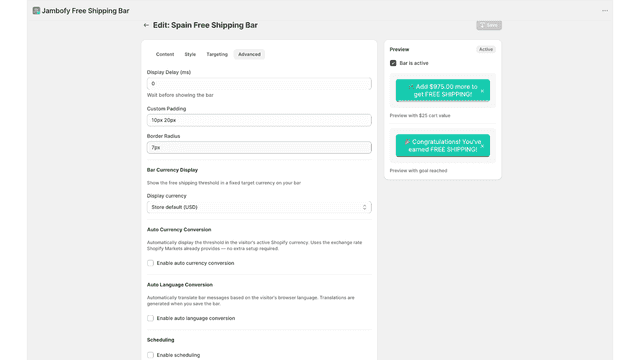
- · Auto currency and Language conversion
- · Background images and full brand styling
- · Everything in Basic plus...
- · Geo targeting with Shopify Markets
- · Performance analytics and A/B Testing
- · Progress bar inside the cart drawer
Base
- · Automatic free shipping discount.
- · Customizable threshold & messages.
- · Progress bar in checkout page.
- · Shop Pay support.
Premium
- · Analytics dashboard.
- · Everything in Base.
- · Order value tracking.
- · Revenue lift insights.
Coverage counts what each App Store listing names. Every feature, checked off app by app, is in Shoplist.
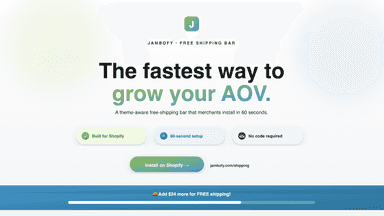
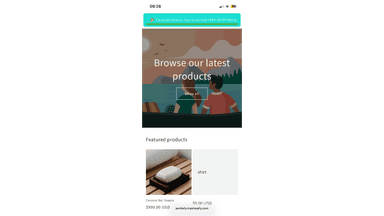
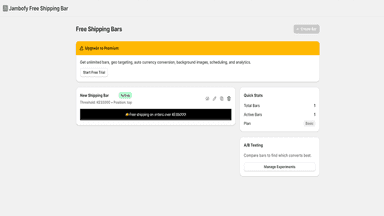
See every featureShoppers add more to their cart when they can see how close they are to a reward. Jambofy shows that progress live as the cart changes. Set one free shipping goal, or stack up to five: Free shipping at $50, A gift at $100, 10% off at $150. Add a countdown so the offer has a deadline. Place the bar at the top of the page, or inside your cart drawer where shoppers decide.
ShipLift adds a progress bar to your checkout page that shows customers how much more they need to spend to unlock complimentary shipping. When customers reach your threshold, the app automatically applies the shipping discount. No promo code required. The progress bar works in standard checkout and express checkout. You set the threshold amount and customize the messages.
- Progressive messages encouraging customers to buy more, boosting sales.
- Targeting by Shopify markets, pages, and devices.
- Auto-detects customer currency and converts free shipping thresholds.
- Fully customizeable desig, works on all pages, no developer needed.
- Progress bar shows customers how close they are to complimentary shipping.
- Automatically applies complimentary shipping when cart reaches your threshold.
- Works in checkout and accelerated checkout with customizable messages.
- Unlock insights: track order value trends, revenue lift, and conversion rates.


All the numbers
Every figure, side by side
A green dot marks the app ahead on a measured figure. Estimates, gaps and apps that leave no storefront trace never take the lead.
Adoption
| Measure |  Jambofy Free Shipping Bar |  ShipLift |
|---|---|---|
| Detected stores | Not published | Not published |
| Net store change, 28 days | 0 | 0 |
| Stores added, 28 days | Not enough data | Not enough data |
| Big-brand share | Not enough data | Not enough data |
| Top store categories | Not published | Not published |
| Top store countries | Not published | Not published |
Reviews
| Measure | Jambofy Free Shipping Bar | ShipLift |
|---|---|---|
| App Store rating | 5.0 ★ | Not published |
| App Store reviews | 2 | Not published |
| New reviews, 28 days | Not enough data | Not enough data |
| Reviewers a year or more in | Not enough data | Not enough data |
Pricing
| Measure | Jambofy Free Shipping Bar | ShipLift |
|---|---|---|
| Free plan | Yes | Not listed |
| Lowest paid monthly plan | $8.99/month(ahead) | $20/month |
| Longest free trial | 7 days | 14 days |
| Plans listed | 2 | 2 |
Listing
| Measure | Jambofy Free Shipping Bar | ShipLift |
|---|---|---|
| Shopify category rank | #122 | Not enough data |
| Shopify App Charts | Not on this week’s charts | Not on this week’s charts |
| Built for Shopify | No | No |
| Launched | May 15, 2026 | Feb 2, 2026 |
| Languages | 1 | 1 |
| Developer | Jambofy | Chris Luhrs Design |
FAQ
Jambofy Free Shipping Bar and ShipLift: common questions
- Is Jambofy Free Shipping Bar or ShipLift cheaper?
- Only Jambofy Free Shipping Bar lists a free plan. Paid plans start at $8.99/month for Jambofy Free Shipping Bar and $20/month for ShipLift. Shoplist compares base prices only between monthly plans in the same currency; usage charges and annual plans vary, so check each plan’s limits.
- Where does this comparison’s data come from?
- Shoplist crawls Shopify storefronts to detect which apps each store runs, and reads each app’s Shopify App Store listing for reviews, pricing, features and integrations. Store counts are as of Oct 24, 2026 for Jambofy Free Shipping Bar, Oct 14, 2026 for ShipLift; estimated figures are labeled.
How Shoplist compares apps
Store counts come from Shoplist’s crawl of Shopify storefronts, which detects the apps each store runs; they are as of Oct 24, 2026 for Jambofy Free Shipping Bar, Oct 14, 2026 for ShipLift. Reviews, ratings, plans, features and integrations come from each app’s Shopify App Store listing. 28-day figures are labeled when estimated, and a figure that is missing or estimated never decides who leads. Read the methodology.