
Intake vs POS Clock In
Two Shopify apps, side by side: detected stores, momentum, reviews, plans, listed features and who runs each. Store counts as of Oct 13, 2026 for Intake, Jul 10, 2026 for POS Clock In.
The short answer
- Intake lists 8 features POS Clock In’s listing doesn’t mention, including Auto-updates, Cost reporting, Inventory levels.
Head to head


Starter
- · 1 location
- · 1 staff seat
Pro
- · 2 locations
- · 5 staff seats
Plus
- · 4 locations
- · Unlimited staff
Coverage counts what each App Store listing names. Every feature, checked off app by app, is in Shoplist.
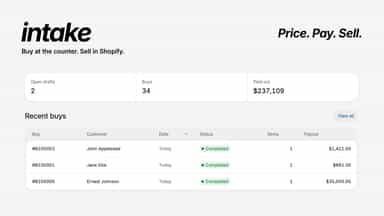
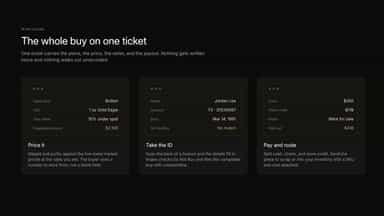
See every featureIntake is a counter app for shops that buy goods from walk in customers. Staff attach a customer, price each piece, record the payout, and complete the buy. Finished buys create Shopify products with cost, quantity, and hold for resale. Owners turn on value modules to set pricing and buy rules for staff, from hand priced pieces to metal melt value based methods.
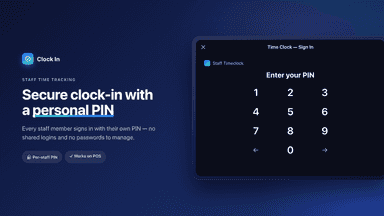
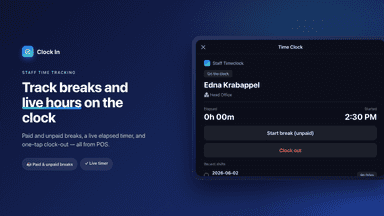
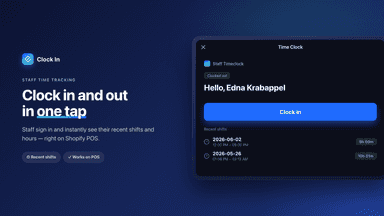
Clock In gives retail teams a staff time clock built into your POS. Employees clock in and out using a PIN or automatic sign-in, and the app records their hours, breaks, and location automatically. Managers can review and edit timecards, set per-location time zones, and flag daily or weekly overtime against thresholds you set. Open shifts can auto-close at a set time each day if staff forget to clock out.
- Value modules let owners set pricing and buy rules for staff
- Complete a counter buy and create Shopify inventory with cost and hold
- Attach a customer, record the payout, and keep a buy history
- Staff sign in with a PIN so every buy is tied to a staff member
- POS PIN Clock-In - Employees clock in at the POS with a personalized PINs
- Live Dashboard - See who's currently clocked, with elapsed shift times & breaks
- Admin Clock-In/Out - Managers can clock any employee in or out directly.
- Shift History - Full audit trail of every shift with employee, date & duration.



All the numbers
Every figure, side by side
A green dot marks the app ahead on a measured figure. Estimates, gaps and apps that leave no storefront trace never take the lead.
Adoption
| Measure |  Intake |  POS Clock In |
|---|---|---|
| Detected stores | Not published | Not published |
| Net store change, 28 days | 0 | 0 |
| Stores added, 28 days | Not enough data | Not enough data |
| Big-brand share | Not enough data | Not enough data |
| Top store categories | Not published | Not published |
| Top store countries | Not published | Not published |
Reviews
| Measure | Intake | POS Clock In |
|---|---|---|
| App Store rating | 5.0 ★ | Not published |
| App Store reviews | 1 | Not published |
| New reviews, 28 days | Not enough data | Not enough data |
| Reviewers a year or more in | Not enough data | Not enough data |
Pricing
| Measure | Intake | POS Clock In |
|---|---|---|
| Free plan | Not listed | Not listed |
| Lowest paid monthly plan | $250/month | No monthly plan listed |
| Longest free trial | 30 days | Not listed |
| Plans listed | 3 | Not published |
Listing
| Measure | Intake | POS Clock In |
|---|---|---|
| Shopify category rank | #106 | Not enough data |
| Shopify App Charts | Not on this week’s charts | Not on this week’s charts |
| Built for Shopify | No | No |
| Launched | Aug 12, 2026 | Jun 24, 2026 |
| Languages | 1 | 1 |
| Developer | Intake | Branch Build |
FAQ
Intake and POS Clock In: common questions
- What features does each app list that the other doesn’t?
- Intake lists 8 the others don’t mention, such as Auto-updates, Cost reporting, Inventory levels, Manual updates. POS Clock In lists 7 the others don’t mention, such as Clock in and out, Labor costs, Payroll, Remote access. A feature missing from a listing may still be supported; this compares what each App Store listing says.
- Where does this comparison’s data come from?
- Shoplist crawls Shopify storefronts to detect which apps each store runs, and reads each app’s Shopify App Store listing for reviews, pricing, features and integrations. Store counts are as of Oct 13, 2026 for Intake, Jul 10, 2026 for POS Clock In; estimated figures are labeled.
How Shoplist compares apps
Store counts come from Shoplist’s crawl of Shopify storefronts, which detects the apps each store runs; they are as of Oct 13, 2026 for Intake, Jul 10, 2026 for POS Clock In. Reviews, ratings, plans, features and integrations come from each app’s Shopify App Store listing. 28-day figures are labeled when estimated, and a figure that is missing or estimated never decides who leads. Read the methodology.