
InfoPin: Image Hotspots vs Spec Pins
Two Shopify apps, side by side: detected stores, momentum, reviews, plans, listed features and who runs each. Store counts as of Oct 14, 2026 for InfoPin, Sep 25, 2026 for Spec Pins.
The short answer
- Only InfoPin lists a free plan.
Head to head


Free
- · 1 product · 1 hotspot per image
Starter
- · Up to 10 products · Unlimited hotspots
Pro
- · Unlimited products · Unlimited hotspots
Coverage counts what each App Store listing names. Every feature, checked off app by app, is in Shoplist.
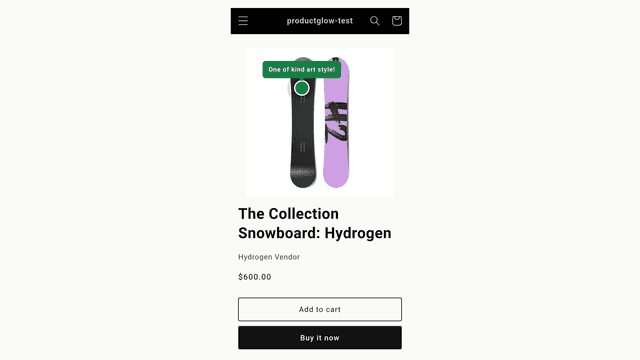
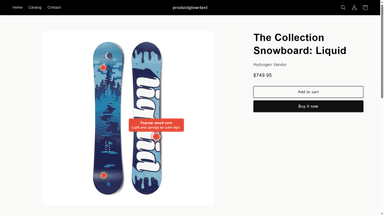
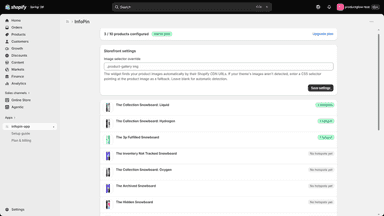
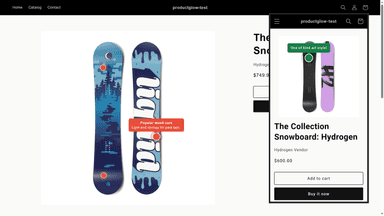
See every featureShoppers scroll product photos looking for details — what a material is, how a feature works. InfoPin lets you place small hotspots directly on product images; a tap or hover shows a short label and description where shoppers are looking. Place and drag pins in a visual editor, customize shapes and colors, and enable one app embed — no theme code, and pins keep working when you switch themes.
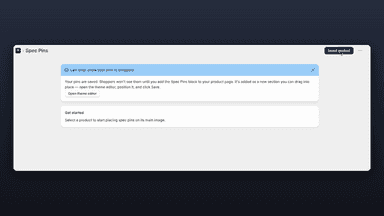
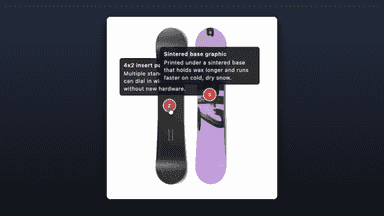
Spec Pins helps you point out the details that sell a product. Open the editor, pick a product, and click anywhere on its image to drop a numbered pin. Add a short label and description for each one, then save. On the product page, shoppers tap a pin to read that feature in a tooltip. It works with your existing theme through a block you add in the theme editor, so there's no code to write and nothing to redesign.
- Click-to-place visual editor: add hotspots on the product image
- Draggable pins with percentage positions that hold across screen sizes
- Custom label, description, shape, and colors for every hotspot
- Theme-agnostic widget: enable one app embed, no theme code to edit
- Highlight product features right on your product images
- Let shoppers tap a pin to read a feature's details in a tooltip
- Match your store with custom pin colors and tooltip styles
- Add it through your theme with no code or theme edits

All the numbers
Every figure, side by side
A green dot marks the app ahead on a measured figure. Estimates, gaps and apps that leave no storefront trace never take the lead.
Adoption
| Measure |  InfoPin |  Spec Pins |
|---|---|---|
| Detected stores | Not published | Not published |
| Net store change, 28 days | 0 | 0 |
| Stores added, 28 days | Not enough data | Not enough data |
| Big-brand share | Not enough data | Not enough data |
| Top store categories | Not published | Not published |
| Top store countries | Not published | Not published |
Reviews
| Measure | InfoPin | Spec Pins |
|---|---|---|
| App Store rating | Not published | Not published |
| App Store reviews | Not published | Not published |
| New reviews, 28 days | Not enough data | Not enough data |
| Reviewers a year or more in | Not enough data | Not enough data |
FAQ
InfoPin and Spec Pins: common questions
- Is InfoPin or Spec Pins cheaper?
- Only InfoPin lists a free plan. Shoplist compares base prices only between monthly plans in the same currency; usage charges and annual plans vary, so check each plan’s limits.
- Where does this comparison’s data come from?
- Shoplist crawls Shopify storefronts to detect which apps each store runs, and reads each app’s Shopify App Store listing for reviews, pricing, features and integrations. Store counts are as of Oct 14, 2026 for InfoPin, Sep 25, 2026 for Spec Pins; estimated figures are labeled.
How Shoplist compares apps
Store counts come from Shoplist’s crawl of Shopify storefronts, which detects the apps each store runs; they are as of Oct 14, 2026 for InfoPin, Sep 25, 2026 for Spec Pins. Reviews, ratings, plans, features and integrations come from each app’s Shopify App Store listing. 28-day figures are labeled when estimated, and a figure that is missing or estimated never decides who leads. Read the methodology.