Imporr: Bulk Edit & CSV Import vs ShopCSV
Two Shopify apps, side by side: detected stores, momentum, reviews, plans, listed features and who runs each. Store counts as of Nov 6, 2026 for Imporr, Oct 14, 2026 for ShopCSV.
The short answer
- Both list a free plan. Paid plans start at $3.99/month for Imporr and $4.99/month for ShopCSV.
- Imporr lists 7 features ShopCSV’s listing doesn’t mention, including Images, Inventory, Metafields.
Head to head

Free
- · 3 free imports
- · Jobs page to track progress
- · Preview & revert changes
- · Unlimited exports
Basic
- · 20 imports
- · Jobs page to track progress
- · Preview & revert changes
- · Unlimited exports
Advanced
- · Early access to new features
- · Fast priority support
- · Preview, revert & jobs page
- · Unlimited imports & exports
Free
- · Bulk actions
- · CSV import & export
- · Search & filters
- · Spreadsheet-style editing
- · Undo/redo history
- · Up to 100 products
Starter
- · All Free features included
- · Priority email support
- · Up to 1,000 products
Pro
- · All Starter features included
- · Priority support
- · Unlimited products
Coverage counts what each App Store listing names. Every feature, checked off app by app, is in Shoplist.
See every featureImporr lets you create, update and delete products in bulk with CSV or Excel files. Pick only the columns you need, such as SEO title, description and handle, export them, edit the file and import it back. Update prices, SKUs, variants, inventory, vendors, tags, product types, templates, SEO and metafields. Before anything changes, you review each product’s current and new values side by side.
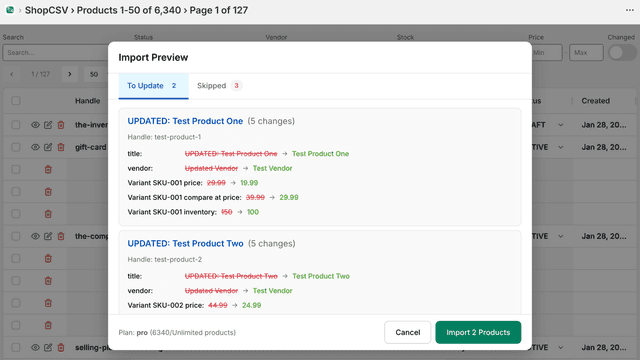
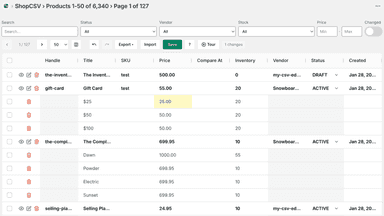
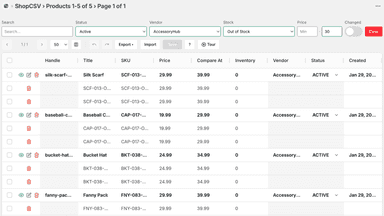
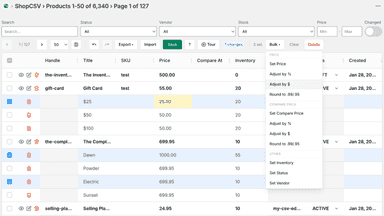
Managing products one by one is slow. ShopCSV gives you a spreadsheet where you can edit all products at once. Click any cell to change prices, inventory, titles, SKUs, and more. Select multiple rows for bulk updates. Import CSV files to update thousands of products. Export your catalog for backup. Changes highlight before saving. Undo mistakes instantly.
- Create, update or delete products in bulk from CSV or Excel files
- Choose exactly which columns to export, like SEO title, description or handle
- Edit prices, SKUs, variants, inventory, tags, vendors and product types
- Update SEO, URL handles, theme templates and metafields in bulk
- Spreadsheet editing. Click cells to edit prices, inventory, titles, and more.
- Bulk updates. Select rows and update all at once with bulk actions.
- CSV import/export. Import CSV to update products. Export for backup.
All the numbers
Every figure, side by side
A green dot marks the app ahead on a measured figure. Estimates, gaps and apps that leave no storefront trace never take the lead.
Adoption
| Measure |  ShopCSV | |
|---|---|---|
| Detected stores | Not published | Not published |
| Net store change, 28 days | 0 | 0 |
| Stores added, 28 days | Not enough data | Not enough data |
| Big-brand share | Not enough data | Not enough data |
| Top store categories | Not published | Not published |
| Top store countries | Not published | Not published |
Reviews
| Measure | ShopCSV | |
|---|---|---|
| App Store rating | Not published | Not published |
| App Store reviews | Not published | Not published |
| New reviews, 28 days | Not enough data | Not enough data |
| Reviewers a year or more in | Not enough data | Not enough data |
FAQ
Imporr and ShopCSV: common questions
- Is Imporr or ShopCSV cheaper?
- Both list a free plan. Paid plans start at $3.99/month for Imporr and $4.99/month for ShopCSV. Shoplist compares base prices only between monthly plans in the same currency; usage charges and annual plans vary, so check each plan’s limits.
- What features does each app list that the other doesn’t?
- Imporr lists 7 the others don’t mention, such as Images, Inventory, Metafields, Prices. ShopCSV lists 3 the others don’t mention, such as Bulk deletion, Bulk edit, Search and filter. A feature missing from a listing may still be supported; this compares what each App Store listing says.
- Where does this comparison’s data come from?
- Shoplist crawls Shopify storefronts to detect which apps each store runs, and reads each app’s Shopify App Store listing for reviews, pricing, features and integrations. Store counts are as of Nov 6, 2026 for Imporr, Oct 14, 2026 for ShopCSV; estimated figures are labeled.
How Shoplist compares apps
Store counts come from Shoplist’s crawl of Shopify storefronts, which detects the apps each store runs; they are as of Nov 6, 2026 for Imporr, Oct 14, 2026 for ShopCSV. Reviews, ratings, plans, features and integrations come from each app’s Shopify App Store listing. 28-day figures are labeled when estimated, and a figure that is missing or estimated never decides who leads. Read the methodology.