

Trend Trigger vs AOD ‑ Sales Pop Notifications
Two Shopify apps, side by side: detected stores, momentum, reviews, plans, listed features and who runs each. Store counts as of Sep 3, 2026 for Trend Trigger, Oct 22, 2026 for AOD.
The short answer
- On the Shopify App Store: Trend Trigger 5.0 from 1 reviews and AOD 1.7 from 4 reviews.
Head to head


Social Proof, Sales Pop, Manual Sales Pop Up - Cart Terms
Momentum
New reviews each month
Review pace is the clearest public read on how fast an app is winning new merchants.
Basic Plan
- · Design Templates
- · Full Support
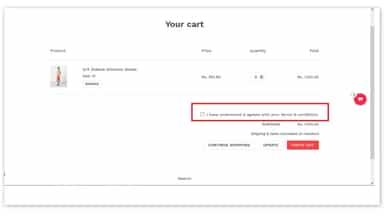
- · I Agree to cart terms
- · Manual Sales Notification
- · Recent Sales Notifications
- · Sticky Cart
High Traffic Plan
- · All features from Basic Plan
- · Analytics (Clicks Count)
- · High Traffic
- · Manual Sales pop up to 30
- · Priority support
- · Up to 5 h/m of customizations
Coverage counts what each App Store listing names. Every feature, checked off app by app, is in Shoplist.
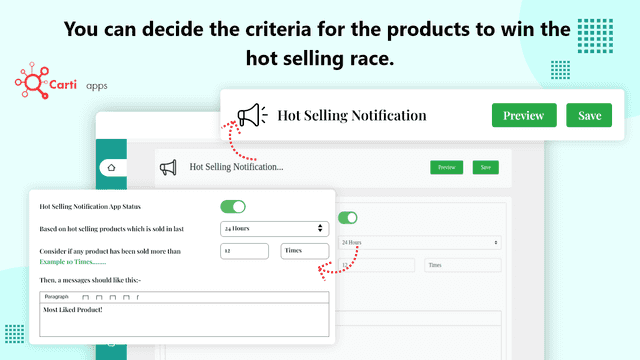
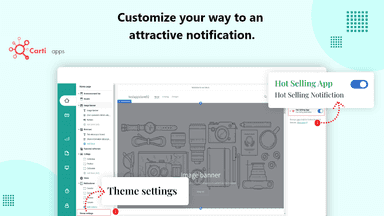
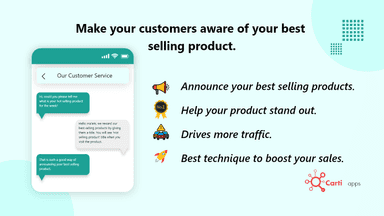
See every featureInform your buyers about your hot selling products and prompt them to buy. This app lets you notify your customers if the product is the most sold, which will automatically create a good mental image of the product in customer's mind.
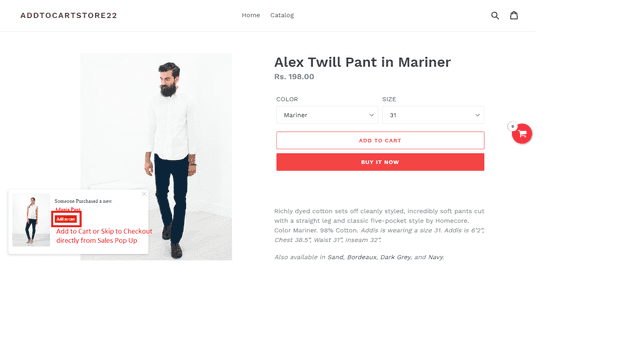
Sales Popup & Sticky Cart app provides you an option of sticky cart and will show real time products in cart on the screen. The main powerful features lets you target customers who have already viewed a product by showing them a recent sales notification of that specific product. By showing the real sales going on in real time we can build users confidence and can encourage them to buy the product.
- Your product gets the title for being the best one.
- Your customers are informed about their excellent choice.
- Set a criteria for the products to be on top.
- App installation process is extremely easy & it does not require any manual code
- Sticky cart will show real time cart counter & redirects direct to checkout
- Build trust and engagement with Real time sales popup notification.
- Manual Sales popup Notifications. Sticky add to cart. I Agree To Cart Terms.



All the numbers
Every figure, side by side
A green dot marks the app ahead on a measured figure. Estimates, gaps and apps that leave no storefront trace never take the lead.
Adoption
| Measure |  Trend Trigger |  AOD |
|---|---|---|
| Detected stores | Not published | Not published |
| Net store change, 28 days | 0 | 0 |
| Stores added, 28 days | Not enough data | Not enough data |
| Big-brand share | Not enough data | Not enough data |
| Top store categories | Not published | Not published |
| Top store countries | Not published | Not published |
Reviews
| Measure | Trend Trigger | AOD |
|---|---|---|
| App Store rating | 5.0 ★(ahead) | 1.7 ★ |
| App Store reviews | 1 | 4(ahead) |
| New reviews, 28 days | 0(ahead) | 0 |
| Reviewers a year or more in | Not enough data | Not enough data |
Pricing
| Measure | Trend Trigger | AOD |
|---|---|---|
| Free plan | Not listed | Not listed |
| Lowest paid monthly plan | No monthly plan listed | $2.99/month |
| Longest free trial | Not listed | 3 days |
| Plans listed | Not published | 2 |
Listing
| Measure | Trend Trigger | AOD |
|---|---|---|
| Shopify category rank | #104 | #288 |
| Shopify App Charts | Not on this week’s charts | Not on this week’s charts |
| Built for Shopify | No | No |
| Launched | Aug 10, 2022 | Sep 26, 2018 |
| Languages | 1 | 1 |
| Developer | Carti Apps | Apps On Demand |
FAQ
Trend Trigger and AOD: common questions
- Which has better reviews, Trend Trigger or AOD?
- On the Shopify App Store: Trend Trigger 5.0 from 1 reviews and AOD 1.7 from 4 reviews.
- Where does this comparison’s data come from?
- Shoplist crawls Shopify storefronts to detect which apps each store runs, and reads each app’s Shopify App Store listing for reviews, pricing, features and integrations. Store counts are as of Sep 3, 2026 for Trend Trigger, Oct 22, 2026 for AOD; estimated figures are labeled.
How Shoplist compares apps
Store counts come from Shoplist’s crawl of Shopify storefronts, which detects the apps each store runs; they are as of Sep 3, 2026 for Trend Trigger, Oct 22, 2026 for AOD. Reviews, ratings, plans, features and integrations come from each app’s Shopify App Store listing. 28-day figures are labeled when estimated, and a figure that is missing or estimated never decides who leads. Read the methodology.