
Histora: Product Audit Log vs ShopSight
Two Shopify apps, side by side: detected stores, momentum, reviews, plans, listed features and who runs each. Store counts as of Oct 13, 2026 for Histora, Jun 25, 2026 for ShopSight.
The short answer
- On the Shopify App Store: Histora 4.1 from 7 reviews and ShopSight 5.0 from 1 reviews.
- ShopSight lists 1 features Histora’s listing doesn’t mention, including Analytics dashboard.
Head to head


Momentum
New reviews each month
Review pace is the clearest public read on how fast an app is winning new merchants.
Lite
- · See History directly on the Product Page
- · See which staff member made changes
Full History
- · EU Price Compliance for your store theme
- · Full Product History - all fields
- · Image Backup
- · Metafields history
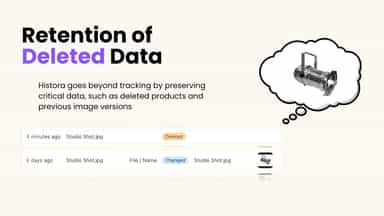
- · Remember deleted products
- · Track changes even from other apps
Coverage counts what each App Store listing names. Every feature, checked off app by app, is in Shoplist.
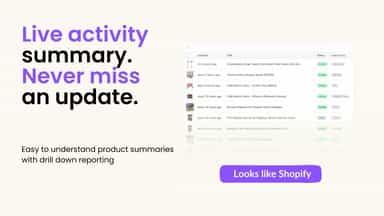
See every featureHistora does two jobs Shopify teams usually buy two apps for. One: a complete, searchable audit trail of product activity — every product, variant, media and price change, with when it happened. When your team edits through Histora, you also see exactly who changed what. Two: an Omnibus-compliant 30-day lowest-price message shown automatically on your product pages.
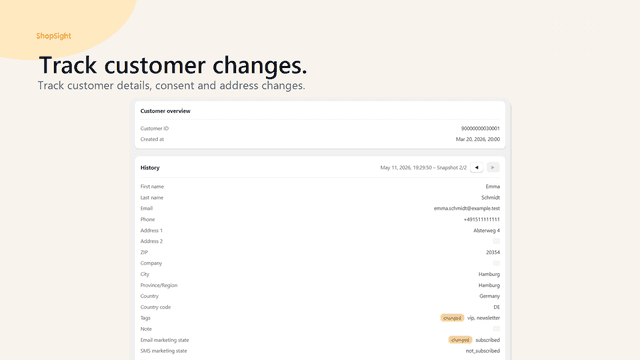
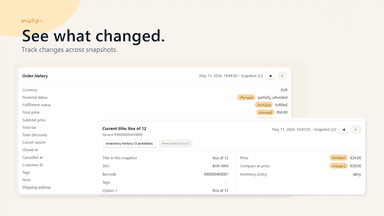
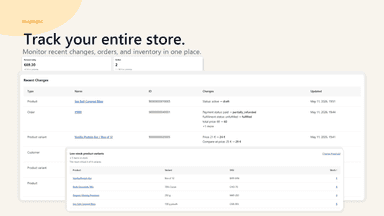
ShopSight helps merchants track changes in products, orders, and customers over time. The app stores structured snapshots and provides clear history views so merchants can compare previous and current data states. Existing shop data is imported during the initial sync, and snapshot/history tracking begins after the app has been installed.
- Backup All Product Activity - history of price, tags, description and more
- Real-Time Activity Dashboard - See the latest activity by Tag or Vendor etc
- Add Notes to Changes - Comment on changes to record the reasoning behind them
- Search and Filter the history of product changes to show a clearer picture
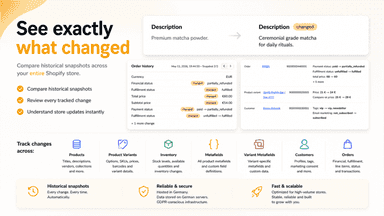
- Track product, order, and customer changes over time
- Compare snapshots to see what changed between data states
- Review product variants, metafields, and inventory history
- Use clear history views inside the Shopify Admin


All the numbers
Every figure, side by side
A green dot marks the app ahead on a measured figure. Estimates, gaps and apps that leave no storefront trace never take the lead.
Adoption
| Measure |  Histora |  ShopSight |
|---|---|---|
| Detected stores | Not published | Not published |
| Net store change, 28 days | 0 | 0 |
| Stores added, 28 days | Not enough data | Not enough data |
| Big-brand share | Not enough data | Not enough data |
| Top store categories | Not published | Not published |
| Top store countries | Not published | Not published |
Reviews
| Measure | Histora | ShopSight |
|---|---|---|
| App Store rating | 4.1 ★ | 5.0 ★(ahead) |
| App Store reviews | 7(ahead) | 1 |
| New reviews, 28 days | Not enough data | Not enough data |
| Reviewers a year or more in | Not enough data | Not enough data |
FAQ
Histora and ShopSight: common questions
- Which has better reviews, Histora or ShopSight?
- On the Shopify App Store: Histora 4.1 from 7 reviews and ShopSight 5.0 from 1 reviews.
- What features does each app list that the other doesn’t?
- ShopSight lists 1 the others don’t mention, such as Analytics dashboard. A feature missing from a listing may still be supported; this compares what each App Store listing says.
- Where does this comparison’s data come from?
- Shoplist crawls Shopify storefronts to detect which apps each store runs, and reads each app’s Shopify App Store listing for reviews, pricing, features and integrations. Store counts are as of Oct 13, 2026 for Histora, Jun 25, 2026 for ShopSight; estimated figures are labeled.
How Shoplist compares apps
Store counts come from Shoplist’s crawl of Shopify storefronts, which detects the apps each store runs; they are as of Oct 13, 2026 for Histora, Jun 25, 2026 for ShopSight. Reviews, ratings, plans, features and integrations come from each app’s Shopify App Store listing. 28-day figures are labeled when estimated, and a figure that is missing or estimated never decides who leads. Read the methodology.