
GuardIQ – Store Guardian vs StoreStatus Product Analytics
Two Shopify apps, side by side: detected stores, momentum, reviews, plans, listed features and who runs each. Store counts as of Oct 13, 2026 for GuardIQ, Nov 10, 2026 for StoreStatus Product Analytics.
The short answer
- Both list a free plan. Paid plans start at $9/month for GuardIQ and $19.99/month for StoreStatus Product Analytics.
- GuardIQ lists 21 features StoreStatus Product Analytics’s listing doesn’t mention, including Abandoned cart, Activity tracking, AI insights.
Head to head

Free
- · Manual store scans
- · Product and collection checks
- · Read-only recommendations
- · Store health score and issue list
Starter
- · Broken link checks
- · Daily catalog scans
- · Inventory and SEO checks
- · Store health history
Growth
- · Automatic scans and change monitoring
- · Checkout and pixel monitoring
- · Email alerts and anomaly insights
- · Revenue funnel monitoring
pro
- · Advanced history and reporting
- · Likely-cause explanations
- · Revenue-at-risk estimates
- · Safe fixes when available
Agency
- · Advanced revenue and reliability insight
- · Agency-focused portfolio view
- · Multi-store monitoring foundation
- · Priority alerts and reporting
Free
- · 15 product deep dives a month
- · Days of stock left for every size
- · Overview, opportunities and inventory
- · Preview of the morning email in the app
- · Today, yesterday, 7 and 30 days
- · Your top 3 pairs bought together
Pro
- · 90 days and 12 months of history
- · Email the morning a size sells out
- · Every pair bought together
- · Full inventory lists
- · Morning email and Monday report for 5
- · Sold-out sizes in 4 busiest collections
Plus
- · Everything in Pro
- · Last 12 months against the year before
- · Priority support
- · Reports for up to 25 people
- · Scores for automations and collections
- · Slide decks for team meetings
Coverage counts what each App Store listing names. Every feature, checked off app by app, is in Shoplist.
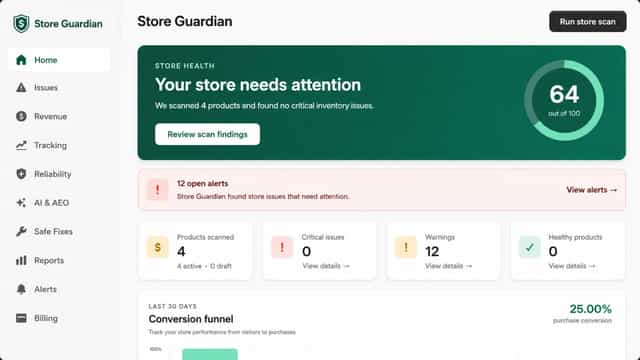
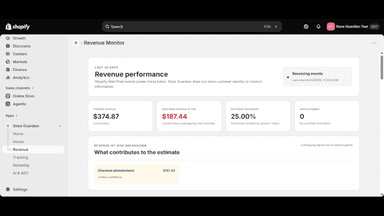
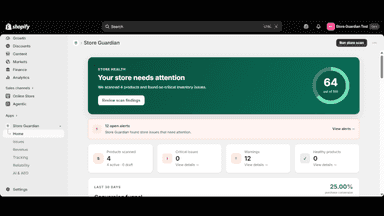
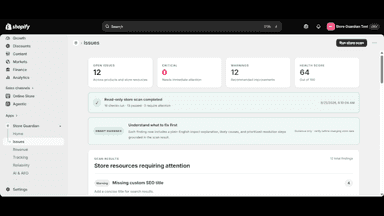
See every featureStore Guardian helps merchants review store health, identify issues that may affect sales, and prioritize what needs attention. It brings store issues and revenue-related signals into one clear dashboard so merchants can quickly understand what to review and take action without checking multiple reports.
StoreStatus explains how every product in your store is performing and what to do about it. See sales, conversion, profit and stock side by side for each product and variant, right inside your admin and on each product page. Spot products that convert well but get little traffic, and pages that lose visitors. Track days of stock left and the sales you missed while sold out.
- Scan products, inventory, SEO, discounts, links, and storefront health
- Monitor conversion events and estimate potential revenue at risk
- Receive prioritized alerts with explanations and recommended steps
- Track storefront uptime, pixels, theme changes, and checkout activity
- Product analytics on every product page in your admin
- Promote-or-fix matrix that plots every product by traffic and conversion
- Days of stock left, reorder suggestions and sales missed while sold out
- Bundle ideas, products that grow the basket and what customers buy next
All the numbers
Every figure, side by side
A green dot marks the app ahead on a measured figure. Estimates, gaps and apps that leave no storefront trace never take the lead.
Adoption
| Measure |  GuardIQ | |
|---|---|---|
| Detected stores | Not published | Not published |
| Net store change, 28 days | 0 | 0 |
| Stores added, 28 days | Not enough data | Not enough data |
| Big-brand share | Not enough data | Not enough data |
| Top store categories | Not published | Not published |
| Top store countries | Not published | Not published |
Reviews
| Measure | GuardIQ | |
|---|---|---|
| App Store rating | Not published | 5.0 ★ |
| App Store reviews | Not published | 1 |
| New reviews, 28 days | Not enough data | Not enough data |
| Reviewers a year or more in | Not enough data | Not enough data |
Pricing
| Measure | GuardIQ | |
|---|---|---|
| Free plan | Yes | Yes |
| Lowest paid monthly plan | $9/month(ahead) | $19.99/month |
| Longest free trial | Not listed | 14 days |
| Plans listed | 5 | 3 |
Listing
| Measure | GuardIQ | |
|---|---|---|
| Shopify category rank | #1574 | Not enough data |
| Shopify App Charts | Not on this week’s charts | Not on this week’s charts |
| Built for Shopify | No | No |
| Launched | Sep 4, 2026 | Jul 24, 2023 |
| Languages | 1 | 1 |
| Developer | Geekyace Digital Hub | MoreCheckouts |
FAQ
GuardIQ and StoreStatus Product Analytics: common questions
- Is GuardIQ or StoreStatus Product Analytics cheaper?
- Both list a free plan. Paid plans start at $9/month for GuardIQ and $19.99/month for StoreStatus Product Analytics. Shoplist compares base prices only between monthly plans in the same currency; usage charges and annual plans vary, so check each plan’s limits.
- What features does each app list that the other doesn’t?
- GuardIQ lists 21 the others don’t mention, such as Abandoned cart, Activity tracking, AI insights, Benchmarking. StoreStatus Product Analytics lists 3 the others don’t mention, such as Forecasting, Historical analysis, Notifications. A feature missing from a listing may still be supported; this compares what each App Store listing says.
- Where does this comparison’s data come from?
- Shoplist crawls Shopify storefronts to detect which apps each store runs, and reads each app’s Shopify App Store listing for reviews, pricing, features and integrations. Store counts are as of Oct 13, 2026 for GuardIQ, Nov 10, 2026 for StoreStatus Product Analytics; estimated figures are labeled.
How Shoplist compares apps
Store counts come from Shoplist’s crawl of Shopify storefronts, which detects the apps each store runs; they are as of Oct 13, 2026 for GuardIQ, Nov 10, 2026 for StoreStatus Product Analytics. Reviews, ratings, plans, features and integrations come from each app’s Shopify App Store listing. 28-day figures are labeled when estimated, and a figure that is missing or estimated never decides who leads. Read the methodology.