

WDS Google Shopping Optimizer vs SpendGuard: Pause Ads LowStock
Two Shopify apps, side by side: detected stores, momentum, reviews, plans, listed features and who runs each. Store counts as of Jul 18, 2026 for WDS Google Shopping Optimizer, Oct 13, 2026 for SpendGuard.
The short answer
- Only SpendGuard lists a free plan.
- WDS Google Shopping Optimizer lists 4 features SpendGuard’s listing doesn’t mention, including AI optimization, AI targeting, Audience segments.
Head to head


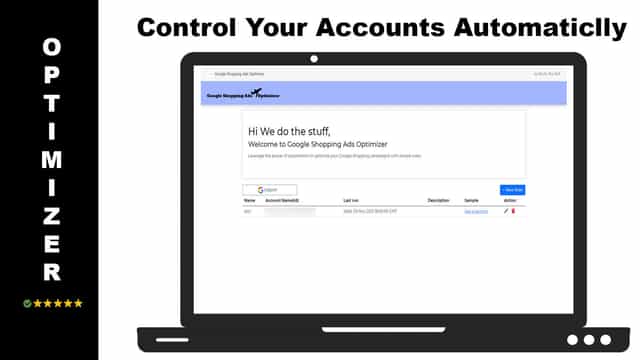
Automate Your Google Shopping Campaigns with Rules
Free
- · 1-day activity history
- · Auto Pause, resume, or monitor only
- · Email alerts
- · Google Ads + Meta
- · Protect 1 product
Growth
- · 7-day activity history
- · Guard builder
- · Includes all Free features
- · Stock buffers
- · Up to 50 products protected
Pro
- · CSV exports
- · Full activity history
- · Includes all Growth features
- · Priority support
- · Up to 200 products protected
Coverage counts what each App Store listing names. Every feature, checked off app by app, is in Shoplist.
See every featureLeverage the power of automation on your Google Shopping ads campaigns. You set the conditions and the actions to reduce manual work and get top-performing results. Aiming for a certain ROAS on your Shopping campaigns and one or more of the products are underperforming, no problem just use our app to exclude it to reach your goals!
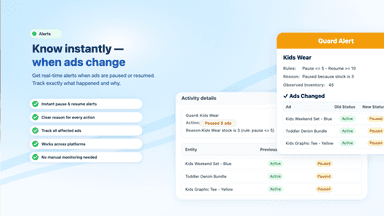
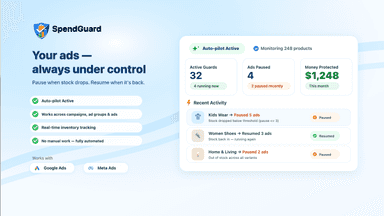
Connect Google Ads or Meta Ads, choose the campaigns, ad groups, or ads you want to protect, and set low-stock and recovery rules. SpendGuard pauses the selected items when stock drops below your threshold and resumes them when inventory recovers. Includes email alerts and an activity log so you can see what changed and why.
- Exclude Shopping Products from Your Campaigns
- Set the conditions and actions for Automation
- Make it run once a week, day or on hourly basis
- Auto pause, resume, or monitor selected ads based on product stock
- Set low-stock and recovery thresholds with an “any/all products” option
- Get email alerts and an activity log showing what changed and why




All the numbers
Every figure, side by side
A green dot marks the app ahead on a measured figure. Estimates, gaps and apps that leave no storefront trace never take the lead.
Adoption
| Measure |  WDS Google Shopping Optimizer |  SpendGuard |
|---|---|---|
| Detected stores | Not published | Not published |
| Net store change, 28 days | 0 | 0 |
| Stores added, 28 days | Not enough data | Not enough data |
| Big-brand share | Not enough data | Not enough data |
| Top store categories | Not published | Not published |
| Top store countries | Not published | Not published |
Reviews
| Measure | WDS Google Shopping Optimizer | SpendGuard |
|---|---|---|
| App Store rating | Not published | Not published |
| App Store reviews | Not published | Not published |
| New reviews, 28 days | Not enough data | Not enough data |
| Reviewers a year or more in | Not enough data | Not enough data |
Pricing
| Measure | WDS Google Shopping Optimizer | SpendGuard |
|---|---|---|
| Free plan | Not listed | Yes |
| Lowest paid monthly plan | No monthly plan listed | $49/month |
| Longest free trial | Not listed | 14 days |
| Plans listed | Not published | 3 |
Listing
| Measure | WDS Google Shopping Optimizer | SpendGuard |
|---|---|---|
| Shopify category rank | #282(ahead) | #358 |
| Shopify App Charts | Not on this week’s charts | Not on this week’s charts |
| Built for Shopify | No | No |
| Launched | Nov 29, 2021 | Mar 13, 2026 |
| Languages | 1 | 1 |
| Developer | We Do The Stuff | Saanvi |
FAQ
WDS Google Shopping Optimizer and SpendGuard: common questions
- Is WDS Google Shopping Optimizer or SpendGuard cheaper?
- Only SpendGuard lists a free plan. Shoplist compares base prices only between monthly plans in the same currency; usage charges and annual plans vary, so check each plan’s limits.
- What features does each app list that the other doesn’t?
- WDS Google Shopping Optimizer lists 4 the others don’t mention, such as AI optimization, AI targeting, Audience segments, Keyword. A feature missing from a listing may still be supported; this compares what each App Store listing says.
- Where does this comparison’s data come from?
- Shoplist crawls Shopify storefronts to detect which apps each store runs, and reads each app’s Shopify App Store listing for reviews, pricing, features and integrations. Store counts are as of Jul 18, 2026 for WDS Google Shopping Optimizer, Oct 13, 2026 for SpendGuard; estimated figures are labeled.
How Shoplist compares apps
Store counts come from Shoplist’s crawl of Shopify storefronts, which detects the apps each store runs; they are as of Jul 18, 2026 for WDS Google Shopping Optimizer, Oct 13, 2026 for SpendGuard. Reviews, ratings, plans, features and integrations come from each app’s Shopify App Store listing. 28-day figures are labeled when estimated, and a figure that is missing or estimated never decides who leads. Read the methodology.