

Go Upsell vs ProfitTap
Two Shopify apps, side by side: detected stores, momentum, reviews, plans, listed features and who runs each. Store counts as of Oct 13, 2026 for Go Upsell, Oct 14, 2026 for ProfitTap.
The short answer
- ProfitTap lists 5 features Go Upsell’s listing doesn’t mention, including Custom rules, Multi-currency, Multi-language.
Head to head


Early Bird
- · No order limits
- · No revenue share
- · One-product upsell on your product page
- · Real discount applied at checkout
Success fee
- · 3% of the sales ProfitTap generates
- · 30-day free trial
- · Charged 30 days after the sale
- · Free to install. No monthly fee.
- · Monthly cap you approve in Shopify
- · Nothing on your other sales
Coverage counts what each App Store listing names. Every feature, checked off app by app, is in Shoplist.
See every featureGo Upsell adds a simple upsell to your store. Choose one product from your catalogue, set a percentage discount, and it appears as a clean block on your product page — then the discount is applied for real in the cart at checkout. It's built for small and growing stores, not enterprise suites: no complex funnels, no rules to learn, and no large catalogue needed.
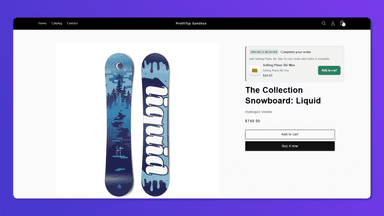
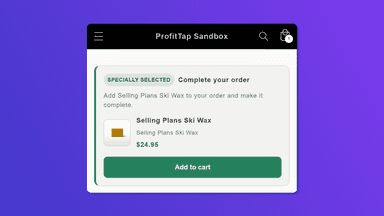
ProfitTap adds a recommendation card to your product pages. It shows one matching item a shopper can add in a single tap, with no pop-ups and no detour from the page. You decide what appears: the autopilot suggests a related item in stock, or you write your own rules. Everything shown is verified live against your store, so nothing sold out or outdated reaches the cart.
- Pick any product as your upsell in one click
- Set a fixed percentage discount of your choice
- A clean upsell block on the product page — no pop-ups
- The discount is applied for real in the cart at checkout
- One-tap add to cart on your product page. No pop-ups, no redirects.
- Autopilot recommends a related in-stock product — or you write your own rules.
- Live checks before every add, so a sold-out item never reaches the cart.



All the numbers
Every figure, side by side
A green dot marks the app ahead on a measured figure. Estimates, gaps and apps that leave no storefront trace never take the lead.
Adoption
| Measure |  Go Upsell |  ProfitTap |
|---|---|---|
| Detected stores | Not published | Not published |
| Net store change, 28 days | 0 | 0 |
| Stores added, 28 days | Not enough data | Not enough data |
| Big-brand share | Not enough data | Not enough data |
| Top store categories | Not published | Not published |
| Top store countries | Not published | Not published |
Reviews
| Measure | Go Upsell | ProfitTap |
|---|---|---|
| App Store rating | Not published | 5.0 ★ |
| App Store reviews | Not published | 1 |
| New reviews, 28 days | Not enough data | Not enough data |
| Reviewers a year or more in | Not enough data | Not enough data |
FAQ
Go Upsell and ProfitTap: common questions
- What features does each app list that the other doesn’t?
- ProfitTap lists 5 the others don’t mention, such as Custom rules, Multi-currency, Multi-language, One-click add-ons. A feature missing from a listing may still be supported; this compares what each App Store listing says.
- Where does this comparison’s data come from?
- Shoplist crawls Shopify storefronts to detect which apps each store runs, and reads each app’s Shopify App Store listing for reviews, pricing, features and integrations. Store counts are as of Oct 13, 2026 for Go Upsell, Oct 14, 2026 for ProfitTap; estimated figures are labeled.
How Shoplist compares apps
Store counts come from Shoplist’s crawl of Shopify storefronts, which detects the apps each store runs; they are as of Oct 13, 2026 for Go Upsell, Oct 14, 2026 for ProfitTap. Reviews, ratings, plans, features and integrations come from each app’s Shopify App Store listing. 28-day figures are labeled when estimated, and a figure that is missing or estimated never decides who leads. Read the methodology.