

GloSize vs Size Chart
Two Shopify apps, side by side: detected stores, momentum, reviews, plans, listed features and who runs each. Store counts as of Oct 14, 2026 for GloSize, Oct 13, 2026 for Size Chart.
The short answer
- Paid plans start at $5.99/month for GloSize and $0.99/month for Size Chart.
- Size Chart lists 6 features GloSize’s listing doesn’t mention, including Highlight differences, Images, Show and hide.
Head to head


Standard
- · Assign to products or collections
- · Measurement image and footer note
- · Multiple tables in one popup
- · Unit switching: cm, inch, kg, lb
- · Unlimited size charts
Basic Plan
Coverage counts what each App Store listing names. Every feature, checked off app by app, is in Shoplist.
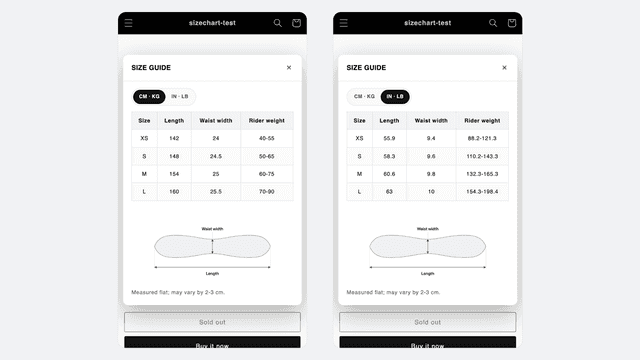
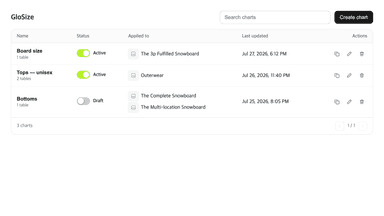
See every featureA size chart needs to do two things: open in a popup on the product page, and switch units. GloSize is built around those two. You set the units on the column itself, in the grid where you type the values: centimeters to inches, kilograms to pounds, or the reverse. Weight works the same way length does. Build the table once, assign it to products or a whole collection, and update it in one place.
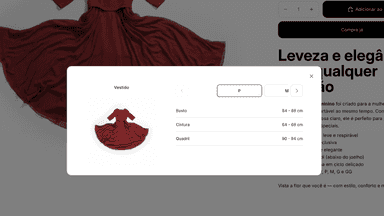
Help your customers choose the right size before they buy. Display size charts and size guides directly on your product pages, providing clear information about measurements and sizing. Reduce uncertainty when shopping for clothing, footwear, and accessories, and create a simpler shopping experience for customers looking for the right fit.
- Switch units column by column: centimeters, inches, kilograms and pounds
- Show several size tables in one popup, such as tops and bottoms together
- Add a measurement guide image and a note under any chart
- Start from templates for tops, bottoms, outerwear and shoes, or from scratch
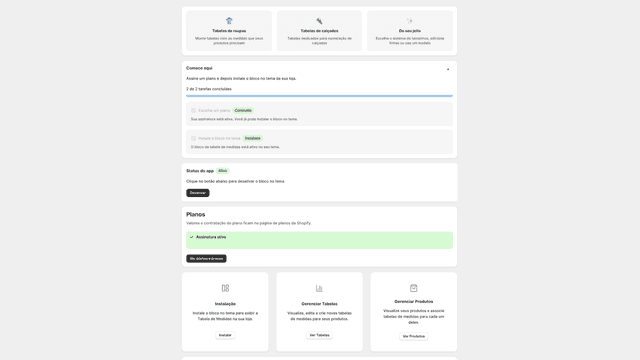
- Crie tabelas de medidas personalizadas para roupas e calçados
- Associe guias de tamanho a produtos
- Exiba tabelas de medidas diretamente nas páginas de produto
- Ofereça suporte a diferentes sistemas de numeração e medidas


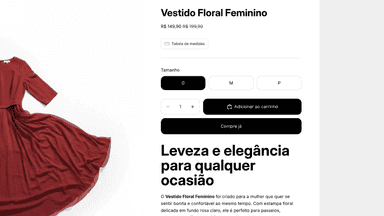
All the numbers
Every figure, side by side
A green dot marks the app ahead on a measured figure. Estimates, gaps and apps that leave no storefront trace never take the lead.
Adoption
| Measure |  GloSize |  Size Chart |
|---|---|---|
| Detected stores | Not published | Not published |
| Net store change, 28 days | 0 | 0 |
| Stores added, 28 days | Not enough data | Not enough data |
| Big-brand share | Not enough data | Not enough data |
| Top store categories | Not published | Not published |
| Top store countries | Not published | Not published |
Reviews
| Measure | GloSize | Size Chart |
|---|---|---|
| App Store rating | Not published | Not published |
| App Store reviews | Not published | Not published |
| New reviews, 28 days | Not enough data | Not enough data |
| Reviewers a year or more in | Not enough data | Not enough data |
Pricing
| Measure | GloSize | Size Chart |
|---|---|---|
| Free plan | Not listed | Not listed |
| Lowest paid monthly plan | $5.99/month | $0.99/month(ahead) |
| Longest free trial | 14 days | 3 days |
| Plans listed | 1 | 1 |
Listing
| Measure | GloSize | Size Chart |
|---|---|---|
| Shopify category rank | #123 | #106(ahead) |
| Shopify App Charts | Not on this week’s charts | Not on this week’s charts |
| Built for Shopify | No | No |
| Launched | Jul 30, 2026 | Jul 13, 2026 |
| Languages | 4 | 1 |
| Developer | Global Connection | Kokfy |
FAQ
GloSize and Size Chart: common questions
- Is GloSize or Size Chart cheaper?
- Paid plans start at $5.99/month for GloSize and $0.99/month for Size Chart. Shoplist compares base prices only between monthly plans in the same currency; usage charges and annual plans vary, so check each plan’s limits.
- What features does each app list that the other doesn’t?
- GloSize lists 5 the others don’t mention, such as Mobile responsive, Multi-language, Pop-ups, Table layout. Size Chart lists 6 the others don’t mention, such as Highlight differences, Images, Show and hide, Specifications. A feature missing from a listing may still be supported; this compares what each App Store listing says.
- Where does this comparison’s data come from?
- Shoplist crawls Shopify storefronts to detect which apps each store runs, and reads each app’s Shopify App Store listing for reviews, pricing, features and integrations. Store counts are as of Oct 14, 2026 for GloSize, Oct 13, 2026 for Size Chart; estimated figures are labeled.
How Shoplist compares apps
Store counts come from Shoplist’s crawl of Shopify storefronts, which detects the apps each store runs; they are as of Oct 14, 2026 for GloSize, Oct 13, 2026 for Size Chart. Reviews, ratings, plans, features and integrations come from each app’s Shopify App Store listing. 28-day figures are labeled when estimated, and a figure that is missing or estimated never decides who leads. Read the methodology.