

GA: Product Tabs with AI vs SS: Toggle Description
Two Shopify apps, side by side: detected stores, momentum, reviews, plans, listed features and who runs each. Store counts as of Oct 4, 2026 for GA, Oct 13, 2026 for SS.
The short answer
- On the Shopify App Store: GA 4.8 from 10 reviews and SS 4.1 from 17 reviews.
Head to head


Toggle long text anywhere via "show more" & "show less" links
Momentum
New reviews each month
Review pace is the clearest public read on how fast an app is winning new merchants.
Basic
- · Toggle long text anywhere on your site
Premium
- · Add tabs anywhere on your site
- · Everything in the Basic plan
Coverage counts what each App Store listing names. Every feature, checked off app by app, is in Shoplist.
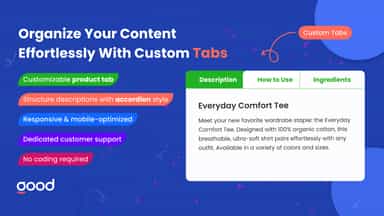
See every featureOrganize your store content with smart tabs and customizable product page tabs. Create product page FAQ sections, accordion tabs, and collapsible tab layouts for clean product display. Design products tabs with horizontal or vertical styles, adjust width, and build a product table effortlessly. With intuitive designer tools, manage descriptions and layouts faster while improving navigation and engagement.
Above the fold space is precious. Long text shouldn't displace other conversion-driving content like products, specs, and social links. The Toggle Description app allows you to manage the appearance of long text on your site by adding customizable "show more" and "show less" links to text that exceeds a maximum number of words or characters. When users click on these links the text will be shown or collapsed.
- Effortlessly design tabs to align with your brand and content style.
- Streamline your page design with easy-to-manage tabbed layouts.
- Seamlessly add product details, FAQs, or other information.
- Create and edit tabs without any coding knowledge.
- Manage the appearance of long text by adding "show more" and "show less" links
- Works with all text: product & collection descriptions, blog, homepage, and more
- Limit text by words, characters, and more, no coding required



All the numbers
Every figure, side by side
A green dot marks the app ahead on a measured figure. Estimates, gaps and apps that leave no storefront trace never take the lead.
Adoption
| Measure |  GA |  SS |
|---|---|---|
| Detected stores | Not published | Not published |
| Net store change, 28 days | 0 | 0 |
| Stores added, 28 days | Not enough data | Not enough data |
| Big-brand share | Not enough data | Not enough data |
| Top store categories | Not published | Not published |
| Top store countries | Not published | Not published |
Reviews
| Measure | GA | SS |
|---|---|---|
| App Store rating | 4.8 ★(ahead) | 4.1 ★ |
| App Store reviews | 10 | 17(ahead) |
| New reviews, 28 days | Not enough data | 0 |
| Reviewers a year or more in | Not enough data | Not enough data |
FAQ
GA and SS: common questions
- Which has better reviews, GA or SS?
- On the Shopify App Store: GA 4.8 from 10 reviews and SS 4.1 from 17 reviews.
- Where does this comparison’s data come from?
- Shoplist crawls Shopify storefronts to detect which apps each store runs, and reads each app’s Shopify App Store listing for reviews, pricing, features and integrations. Store counts are as of Oct 4, 2026 for GA, Oct 13, 2026 for SS; estimated figures are labeled.
How Shoplist compares apps
Store counts come from Shoplist’s crawl of Shopify storefronts, which detects the apps each store runs; they are as of Oct 4, 2026 for GA, Oct 13, 2026 for SS. Reviews, ratings, plans, features and integrations come from each app’s Shopify App Store listing. 28-day figures are labeled when estimated, and a figure that is missing or estimated never decides who leads. Read the methodology.