

test vs Ideliver
Two Shopify apps, side by side: detected stores, momentum, reviews, plans, listed features and who runs each. Store counts as of Oct 13, 2026 for test, May 20, 2026 for Ideliver.
The short answer
Head to head


Starter
- · 500 fulfillments per month
- · AI column auto-mapping
- · CSV / TSV / TXT / XLS / XLSX / JSON
- · Manual upload + Inbox webhook
- · Sync history & per-row errors
Growth
- · 2,500 fulfillments per month
- · 5-minute polling intervals
- · AI column mapping + saved templates
- · Daily email reports
- · SFTP, Dropbox, Email (IMAP), Inbox
- · SHA-256 duplicate protection
Scale
- · 1-minute priority polling
- · Advanced logs + audit export
- · All ingestion sources
- · Daily email reports
- · Priority email support
- · Unlimited fulfillments
Coverage counts what each App Store listing names. Every feature, checked off app by app, is in Shoplist.
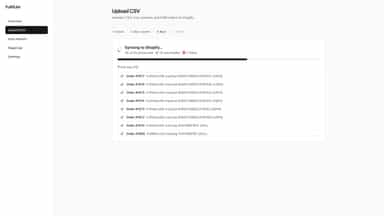
See every featureFulfillcsv automates fulfillment syncing from warehouse exports, 3PL files, SFTP folders, Dropbox uploads, and email attachments. AI-assisted mapping detects order IDs, tracking numbers, and carriers automatically — even with messy headers. Bulk sync fulfillments, prevent duplicate processing, and monitor operations from one dashboard. Supports CSV, TSV, TXT, XLSX, XLS, and JSON fulfillment exports.
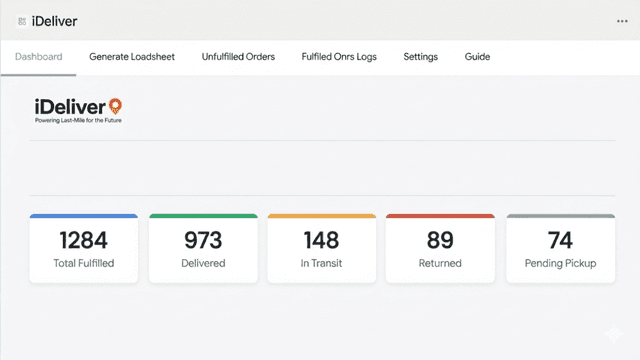
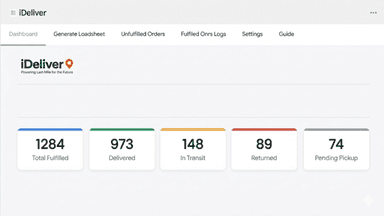
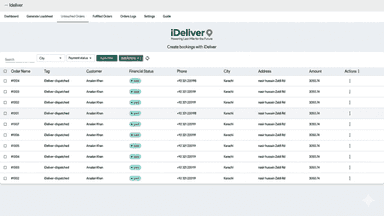
iDeliver streamlines your order fulfillment with one-click bulk dispatching, auto-generated loadsheets, and real-time shipment tracking. Orders are automatically tagged as Dispatched, In Transit, Delivered, Returned, or Cancelled, keeping your store organized without manual effort. A live dashboard gives you instant visibility into fulfillment performance, so you always know where your shipments stand.
- Bulk sync tracking numbers from CSV files
- Automatically fulfill Shopify orders in seconds
- Preview and map CSV columns before syncing
- Detailed sync logs with success and error tracking
- Bulk fulfill Shopify orders and auto-generate courier loadsheets
- Auto-tag orders by status: Dispatched, In Transit, Delivered, Returned
- Live dashboard showing real-time fulfillment and shipment statistics



All the numbers
Every figure, side by side
A green dot marks the app ahead on a measured figure. Estimates, gaps and apps that leave no storefront trace never take the lead.
Adoption
| Measure |  test |  Ideliver |
|---|---|---|
| Detected stores | Not published | Not published |
| Net store change, 28 days | 0 | 0 |
| Stores added, 28 days | Not enough data | Not enough data |
| Big-brand share | Not enough data | Not enough data |
| Top store categories | Not published | Not published |
| Top store countries | Not published | Not published |
Reviews
| Measure | test | Ideliver |
|---|---|---|
| App Store rating | Not published | Not published |
| App Store reviews | Not published | Not published |
| New reviews, 28 days | Not enough data | Not enough data |
| Reviewers a year or more in | Not enough data | Not enough data |
FAQ
test and Ideliver: common questions
- Where does this comparison’s data come from?
- Shoplist crawls Shopify storefronts to detect which apps each store runs, and reads each app’s Shopify App Store listing for reviews, pricing, features and integrations. Store counts are as of Oct 13, 2026 for test, May 20, 2026 for Ideliver; estimated figures are labeled.
How Shoplist compares apps
Store counts come from Shoplist’s crawl of Shopify storefronts, which detects the apps each store runs; they are as of Oct 13, 2026 for test, May 20, 2026 for Ideliver. Reviews, ratings, plans, features and integrations come from each app’s Shopify App Store listing. 28-day figures are labeled when estimated, and a figure that is missing or estimated never decides who leads. Read the methodology.