
Flowkit: Timers & Counters vs Workflow Automation—React Flow
Two Shopify apps, side by side: detected stores, momentum, reviews, plans, listed features and who runs each. Store counts as of Nov 6, 2026 for Flowkit, Nov 7, 2026 for Workflow Automation—React Flow.
The short answer
- Paid plans start at $14/month for Flowkit and $19/month for Workflow Automation—React Flow.
- Workflow Automation—React Flow lists 35 features Flowkit’s listing doesn’t mention, including Address, Analytics, Archiving.
Head to head

Automate tasks, add tag, send email, stock alert and much more
Momentum
New reviews each month
Review pace is the clearest public read on how fast an app is winning new merchants.
Standard
Pay as you go
- · 100 runs / month
- · 20 active workflows
- · 24/7 chat, email, and phone support
- · Unlimited actions
- · Unlimited conditions
- · Unlimited triggers
Starter
- · 1,000 runs / month
- · 24/7 chat, email, and phone support
- · Shopify Functions
- · Unlimited actions
- · Unlimited conditions
- · Unlimited triggers
Standard
- · 10,000 runs / month
- · 24/7 chat, email, and phone support
- · Shopify Functions
- · Unlimited actions
- · Unlimited conditions
- · Unlimited triggers
Professional
- · 24/7 chat, email, and phone support
- · 50,000 runs / month
- · Shopify Functions
- · Unlimited actions
- · Unlimited conditions
- · Unlimited triggers
Unlimited
- · 24/7 chat, email, and phone support
- · Shopify Functions
- · Unlimited actions
- · Unlimited conditions
- · Unlimited runs/month
- · Unlimited triggers
Coverage counts what each App Store listing names. Every feature, checked off app by app, is in Shoplist.
See every featureFlowkit adds nine steps to Shopify Flow, each named “Flowkit:”. Start a timer of up to 90 days; when it is due, Timer elapsed fires, and its (order) and (customer) versions carry what you attached. Cancel it by key from another workflow. Keep named counters that reset every day, week or calendar month. Call an API and use its status, body or one JSON value in the next step.
Works with Shopify Flow. Tag orders with hot products, assign VIP customer tags, priority order tags, auto tag customers by total spent, fraud filter to tag or cancel high risk orders, low stock alert emails, auto email or cancel unpaid orders, auto fulfill or auto cancel orders from blacklisted customers, automatic discounts and discount codes, loyalty store credits, order editing, draft orders, automated order and…
- Timers of up to 90 days that fire a trigger, and can be cancelled by key
- Named counters that reset each day, week or month; returns the new value
- HTTP request action that returns the status, body and one JSON value
- Low-stock and stock-received triggers for one location at a time
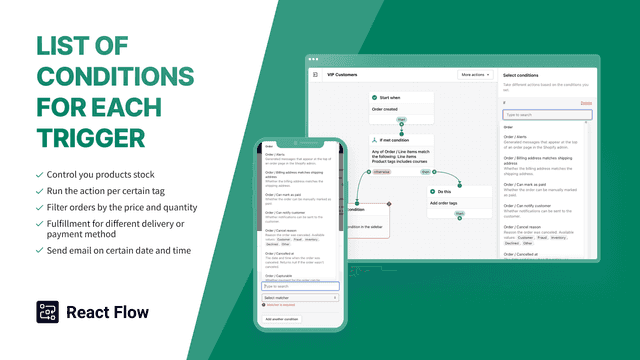
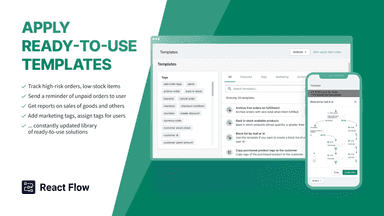
- Use existing workflow templates or create your own unique automated Shopify flow
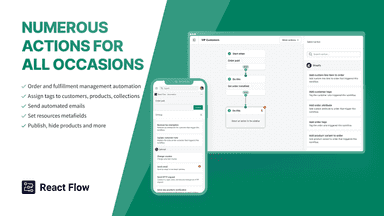
- Many triggers, conditions, and actions to automate tasks of varying complexity
- Set up automatic counting of any events that you can imagine and use it in flows
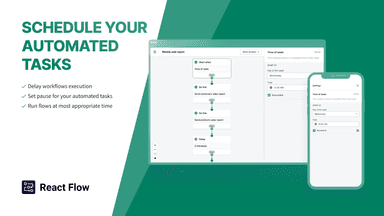
- Scheduled workflows execution and delays between tasks are available
All the numbers
Every figure, side by side
A green dot marks the app ahead on a measured figure. Estimates, gaps and apps that leave no storefront trace never take the lead.
Adoption
| Measure |  Workflow Automation—React Flow | |
|---|---|---|
| Detected stores | Not published | Not published |
| Net store change, 28 days | 0 | 0 |
| Stores added, 28 days | Not enough data | Not enough data |
| Big-brand share | Not enough data | Not enough data |
| Top store categories | Not published | Not published |
| Top store countries | Not published | Not published |
Reviews
| Measure | Workflow Automation—React Flow | |
|---|---|---|
| App Store rating | Not published | 5.0 ★ |
| App Store reviews | Not published | 175 |
| New reviews, 28 days | Not enough data | 0 |
| Reviewers a year or more in | Not enough data | Not enough data |
Pricing
| Measure | Workflow Automation—React Flow | |
|---|---|---|
| Free plan | Not listed | Not listed |
| Lowest paid monthly plan | $14/month(ahead) | $19/month |
| Longest free trial | 14 days | 7 days |
| Plans listed | 1 | 5 |
Listing
| Measure | Workflow Automation—React Flow | |
|---|---|---|
| Shopify category rank | Not enough data | #29 |
| Shopify App Charts | Not on this week’s charts | Not on this week’s charts |
| Built for Shopify | No | Yes |
| Launched | Nov 6, 2026 | Dec 2, 2021 |
| Languages | 1 | 1 |
| Developer | Sam Bartolotta | DevIT |
FAQ
Flowkit and Workflow Automation—React Flow: common questions
- Is Flowkit or Workflow Automation—React Flow cheaper?
- Paid plans start at $14/month for Flowkit and $19/month for Workflow Automation—React Flow. Shoplist compares base prices only between monthly plans in the same currency; usage charges and annual plans vary, so check each plan’s limits.
- What features does each app list that the other doesn’t?
- Workflow Automation—React Flow lists 35 the others don’t mention, such as Address, Analytics, Archiving, Auto-sync data. A feature missing from a listing may still be supported; this compares what each App Store listing says.
- Where does this comparison’s data come from?
- Shoplist crawls Shopify storefronts to detect which apps each store runs, and reads each app’s Shopify App Store listing for reviews, pricing, features and integrations. Store counts are as of Nov 6, 2026 for Flowkit, Nov 7, 2026 for Workflow Automation—React Flow; estimated figures are labeled.
How Shoplist compares apps
Store counts come from Shoplist’s crawl of Shopify storefronts, which detects the apps each store runs; they are as of Nov 6, 2026 for Flowkit, Nov 7, 2026 for Workflow Automation—React Flow. Reviews, ratings, plans, features and integrations come from each app’s Shopify App Store listing. 28-day figures are labeled when estimated, and a figure that is missing or estimated never decides who leads. Read the methodology.