

Fits In The Box vs FreeShip Pro
Two Shopify apps, side by side: detected stores, momentum, reviews, plans, listed features and who runs each. Store counts as of Oct 13, 2026.
The short answer
- Only FreeShip Pro lists a free plan. Paid plans start at $9/month for Fits In The Box and $49/month for FreeShip Pro.
- Fits In The Box lists 3 features FreeShip Pro’s listing doesn’t mention, including Custom rules, Dimension-based, Product-based.
Head to head


Starter
- · Basic product recommendations
- · Cart shipping estimate widget
- · Email support (48hr response)
- · Real-time 3D bin packing engine
- · Up to 100 synced products
- · Up to 5 box configurations
Pro
- · Analytics dashboard with insights
- · Cold chain and special handling
- · Custom packing rules and constraints
- · Multi-box packing for large orders
- · Priority email support (24hr)
- · Smart recommendations by fit + margin
Free
- · 1 Active Campaign
- · Basic Free Shipping Bar
- · No Credit Card Required
- · Standard Placement
STARTER
- · 1 Active Campaign limit
- · Basic Targeting rules
- · Minimal & Clean Designs
- · Standard Analytics
PRO
- · Advanced Analytics
- · Geo & Device Targeting
- · High-Converting Animated Designs
- · Priority Support
- · Unlimited Campaigns
PREMIUM
- · Advanced A/B Testing
- · Custom CSS Support
- · Dedicated Account Manager
- · Maximum Urgency Indicators
- · Top-Tier Striped Loading Bars
Coverage counts what each App Store listing names. Every feature, checked off app by app, is in Shoplist.
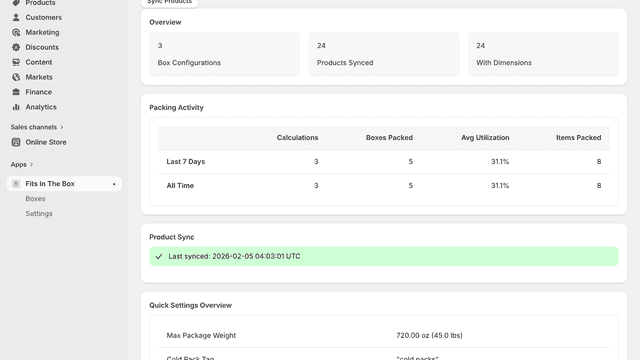
See every featureFits In The Box uses a 3D packing engine to show customers exactly what else fits in their current shipment. It helps merchants build bigger orders by giving shoppers a reason to add one more item. The app installs in minutes, works with your existing products and shipping rates, and handles complex scenarios like multi-box orders and cold chain requirements automatically.
FreeShip Pro helps merchants encourage larger purchases by displaying a free shipping progress bar based on the customer’s cart value. The app shows real-time progress toward a free shipping goal, helping customers understand how much more they need to spend to qualify for free shipping.
- Real-time 3D packing calculates remaining box space as shoppers browse
- Smart upsell suggestions highlight products that ship with no added weight
- Works out of the box—just enter your box sizes and shipping rates
- Multi-box logic splits large orders across boxes for accurate shipping
- Free Shipping Progress Bar with real-time cart value tracking.
- Custom shipping goals and personalized customer messages
- Create and manage multiple free shipping campaigns


All the numbers
Every figure, side by side
A green dot marks the app ahead on a measured figure. Estimates, gaps and apps that leave no storefront trace never take the lead.
Adoption
| Measure |  Fits In The Box |  FreeShip Pro |
|---|---|---|
| Detected stores | Not published | Not published |
| Net store change, 28 days | 0 | 0 |
| Stores added, 28 days | Not enough data | Not enough data |
| Big-brand share | Not enough data | Not enough data |
| Top store categories | Not published | Not published |
| Top store countries | Not published | Not published |
Reviews
| Measure | Fits In The Box | FreeShip Pro |
|---|---|---|
| App Store rating | Not published | Not published |
| App Store reviews | Not published | Not published |
| New reviews, 28 days | Not enough data | Not enough data |
| Reviewers a year or more in | Not enough data | Not enough data |
Pricing
| Measure | Fits In The Box | FreeShip Pro |
|---|---|---|
| Free plan | Not listed | Yes |
| Lowest paid monthly plan | $9/month(ahead) | $49/month |
| Longest free trial | 14 days | Not listed |
| Plans listed | 2 | 4 |
Listing
| Measure | Fits In The Box | FreeShip Pro |
|---|---|---|
| Shopify category rank | #458(ahead) | #541 |
| Shopify App Charts | Not on this week’s charts | Not on this week’s charts |
| Built for Shopify | No | No |
| Launched | Mar 13, 2026 | Jun 12, 2026 |
| Languages | 1 | 1 |
| Developer | Swagstack | Sisodiya Web Solutions |
FAQ
Fits In The Box and FreeShip Pro: common questions
- Is Fits In The Box or FreeShip Pro cheaper?
- Only FreeShip Pro lists a free plan. Paid plans start at $9/month for Fits In The Box and $49/month for FreeShip Pro. Shoplist compares base prices only between monthly plans in the same currency; usage charges and annual plans vary, so check each plan’s limits.
- What features does each app list that the other doesn’t?
- Fits In The Box lists 3 the others don’t mention, such as Custom rules, Dimension-based, Product-based. FreeShip Pro lists 3 the others don’t mention, such as Custom notifications, Customer-based, Flat fee. A feature missing from a listing may still be supported; this compares what each App Store listing says.
- Where does this comparison’s data come from?
- Shoplist crawls Shopify storefronts to detect which apps each store runs, and reads each app’s Shopify App Store listing for reviews, pricing, features and integrations. Store counts are as of Oct 13, 2026; estimated figures are labeled.
How Shoplist compares apps
Store counts come from Shoplist’s crawl of Shopify storefronts, which detects the apps each store runs; they are as of Oct 13, 2026. Reviews, ratings, plans, features and integrations come from each app’s Shopify App Store listing. 28-day figures are labeled when estimated, and a figure that is missing or estimated never decides who leads. Read the methodology.