
Fitify: AI Virtual Try‑On vs PixelFitter
Two Shopify apps, side by side: detected stores, momentum, reviews, plans, listed features and who runs each. Store counts as of Nov 10, 2026 for Fitify, Oct 14, 2026 for PixelFitter.
The short answer
- Only Fitify lists a free plan. Paid plans start at $19/month for Fitify and $299/month for PixelFitter.
Head to head

Momentum
New reviews each month
Review pace is the clearest public read on how fast an app is winning new merchants.
Free
- · 20 try-on renders a month
- · Product page try-on
- · Unlimited re-views, pay for new looks
Starter
- · 150 try-on renders a month
- · Face-only mode
- · Then $0.10 per extra render
- · Unlimited re-views
Growth
- · 500 try-on renders a month
- · Collection, search and home page try-on
- · Face-only mode
- · Then $0.10 per extra render
- · Unlimited re-views
Scale
- · 1,800 try-on renders a month
- · Collection, search and home page try-on
- · Face-only mode
- · Then $0.10 per extra render
- · Unlimited re-views
Basic Plan
Coverage counts what each App Store listing names. Every feature, checked off app by app, is in Shoplist.
See every featureFitify adds AI virtual try-on to your product pages. Shoppers upload a photo or pick a stock model and see your garment on them in seconds. Each look is cached, so shoppers can come back to it. You map each product to a clean garment image and set a monthly render budget. Re-views are free and spend is capped. Shopper photos need consent, are never added to your store, and are deleted within 30 days.
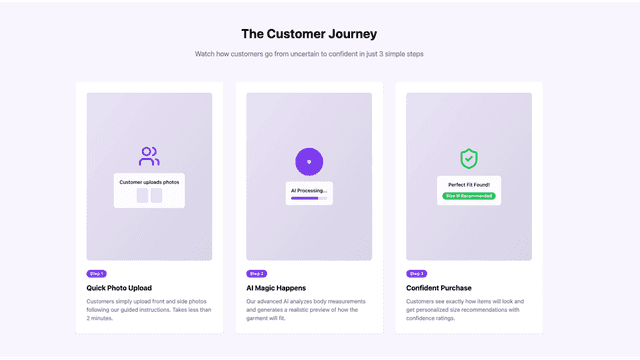
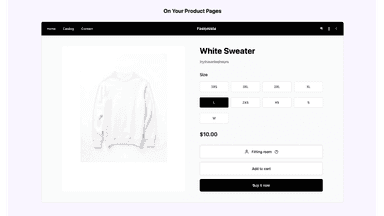
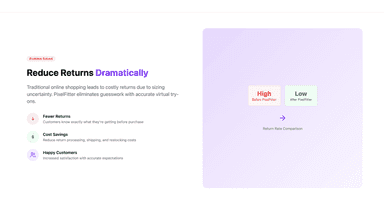
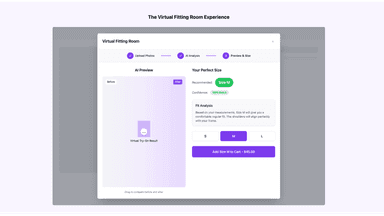
PixelFitter enables customers to take photos and see how garments will look on their body using AI technology. The app provides personalized size recommendations based on body measurements and fit analysis. Merchants can easily configure which products show the virtual try-on widget and upload garment images. The solution integrates seamlessly into existing product pages without disrupting the shopping experience.
- Photo try-on: shopper uploads a photo or picks a stock model
- Free trial for 7 days on paid plans, Free plan w
- Map each product to a garment image from one simple admin page
- Monthly render caps, $0.10 per extra render, optional credit packs
- AI virtual try-on shows how garments fit using customer photos
- Personalized size recommendations based on body measurements
- Easy product configuration to choose which items display the try-on widget
- Seamless integration into existing product pages without theme modifications
All the numbers
Every figure, side by side
A green dot marks the app ahead on a measured figure. Estimates, gaps and apps that leave no storefront trace never take the lead.
Adoption
| Measure |  PixelFitter | |
|---|---|---|
| Detected stores | Not published | Not published |
| Net store change, 28 days | 0 | 0 |
| Stores added, 28 days | Not enough data | Not enough data |
| Big-brand share | Not enough data | Not enough data |
| Top store categories | Not published | Not published |
| Top store countries | Not published | Not published |
Reviews
| Measure | PixelFitter | |
|---|---|---|
| App Store rating | Not published | Not published |
| App Store reviews | Not published | Not published |
| New reviews, 28 days | Not enough data | Not enough data |
| Reviewers a year or more in | Not enough data | Not enough data |
Pricing
| Measure | PixelFitter | |
|---|---|---|
| Free plan | Yes | Not listed |
| Lowest paid monthly plan | $19/month(ahead) | $299/month |
| Longest free trial | 7 days | 30 days |
| Plans listed | 4 | 1 |
Listing
| Measure | PixelFitter | |
|---|---|---|
| Shopify category rank | Not enough data | #376 |
| Shopify App Charts | Not on this week’s charts | Not on this week’s charts |
| Built for Shopify | No | No |
| Launched | Nov 6, 2026 | Sep 15, 2025 |
| Languages | 1 | 1 |
| Developer | XCO Apps | PixelFitter |
FAQ
Fitify and PixelFitter: common questions
- Is Fitify or PixelFitter cheaper?
- Only Fitify lists a free plan. Paid plans start at $19/month for Fitify and $299/month for PixelFitter. Shoplist compares base prices only between monthly plans in the same currency; usage charges and annual plans vary, so check each plan’s limits.
- Where does this comparison’s data come from?
- Shoplist crawls Shopify storefronts to detect which apps each store runs, and reads each app’s Shopify App Store listing for reviews, pricing, features and integrations. Store counts are as of Nov 10, 2026 for Fitify, Oct 14, 2026 for PixelFitter; estimated figures are labeled.
How Shoplist compares apps
Store counts come from Shoplist’s crawl of Shopify storefronts, which detects the apps each store runs; they are as of Nov 10, 2026 for Fitify, Oct 14, 2026 for PixelFitter. Reviews, ratings, plans, features and integrations come from each app’s Shopify App Store listing. 28-day figures are labeled when estimated, and a figure that is missing or estimated never decides who leads. Read the methodology.