
Fit: Size Charts vs Sizemate
Two Shopify apps, side by side: detected stores, momentum, reviews, plans, listed features and who runs each. Store counts as of Oct 14, 2026 for Fit, Nov 12, 2026 for Sizemate.
The short answer
- Both list a free plan. Paid plans start at $7/month for Fit and $4.99/month for Sizemate.
- Fit lists 3 features Sizemate’s listing doesn’t mention, including Mobile responsive, Product page, Table layout.
Head to head

Free
- · CSV measurement tables
- · Centimeter and inch display options
- · No percentage or per-order fees
- · One chart; assign up to 50 products
Growth
- · CSV measurement tables
- · Centimeter and inch display options
- · No percentage or per-order fees
- · Up to 100 charts; 50 products per chart
Free
- · 11 ready-made templates
- · 2 size charts on any number of products
- · Matches your theme, light or dark
- · Shopper text in 8 languages
- · cm, mm, in, ft, kg and lb
Pro
- · Design studio: styles, fonts, layouts
- · Fit Finder on every chart
- · No branding, CSV import and export
- · Photo card and fit scale
- · Unlimited charts and all 60 templates
Plus
- · Chart translations for every language
- · Everything in Pro
- · Insights: views, sizes, missing sizes
- · Priority support and chart setup
- · Size memory for returning shoppers
Coverage counts what each App Store listing names. Every feature, checked off app by app, is in Shoplist.
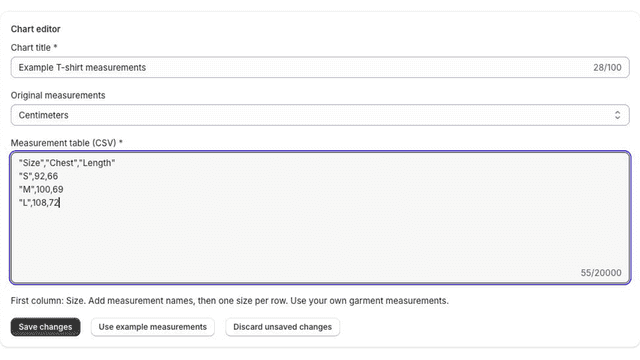
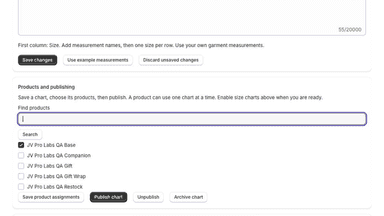
See every featureFit helps apparel and accessory stores publish measurement tables using their own sizing information. Paste a CSV table to create a size chart, assign it to selected products, and add the size-chart block in your theme editor. Shoppers can switch between centimeters and inches. Preview changes before publishing and pause charts when needed.
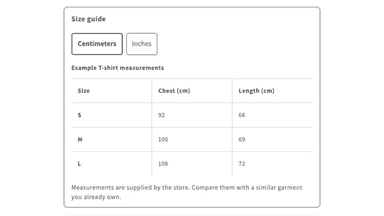
Sizemate adds a size chart button to your product pages. The chart takes on your theme's fonts and colors, and works in light or dark mode. Shoppers switch between cm and inches with one tap, and see numbered how-to-measure illustrations. The Fit Finder compares a shopper's measurements with your own chart and suggests a size. Start from ready-made templates or paste a table from a spreadsheet.
- Create measurement tables using your own garment sizing information
- Assign charts to selected products through a theme app block
- Let shoppers switch between centimeter and inch measurements
- A size chart that takes on your theme's fonts and colors, light or dark
- Fit Finder suggests a size from your own chart and selects it on the page
- Shoppers switch between cm and inches, kg and lb, with one tap
- Start from ready-made templates, or paste a table from Excel or Google Sheets
All the numbers
Every figure, side by side
A green dot marks the app ahead on a measured figure. Estimates, gaps and apps that leave no storefront trace never take the lead.
Adoption
| Measure |  Fit | |
|---|---|---|
| Detected stores | Not published | Not published |
| Net store change, 28 days | 0 | Not enough data |
| Stores added, 28 days | Not enough data | Not enough data |
| Big-brand share | Not enough data | Not enough data |
| Top store categories | Not published | Not published |
| Top store countries | Not published | Not published |
Reviews
| Measure | Fit | |
|---|---|---|
| App Store rating | Not published | Not published |
| App Store reviews | Not published | Not published |
| New reviews, 28 days | Not enough data | Not enough data |
| Reviewers a year or more in | Not enough data | Not enough data |
FAQ
Fit and Sizemate: common questions
- Is Fit or Sizemate cheaper?
- Both list a free plan. Paid plans start at $7/month for Fit and $4.99/month for Sizemate. Shoplist compares base prices only between monthly plans in the same currency; usage charges and annual plans vary, so check each plan’s limits.
- What features does each app list that the other doesn’t?
- Fit lists 3 the others don’t mention, such as Mobile responsive, Product page, Table layout. Sizemate lists 2 the others don’t mention, such as Multi-language, Pop-ups. A feature missing from a listing may still be supported; this compares what each App Store listing says.
- Where does this comparison’s data come from?
- Shoplist crawls Shopify storefronts to detect which apps each store runs, and reads each app’s Shopify App Store listing for reviews, pricing, features and integrations. Store counts are as of Oct 14, 2026 for Fit, Nov 12, 2026 for Sizemate; estimated figures are labeled.
How Shoplist compares apps
Store counts come from Shoplist’s crawl of Shopify storefronts, which detects the apps each store runs; they are as of Oct 14, 2026 for Fit, Nov 12, 2026 for Sizemate. Reviews, ratings, plans, features and integrations come from each app’s Shopify App Store listing. 28-day figures are labeled when estimated, and a figure that is missing or estimated never decides who leads. Read the methodology.