

File Upload by Uploadery vs UploadLab ‑ Custom File Upload
Two Shopify apps, side by side: detected stores, momentum, reviews, plans, listed features and who runs each. Store counts as of Nov 9, 2026 for File Upload by Uploadery, Oct 14, 2026 for UploadLab.
The short answer
- Both list a free plan. Paid plans start at $9.99/month for File Upload by Uploadery and $12/month for UploadLab.
- File Upload by Uploadery lists 8 features UploadLab’s listing doesn’t mention, including Add-ons, Custom rules, Dropdowns.
Head to head


Give your customers the ability to send files with their order


- United States
- United Kingdom
- Australia
Momentum
New reviews each month
Review pace is the clearest public read on how fast an app is winning new merchants.
Affiliate
- · 100% customizable
- · All file types
- · FREE for partner development stores
- · Up to 50MB per file
Professional
- · 100GB archive space
- · All file types
- · Fully customizable
- · No order limits
- · Unlimited file uploads
- · Up to 50MB per file
100MB
- · 100GB archive space
- · All file types
- · Fully customizable
- · No order limits
- · Unlimited file uploads
- · Up to 100MB per file
2GB
- · 100GB archive space
- · All file types
- · Fully customizable
- · No order limits
- · Unlimited file uploads
- · Up to 2GB per file
Free
- · 1 Custom Upload Form / Widget
- · Restrict to 3 File Formats (e.g., JPEG,
- · Up to 10MB file size limit
- · Up to 50 Uploaded Orders / month
Growth
- · Real-time Progress Bar & Instant Preview
- · Unlimited File Formats
- · Unlimited Upload Forms / Widgets
- · Up to 1,000 Uploaded Orders / month
- · Up to 100MB file size limit
Pro
- · No File Size Limits
- · Real-time Progress Bar & Instant Preview
- · Unlimited File Formats
- · Unlimited Upload Forms / Widgets
- · Up to 2,500 Uploaded Orders / month
Coverage counts what each App Store listing names. Every feature, checked off app by app, is in Shoplist.
See every featureUploadery lets customers upload files directly when adding your products to their cart. Files are attached to the order in Shopify so you can fulfill without chasing customers. Accept any file type, validate uploads, keep your fulfillment workflow clean, and your shoppers happy.
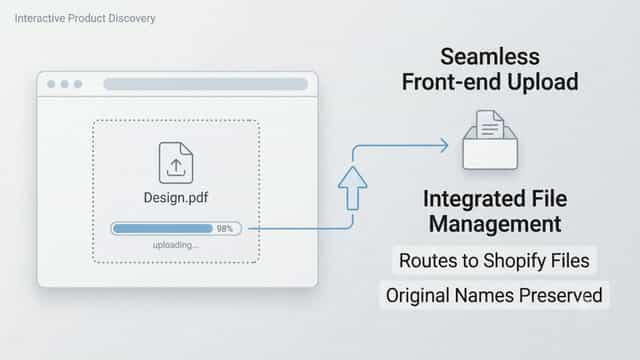
UploadLab makes selling custom products like printed t-shirts, personalised gifts, and custom signs effortless. It embeds a native upload widget directly on your product pages, allowing buyers to attach their artwork or photos before adding to cart. Customers get a real-time progress bar and live image previews to ensure accuracy.
- Let your customers upload files when they order from your shop
- Email customers a preview image of their made-to-order item
- Set minimum/maximum heights & widths for uploaded images
- Control what uploaded files you accept with specific filetypes or aspect ratios
- Embeds native upload fields on product pages for custom and personalised orders
- Shows instant visual image previews to ensure design accuracy before checkout
- Displays a real-time progress bar to prevent checkout abandonment
- Routes files directly to Shopify Files with original names fully preserved




All the numbers
Every figure, side by side
A green dot marks the app ahead on a measured figure. Estimates, gaps and apps that leave no storefront trace never take the lead.
Adoption
| Measure |  File Upload by Uploadery |  UploadLab |
|---|---|---|
| Detected stores | 1,666 | Not published |
| Net store change, 28 days | −7 | 0 |
| Stores added, 28 days | 16 | Not enough data |
| Big-brand share | 11% | Not enough data |
| Top store categories | Apparel & Accessories, Home & Garden, Arts & Entertainment | Not published |
| Top store countries | United States, United Kingdom, Australia | Not published |
Reviews
| Measure | File Upload by Uploadery | UploadLab |
|---|---|---|
| App Store rating | 4.6 ★ | Not published |
| App Store reviews | 182 | Not published |
| New reviews, 28 days | 1 | Not enough data |
| Reviewers a year or more in | 17% | Not enough data |
Pricing
| Measure | File Upload by Uploadery | UploadLab |
|---|---|---|
| Free plan | Yes | Yes |
| Lowest paid monthly plan | $9.99/month(ahead) | $12/month |
| Longest free trial | 14 days | Not listed |
| Plans listed | 4 | 3 |
Listing
| Measure | File Upload by Uploadery | UploadLab |
|---|---|---|
| Shopify category rank | #15(ahead) | #164 |
| Shopify App Charts | #1 in Custom file upload | Not on this week’s charts |
| Built for Shopify | Yes | No |
| Launched | May 20, 2015 | Jun 17, 2026 |
| Languages | 1 | 1 |
| Developer | ShopPad Inc. | Another, LLC |
FAQ
File Upload by Uploadery and UploadLab: common questions
- Is File Upload by Uploadery or UploadLab cheaper?
- Both list a free plan. Paid plans start at $9.99/month for File Upload by Uploadery and $12/month for UploadLab. Shoplist compares base prices only between monthly plans in the same currency; usage charges and annual plans vary, so check each plan’s limits.
- What features does each app list that the other doesn’t?
- File Upload by Uploadery lists 8 the others don’t mention, such as Add-ons, Custom rules, Dropdowns, File conversion. UploadLab lists 8 the others don’t mention, such as Custom fields, Custom font, Multi-select, Numbers. A feature missing from a listing may still be supported; this compares what each App Store listing says.
- Where does this comparison’s data come from?
- Shoplist crawls Shopify storefronts to detect which apps each store runs, and reads each app’s Shopify App Store listing for reviews, pricing, features and integrations. Store counts are as of Nov 9, 2026 for File Upload by Uploadery, Oct 14, 2026 for UploadLab; estimated figures are labeled.
How Shoplist compares apps
Store counts come from Shoplist’s crawl of Shopify storefronts, which detects the apps each store runs; they are as of Nov 9, 2026 for File Upload by Uploadery, Oct 14, 2026 for UploadLab. Reviews, ratings, plans, features and integrations come from each app’s Shopify App Store listing. 28-day figures are labeled when estimated, and a figure that is missing or estimated never decides who leads. Read the methodology.