

FeeLayer:Deposits & Surcharges vs Kai: Extra Fees & Surcharges
Two Shopify apps, side by side: detected stores, momentum, reviews, plans, listed features and who runs each. Store counts as of Oct 14, 2026 for FeeLayer:Deposits & Surcharges, Nov 15, 2026 for Kai.
The short answer
- Both list a free plan. Paid plans start at $4.99/month for FeeLayer:Deposits & Surcharges and $5.99/month for Kai.
Head to head


- United States
- Pakistan
Free
- · 1 active fee rule
- · Basic templates
- · Rule preview
Plus
- · 30-day fee history
- · All fee templates
- · CSV export
- · Checkout and draft fees
- · Unlimited active rules
Pro
- · Advanced reports
- · Audit log
- · Multi-market rules
- · POS fee workflows
- · Priority support
Free Plan
- · 1 active fee
- · Checkbox, toggle and popup widgets
- · Fee revenue analytics dashboard
- · Fixed or percentage fees
- · Market-based tariffs and fees
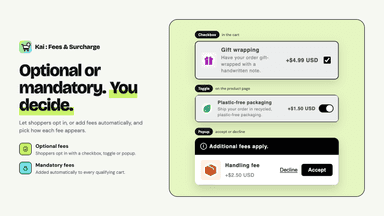
- · Optional and mandatory fees
Unlimited plan
- · Checkbox, toggle and popup widgets
- · Fee revenue analytics dashboard
- · Fixed or percentage fees
- · Market-based tariffs and fees
- · Optional and mandatory fees
- · POS compatibility
Coverage counts what each App Store listing names. Every feature, checked off app by app, is in Shoplist.
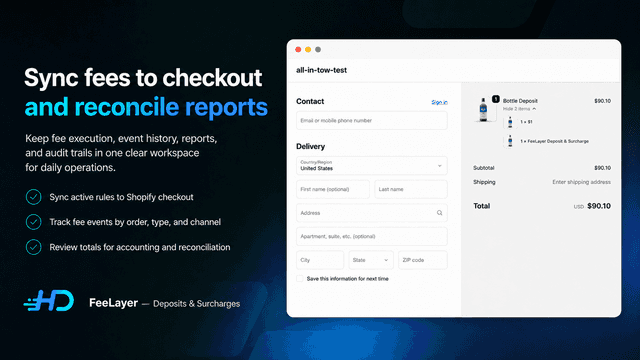
See every featureFeeLayer helps merchants create clear fees and deposits for products, carts, draft orders, and Shopify POS. Use rules for bottle and can deposits, recycling fees, tariffs, COD fees, service charges, and location-based surcharges. Match by product, collection, quantity, customer, market, or channel.
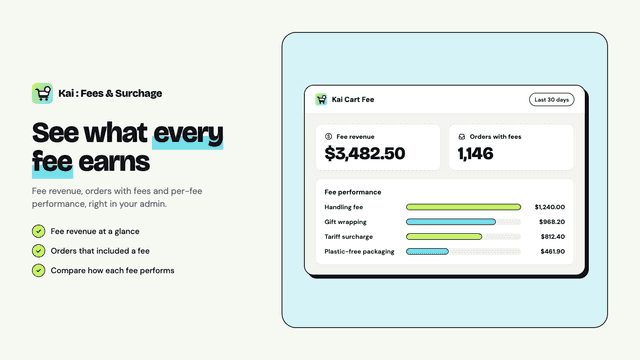
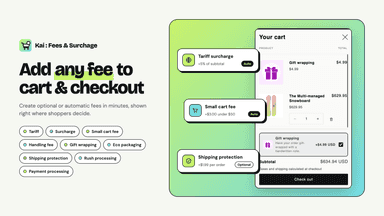
Kai lets you add any fee to your cart and checkout with no code. Create mandatory fees such as tariff surcharges, small order fees and handling fees that apply automatically, or optional add-ons such as gift wrapping, shipping protection and eco packaging that shoppers choose with a checkbox, toggle or popup.
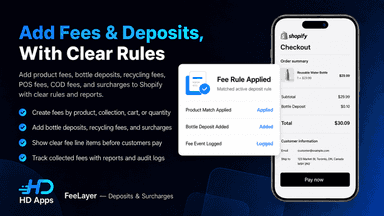
- Create product fees, deposits, recycling fees, COD fees, and POS fees.
- Use templates for bottle deposits, recycling fees, tariffs, and COD fees.
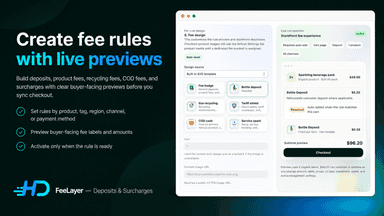
- Apply fees by product, collection, quantity, market, customer, or channel.
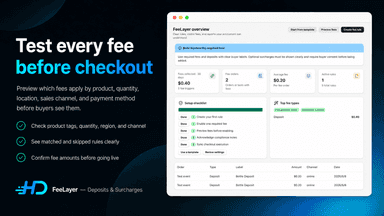
- Preview matched rules with a tester before enabling fees for buyers.
- Mandatory fees or optional add-ons shown as a checkbox, toggle or popup
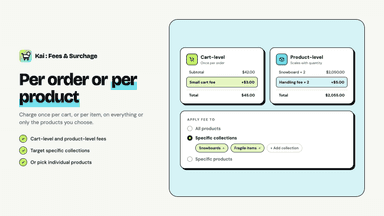
- Fixed or percentage fees per order or per product, with cart value rules
- Apply fees to all products, specific collections or individual products
- Market-based tariffs and fees shown in each shopper's local currency
All the numbers
Every figure, side by side
A green dot marks the app ahead on a measured figure. Estimates, gaps and apps that leave no storefront trace never take the lead.
Adoption
| Measure |  FeeLayer:Deposits & Surcharges |  Kai |
|---|---|---|
| Detected stores | Not published | 10 |
| Net store change, 28 days | 0 | +4 |
| Stores added, 28 days | Not enough data | 4 |
| Big-brand share | Not enough data | Not enough data |
| Top store categories | Not published | Apparel & Accessories, Services, Health & Beauty |
| Top store countries | Not published | United States, Pakistan |
Reviews
| Measure | FeeLayer:Deposits & Surcharges | Kai |
|---|---|---|
| App Store rating | Not published | 4.0 ★ |
| App Store reviews | Not published | 1 |
| New reviews, 28 days | Not enough data | Not enough data |
| Reviewers a year or more in | Not enough data | Not enough data |
Pricing
| Measure | FeeLayer:Deposits & Surcharges | Kai |
|---|---|---|
| Free plan | Yes | Yes |
| Lowest paid monthly plan | $4.99/month(ahead) | $5.99/month |
| Longest free trial | 7 days | 4 days |
| Plans listed | 3 | 2 |
Listing
| Measure | FeeLayer:Deposits & Surcharges | Kai |
|---|---|---|
| Shopify category rank | #152 | #39(ahead) |
| Shopify App Charts | Not on this week’s charts | #9 in Pricing - Other |
| Built for Shopify | No | No |
| Launched | Jun 10, 2026 | Sep 30, 2026 |
| Languages | 1 | 1 |
| Developer | hander | Scalix eCom |
FAQ
FeeLayer:Deposits & Surcharges and Kai: common questions
- Is FeeLayer:Deposits & Surcharges or Kai cheaper?
- Both list a free plan. Paid plans start at $4.99/month for FeeLayer:Deposits & Surcharges and $5.99/month for Kai. Shoplist compares base prices only between monthly plans in the same currency; usage charges and annual plans vary, so check each plan’s limits.
- Where does this comparison’s data come from?
- Shoplist crawls Shopify storefronts to detect which apps each store runs, and reads each app’s Shopify App Store listing for reviews, pricing, features and integrations. Store counts are as of Oct 14, 2026 for FeeLayer:Deposits & Surcharges, Nov 15, 2026 for Kai; estimated figures are labeled.
How Shoplist compares apps
Store counts come from Shoplist’s crawl of Shopify storefronts, which detects the apps each store runs; they are as of Oct 14, 2026 for FeeLayer:Deposits & Surcharges, Nov 15, 2026 for Kai. Reviews, ratings, plans, features and integrations come from each app’s Shopify App Store listing. 28-day figures are labeled when estimated, and a figure that is missing or estimated never decides who leads. Read the methodology.