

Why Disapproved vs Feedwatch: Google & Meta Audit
Two Shopify apps, side by side: detected stores, momentum, reviews, plans, listed features and who runs each. Store counts as of Aug 2, 2026 for Why Disapproved, Oct 14, 2026 for Feedwatch.
The short answer
- Only Feedwatch lists a free plan.
- Feedwatch lists 1 features Why Disapproved’s listing doesn’t mention, including Bulk editing.
Head to head


Free
- · Apply your first 5 AI categories
- · Draft 10 AI descriptions, save 5
- · Full scan of your catalog
- · Weekly email while issues remain
- · What each is missing, and a suggestion
Standard
- · AI descriptions, up to 200 a day
- · Bulk-apply AI categories, undo anytime
- · Each product Google disapproved, and why
- · Everything in Free
- · Fix a barcode without leaving the app
Coverage counts what each App Store listing names. Every feature, checked off app by app, is in Shoplist.
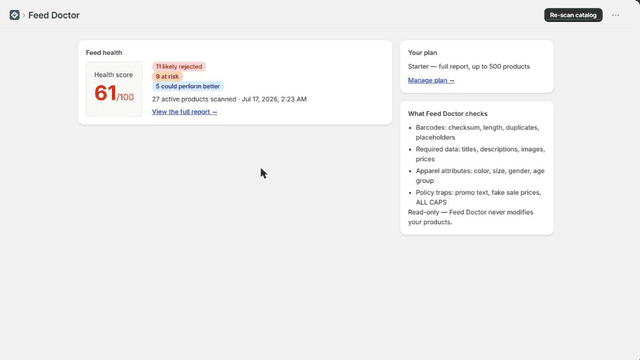
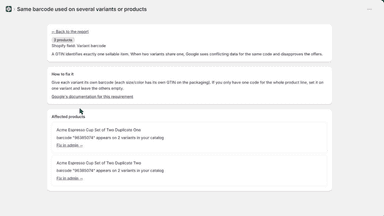
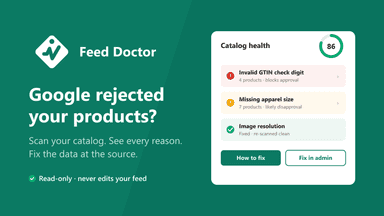
See every featureGoogle silently disapproves products the moment a GTIN, price, or apparel attribute is missing or invalid, and the official channel only shows cryptic error codes. Why Disapproved audits your catalog against Google Merchant Center rules (29 checks): every finding comes with a plain-English reason, the exact Shopify field to change, and a one-click link to fix it in your admin.
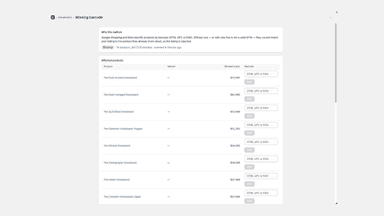
Google and Meta won't list a product with no image or brand. Meta also requires a description, and Google may show a product less when its description, barcode or category is missing. In your admin they still look published. Feedwatch scans your catalog and ranks the affected products by listed price. Fix them here: add a barcode, apply the categories AI suggests, or let it draft a missing description.
- Scans your whole catalog against Google Merchant Center rules in ~2 minutes
- Plain-English reason and exact fix for every disapproval risk
- Health score plus one-click deep links to fix products in your admin
- Scans your catalog and shows which products shopping channels will not list
- Prices every issue in your own stock value, so you fix the costly ones first
- Fix a missing barcode or product category without leaving the app
- Set one category across hundreds of products in a single action


All the numbers
Every figure, side by side
A green dot marks the app ahead on a measured figure. Estimates, gaps and apps that leave no storefront trace never take the lead.
Adoption
| Measure |  Why Disapproved |  Feedwatch |
|---|---|---|
| Detected stores | Not published | Not published |
| Net store change, 28 days | 0 | 0 |
| Stores added, 28 days | Not enough data | Not enough data |
| Big-brand share | Not enough data | Not enough data |
| Top store categories | Not published | Not published |
| Top store countries | Not published | Not published |
Reviews
| Measure | Why Disapproved | Feedwatch |
|---|---|---|
| App Store rating | Not published | Not published |
| App Store reviews | Not published | Not published |
| New reviews, 28 days | Not enough data | Not enough data |
| Reviewers a year or more in | Not enough data | Not enough data |
Pricing
| Measure | Why Disapproved | Feedwatch |
|---|---|---|
| Free plan | Not listed | Yes |
| Lowest paid monthly plan | No monthly plan listed | $19/month |
| Longest free trial | Not listed | Not listed |
| Plans listed | Not published | 2 |
Listing
| Measure | Why Disapproved | Feedwatch |
|---|---|---|
| Shopify category rank | #167(ahead) | #237 |
| Shopify App Charts | Not on this week’s charts | Not on this week’s charts |
| Built for Shopify | No | No |
| Launched | Jul 22, 2026 | Sep 9, 2026 |
| Languages | 1 | 1 |
| Developer | Clarte | Saliga Software |
FAQ
Why Disapproved and Feedwatch: common questions
- Is Why Disapproved or Feedwatch cheaper?
- Only Feedwatch lists a free plan. Shoplist compares base prices only between monthly plans in the same currency; usage charges and annual plans vary, so check each plan’s limits.
- What features does each app list that the other doesn’t?
- Feedwatch lists 1 the others don’t mention, such as Bulk editing. A feature missing from a listing may still be supported; this compares what each App Store listing says.
- Where does this comparison’s data come from?
- Shoplist crawls Shopify storefronts to detect which apps each store runs, and reads each app’s Shopify App Store listing for reviews, pricing, features and integrations. Store counts are as of Aug 2, 2026 for Why Disapproved, Oct 14, 2026 for Feedwatch; estimated figures are labeled.
How Shoplist compares apps
Store counts come from Shoplist’s crawl of Shopify storefronts, which detects the apps each store runs; they are as of Aug 2, 2026 for Why Disapproved, Oct 14, 2026 for Feedwatch. Reviews, ratings, plans, features and integrations come from each app’s Shopify App Store listing. 28-day figures are labeled when estimated, and a figure that is missing or estimated never decides who leads. Read the methodology.