

Customer Sync for EmailOctopus vs Wix: Store Migration
Two Shopify apps, side by side: detected stores, momentum, reviews, plans, listed features and who runs each. Store counts as of Oct 13, 2026 for Customer Sync for EmailOctopus, Nov 8, 2026 for Wix.
The short answer
- Only Wix lists a free plan.
- Wix lists 12 features Customer Sync for EmailOctopus’s listing doesn’t mention, including Auto-update, Bulk updates, Collections.
Head to head


Pro
Free
- · Human support
- · Keep product URLs and SEO data
- · Unlimited updates
- · Up to 100 products with variants
- · Up to 50 customers and 50 orders
Self-service Plan
- · Free re-imports & inventory updates
- · Import CMS Pages
- · Paid above the free-tier limits
- · Preserve order history & status
- · Products with variants, SKUs, prices
- · Products, orders, customers
Expert Plan
- · 30 days of support after launch
- · 301 redirects for supported URLs
- · Complete migration managed for you
- · Fixed price with no hourly fees
- · Launch planned around your timeline
- · Products, orders and customers included
Coverage counts what each App Store listing names. Every feature, checked off app by app, is in Shoplist.
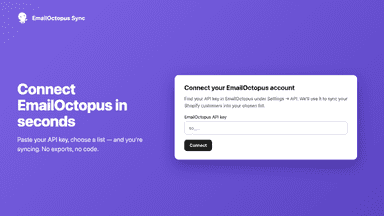
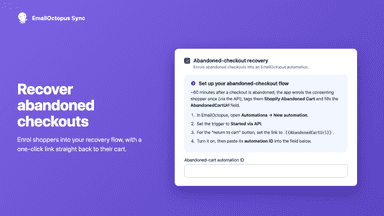
See every featureSync your Shopify customers into your EmailOctopus list automatically. Only customers who have opted in to marketing are ever synced. Contacts are tagged and enriched with purchase data so you can segment and trigger EmailOctopus automations, including abandoned-cart recovery and post-purchase flows.
Switching platforms often means re-entering products, customers and order history by hand, which takes time and leads to mistakes. This app connects to your current store and moves that data into your new store for you. You can run a free test migration on a small sample first and review the results before starting the full transfer.
- Import subscribed customers to EmailOctopus
- Trigger welcome, abandoned checkout and post-purchase flows in EmailOctopus
- Segment your email list by orders, revenue and products
- Move products, customers, and order history in one migration.
- Preview results on a small sample before running the full migration.
- Keep new or updated PrestaShop records in sync after migration.




All the numbers
Every figure, side by side
A green dot marks the app ahead on a measured figure. Estimates, gaps and apps that leave no storefront trace never take the lead.
Adoption
| Measure |  Customer Sync for EmailOctopus |  Wix |
|---|---|---|
| Detected stores | Not published | Not published |
| Net store change, 28 days | 0 | 0 |
| Stores added, 28 days | Not enough data | Not enough data |
| Big-brand share | Not enough data | Not enough data |
| Top store categories | Not published | Not published |
| Top store countries | Not published | Not published |
Reviews
| Measure | Customer Sync for EmailOctopus | Wix |
|---|---|---|
| App Store rating | Not published | Not published |
| App Store reviews | Not published | Not published |
| New reviews, 28 days | Not enough data | Not enough data |
| Reviewers a year or more in | Not enough data | Not enough data |
Pricing
| Measure | Customer Sync for EmailOctopus | Wix |
|---|---|---|
| Free plan | Not listed | Yes |
| Lowest paid monthly plan | $6/month | No monthly plan listed |
| Longest free trial | 7 days | Not listed |
| Plans listed | 1 | 3 |
Listing
| Measure | Customer Sync for EmailOctopus | Wix |
|---|---|---|
| Shopify category rank | #188(ahead) | #236 |
| Shopify App Charts | Not on this week’s charts | Not on this week’s charts |
| Built for Shopify | No | No |
| Launched | Jul 27, 2026 | Jul 28, 2026 |
| Languages | 1 | 1 |
| Developer | Tarka Digital Ltd | MoverPro |
FAQ
Customer Sync for EmailOctopus and Wix: common questions
- Is Customer Sync for EmailOctopus or Wix cheaper?
- Only Wix lists a free plan. Shoplist compares base prices only between monthly plans in the same currency; usage charges and annual plans vary, so check each plan’s limits.
- What features does each app list that the other doesn’t?
- Wix lists 12 the others don’t mention, such as Auto-update, Bulk updates, Collections, Inventory sync. A feature missing from a listing may still be supported; this compares what each App Store listing says.
- Where does this comparison’s data come from?
- Shoplist crawls Shopify storefronts to detect which apps each store runs, and reads each app’s Shopify App Store listing for reviews, pricing, features and integrations. Store counts are as of Oct 13, 2026 for Customer Sync for EmailOctopus, Nov 8, 2026 for Wix; estimated figures are labeled.
How Shoplist compares apps
Store counts come from Shoplist’s crawl of Shopify storefronts, which detects the apps each store runs; they are as of Oct 13, 2026 for Customer Sync for EmailOctopus, Nov 8, 2026 for Wix. Reviews, ratings, plans, features and integrations come from each app’s Shopify App Store listing. 28-day figures are labeled when estimated, and a figure that is missing or estimated never decides who leads. Read the methodology.