

Payment Terms ‑ B2B Wholesale vs Paywire: Hide Payment Methods
Two Shopify apps, side by side: detected stores, momentum, reviews, plans, listed features and who runs each. Store counts as of Oct 13, 2026.
The short answer
- Only Paywire lists a free plan. Paid plans start at $29.99/month for Payment Terms and $5.99/month for Paywire.
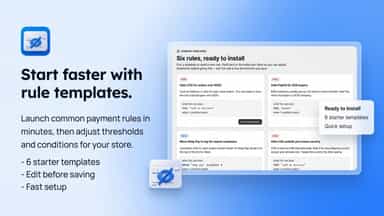
- Paywire lists 4 features Payment Terms’s listing doesn’t mention, including Conditional logic, Custom triggers, Templates.
Head to head


Starter
- · 1 active payment-terms rule
- · Basic conditions
- · Net, fixed & event-based terms
Growth
- · 5 active payment-terms rules
- · Advanced conditions
- · Net, fixed & event-based terms
- · Priority email support
Scale
- · Advanced conditions
- · Net, fixed & event-based terms
- · Priority email support
- · Unlimited active payment-terms rules
Free
- · 1 active rule
- · 2 conditions per rule
- · Cart, country & time conditions
- · Live rule simulator
Starter Monthly
- · 5 active rules
- · 5 conditions per rule
- · 7-day decision logs
- · All 18 condition types
- · B2B, weight, customer history
- · Live rule simulator
Pro Monthly
- · 90-day decision logs
- · All 18 condition types
- · B2B, weight, customer history
- · Live rule simulator
- · Unlimited active rules
- · Unlimited conditions per rule
Coverage counts what each App Store listing names. Every feature, checked off app by app, is in Shoplist.
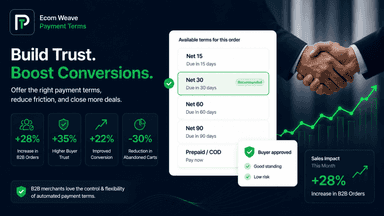
See every featureAutomatically set and remove payment terms at Shopify Plus checkout with flexible payment customization checkout rules. Set or remove Net 7, Net 15, Net 30, Net 45, Net 60, Net 90, fixed due dates, or event-based payment terms based on customer, cart, product, and market criteria.
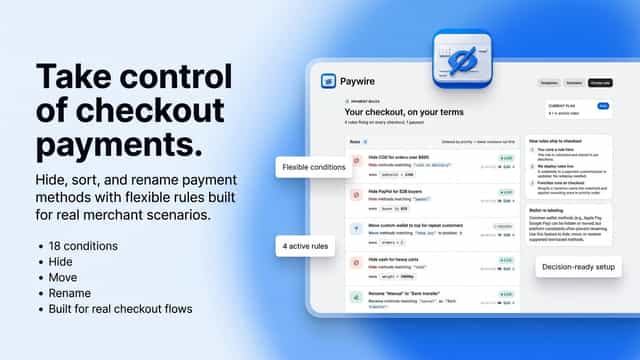
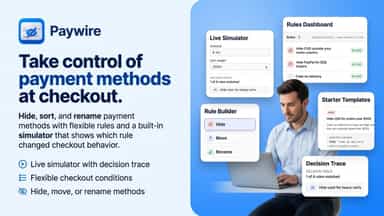
Paywire lets you decide which payment methods appear at your Shopify checkout. Hide PayPal for B2B orders, move Shop Pay to the top for repeat customers, rename Manual to Bank transfer, or hide COD on heavy carts. Combine 18 conditions including cart total, weight, country, market, customer order count, shipping method, and day of week with AND/OR logic.
- Automate payment terms at Shopify Plus checkout
- Set or remove Net terms with flexible rule conditions
- Target buyers by customer, cart, product, and market
- Support Net, fixed due date, and event-based terms
- See which payment method shows or hides for any cart with the live simulator
- Hide methods by B2B status, cart weight, customer order count, country, and more
- Hide, sort, or rename payment methods from one visual rule editor — no code
- Combine up to 18 conditions per rule with visual AND/OR groups for any logic




All the numbers
Every figure, side by side
A green dot marks the app ahead on a measured figure. Estimates, gaps and apps that leave no storefront trace never take the lead.
Adoption
| Measure |  Payment Terms |  Paywire |
|---|---|---|
| Detected stores | Not published | Not published |
| Net store change, 28 days | 0 | 0 |
| Stores added, 28 days | Not enough data | Not enough data |
| Big-brand share | Not enough data | Not enough data |
| Top store categories | Not published | Not published |
| Top store countries | Not published | Not published |
Reviews
| Measure | Payment Terms | Paywire |
|---|---|---|
| App Store rating | Not published | Not published |
| App Store reviews | Not published | Not published |
| New reviews, 28 days | Not enough data | Not enough data |
| Reviewers a year or more in | Not enough data | Not enough data |
Pricing
| Measure | Payment Terms | Paywire |
|---|---|---|
| Free plan | Not listed | Yes |
| Lowest paid monthly plan | $29.99/month | $5.99/month(ahead) |
| Longest free trial | 7 days | 3 days |
| Plans listed | 3 | 3 |
Listing
| Measure | Payment Terms | Paywire |
|---|---|---|
| Shopify category rank | #417 | #149 |
| Shopify App Charts | Not on this week’s charts | Not on this week’s charts |
| Built for Shopify | No | No |
| Launched | Jun 4, 2026 | May 20, 2026 |
| Languages | 1 | 1 |
| Developer | Ecom Weave | BROWDAPPS LLC |
FAQ
Payment Terms and Paywire: common questions
- Is Payment Terms or Paywire cheaper?
- Only Paywire lists a free plan. Paid plans start at $29.99/month for Payment Terms and $5.99/month for Paywire. Shoplist compares base prices only between monthly plans in the same currency; usage charges and annual plans vary, so check each plan’s limits.
- What features does each app list that the other doesn’t?
- Paywire lists 4 the others don’t mention, such as Conditional logic, Custom triggers, Templates, Time-based. A feature missing from a listing may still be supported; this compares what each App Store listing says.
- Where does this comparison’s data come from?
- Shoplist crawls Shopify storefronts to detect which apps each store runs, and reads each app’s Shopify App Store listing for reviews, pricing, features and integrations. Store counts are as of Oct 13, 2026; estimated figures are labeled.
How Shoplist compares apps
Store counts come from Shoplist’s crawl of Shopify storefronts, which detects the apps each store runs; they are as of Oct 13, 2026. Reviews, ratings, plans, features and integrations come from each app’s Shopify App Store listing. 28-day figures are labeled when estimated, and a figure that is missing or estimated never decides who leads. Read the methodology.