

Dropr ‑ Upsell & Cross Sell vs SellUp: Add‑ons & Cart Upsell
Two Shopify apps, side by side: detected stores, momentum, reviews, plans, listed features and who runs each. Store counts as of Oct 28, 2026 for Dropr, Nov 9, 2026 for SellUp.
The short answer
- Only Dropr lists a free plan. Paid plans start at $19/month for Dropr and $14.99/month for SellUp.
- SellUp lists 15 features Dropr’s listing doesn’t mention, including A/B testing, Custom CSS, Custom HTML.
Head to head


- United States
- United Kingdom
- Australia
Momentum
New reviews each month
Review pace is the clearest public read on how fast an app is winning new merchants.
Free
- · 1,000 recommendation views per month
- · Automatic brand matching
- · Every placement
- · No credit card required
- · Sales by placement
Starter
- · Every placement
- · Everything in Free
- · Flat price — no revenue cut
- · Sales by placement
- · Unlimited recommendation views
Free Tier
- · AI On Page Upsell
- · Action Upsell
- · Analytics
- · Basic Support
- · Cart Upsell
- · Post Purchase
Getting Started
- · AI On Page Upsell
- · Action Upsell
- · Analytics
- · Cart Upsell
- · Post Purchase
- · Premium Support
Coverage counts what each App Store listing names. Every feature, checked off app by app, is in Shoplist.
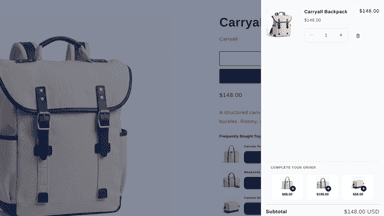
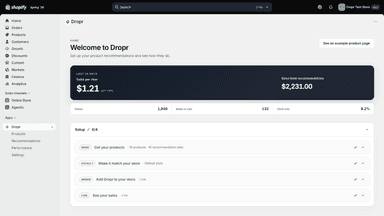
See every featureWhen you install, Dropr reads your catalog, fonts and colors and has recommended products ready. Turn it on in Shopify's theme editor and click Save, and they show on product pages and in the cart drawer. Add the Recently viewed and Popular right now blocks to any page in that editor. Popular right now and Bought together also use your orders as they come in.
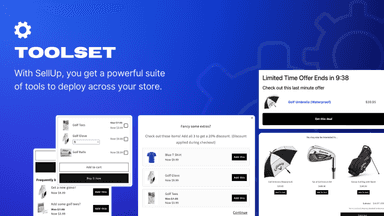
Looking to maximize revenue? With SellUp, you can create precision based cross-sells, upsells, product accessories, shop the look & add-ons for your store. From the product page through to the cart & thank you page, you can offer the best upsell & product add-on flow throughout the customer journey. SellUp will match your stores design so upsells look seamless.
- On-brand recommendations matched to your store's colors and fonts
- Products picked from your own catalog for each page, set up for you
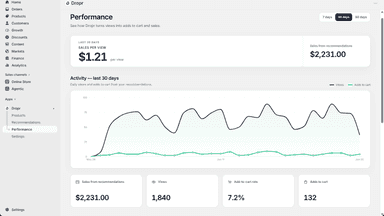
- See the views, clicks, and sales your recommendations bring in
- Clean to add or remove - Dropr never edits your theme files
- Create cross-sells, upsells and add-ons to increase revenue across your store
- Offer add ons and upsells throughout the customer journey
- Create One Check Upsells in 60 seconds. Sell more with SellUp
- Create a frequently bought together section to increase average order value




All the numbers
Every figure, side by side
A green dot marks the app ahead on a measured figure. Estimates, gaps and apps that leave no storefront trace never take the lead.
Adoption
| Measure |  Dropr |  SellUp |
|---|---|---|
| Detected stores | Not published | 697 |
| Net store change, 28 days | 0 | −13 |
| Stores added, 28 days | Not enough data | 14 |
| Big-brand share | Not enough data | 11% |
| Top store categories | Not published | Apparel & Accessories, Home & Garden, Health & Beauty |
| Top store countries | Not published | United States, United Kingdom, Australia |
Reviews
| Measure | Dropr | SellUp |
|---|---|---|
| App Store rating | Not published | 4.4 ★ |
| App Store reviews | Not published | 132 |
| New reviews, 28 days | Not enough data | 0 |
| Reviewers a year or more in | Not enough data | Not enough data |
FAQ
Dropr and SellUp: common questions
- Is Dropr or SellUp cheaper?
- Only Dropr lists a free plan. Paid plans start at $19/month for Dropr and $14.99/month for SellUp. Shoplist compares base prices only between monthly plans in the same currency; usage charges and annual plans vary, so check each plan’s limits.
- What features does each app list that the other doesn’t?
- Dropr lists 2 the others don’t mention, such as Cart drawer, Recommendation performance. SellUp lists 15 the others don’t mention, such as A/B testing, Custom CSS, Custom HTML, Custom rules. A feature missing from a listing may still be supported; this compares what each App Store listing says.
- Where does this comparison’s data come from?
- Shoplist crawls Shopify storefronts to detect which apps each store runs, and reads each app’s Shopify App Store listing for reviews, pricing, features and integrations. Store counts are as of Oct 28, 2026 for Dropr, Nov 9, 2026 for SellUp; estimated figures are labeled.
How Shoplist compares apps
Store counts come from Shoplist’s crawl of Shopify storefronts, which detects the apps each store runs; they are as of Oct 28, 2026 for Dropr, Nov 9, 2026 for SellUp. Reviews, ratings, plans, features and integrations come from each app’s Shopify App Store listing. 28-day figures are labeled when estimated, and a figure that is missing or estimated never decides who leads. Read the methodology.