
dotAOV: Order Editing & Upsell vs Putright ‑ Order Editing
Two Shopify apps, side by side: detected stores, momentum, reviews, plans, listed features and who runs each. Store counts as of Jul 15, 2026 for dotAOV, Nov 18, 2026 for Putright.
The short answer
- dotAOV lists 2 features Putright’s listing doesn’t mention, including Custom attributes, Custom rules.
Head to head

Pro
- · Address, item removal, cancellation
- · Full activity log of every change
- · Unlimited customer edits
- · You set the window and what's allowed
Scale
- · Everything in Pro
- · Same-business-day support
Coverage counts what each App Store listing names. Every feature, checked off app by app, is in Shoplist.
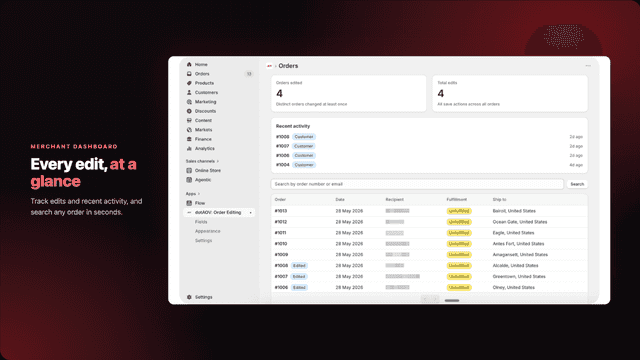
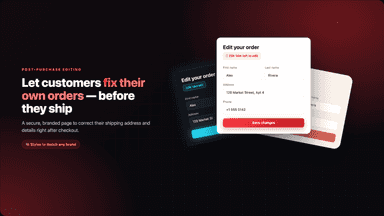
See every featureLet customers fix their own orders on the Thank You page and the order status page after checkout, so your support inbox stays quiet. Add post-purchase upsell offers to boost AOV (average order value). Shoppers can validate and edit their address, swap items, change a variant, add a product, apply a discount, or cancel. Any difference is charged or refunded to the original payment method or store credit.
Most post-purchase tickets are the same three messages: wrong address, "take one off", "can I cancel?". Putright lets customers handle those three themselves, and only those. Setup is a time window and three checkboxes. Customers see only what is safe to change; once the order is packed, it explains why instead. Cancellations count only when Shopify confirms them; a stalled one is flagged.
- Customers edit their shipping address, name, phone, email, and notes
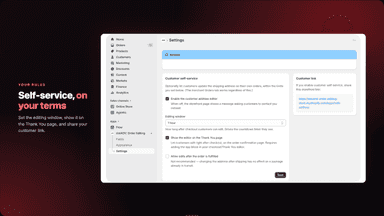
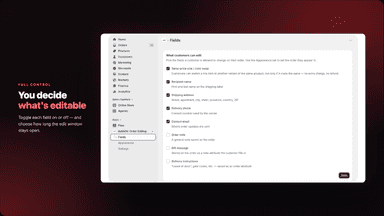
- You choose which fields are editable and how long the window stays open
- Switch to another variant (eg: size or color) of the same product
- Optional editor on the Thank You page with a live countdown
- Set up in a minute: a time window, three checkboxes, and customers self-serve.
- Cancellations count only when Shopify confirms them; a stalled one is flagged.
- Keep the window open over the days you don't ship, in your store's own time.
- Safe by default: packed, shipped and refunded orders are never editable.
All the numbers
Every figure, side by side
A green dot marks the app ahead on a measured figure. Estimates, gaps and apps that leave no storefront trace never take the lead.
Adoption
| Measure |  dotAOV | |
|---|---|---|
| Detected stores | Not published | Not published |
| Net store change, 28 days | 0 | 0 |
| Stores added, 28 days | Not enough data | Not enough data |
| Big-brand share | Not enough data | Not enough data |
| Top store categories | Not published | Not published |
| Top store countries | Not published | Not published |
Reviews
| Measure | dotAOV | |
|---|---|---|
| App Store rating | Not published | Not published |
| App Store reviews | Not published | Not published |
| New reviews, 28 days | Not enough data | Not enough data |
| Reviewers a year or more in | Not enough data | Not enough data |
FAQ
dotAOV and Putright: common questions
- What features does each app list that the other doesn’t?
- dotAOV lists 2 the others don’t mention, such as Custom attributes, Custom rules. Putright lists 1 the others don’t mention, such as Cancellations. A feature missing from a listing may still be supported; this compares what each App Store listing says.
- Where does this comparison’s data come from?
- Shoplist crawls Shopify storefronts to detect which apps each store runs, and reads each app’s Shopify App Store listing for reviews, pricing, features and integrations. Store counts are as of Jul 15, 2026 for dotAOV, Nov 18, 2026 for Putright; estimated figures are labeled.
How Shoplist compares apps
Store counts come from Shoplist’s crawl of Shopify storefronts, which detects the apps each store runs; they are as of Jul 15, 2026 for dotAOV, Nov 18, 2026 for Putright. Reviews, ratings, plans, features and integrations come from each app’s Shopify App Store listing. 28-day figures are labeled when estimated, and a figure that is missing or estimated never decides who leads. Read the methodology.