

DiscountLock ‑ Protect Profit vs MaxOff
Two Shopify apps, side by side: detected stores, momentum, reviews, plans, listed features and who runs each. Store counts as of Sep 28, 2026 for DiscountLock, Oct 13, 2026 for MaxOff.
The short answer
- Only MaxOff lists a free plan.
- MaxOff lists 7 features DiscountLock’s listing doesn’t mention, including Campaigns, Cart discounts, Coupons.
Head to head


FREE
GROWTH
PRO
Coverage counts what each App Store listing names. Every feature, checked off app by app, is in Shoplist.
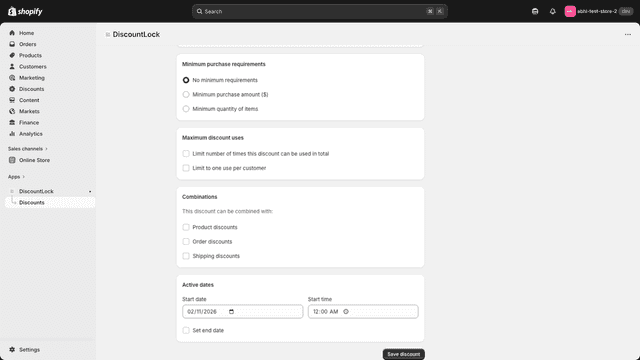
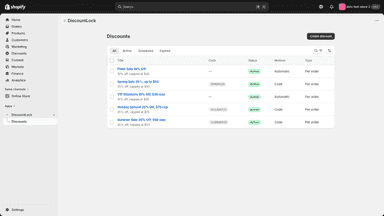
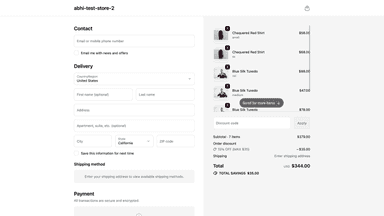
See every featureShopify's native percentage discounts have no way to set a maximum discount amount. A "20 percent off" promotion on a $2,000 item gives $400 off — even if you intended a $50 cap. DiscountLock adds a maximum dollar cap to percentage discounts. Set your percentage and cap amount, and the discount is automatically clamped at checkout. Caps can apply per item or per order.
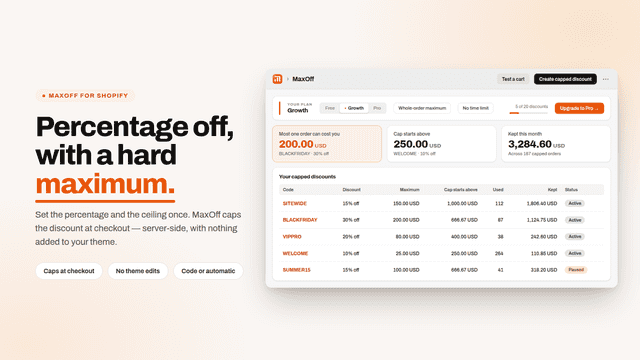
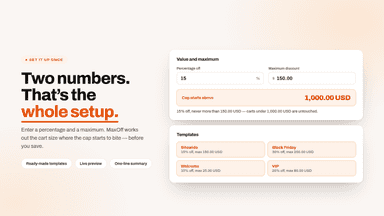
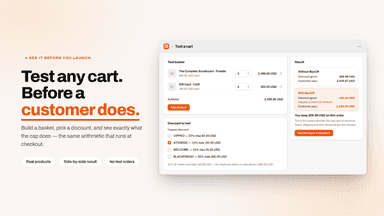
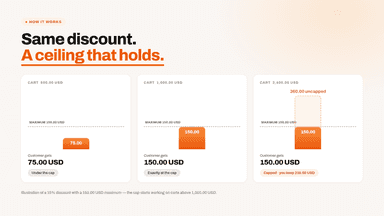
Shopify lets you run a percentage discount but not put a ceiling on it. A 20 percent code on a large basket gives away far more than you intended. MaxOff adds a maximum. The buyer gets whichever is smaller, your percentage or your cap, so a generous code cannot become expensive on one order. MaxOff also shows the cart value at which your cap starts to apply, so you can tell whether it is set sensibly.
- Set a dollar limit on any percentage discount to protect your margins.
- Choose whether the cap applies to each line item or the entire order.
- Same familiar discount settings you already know, with the cap built in.
- Cap a percentage discount at a max amount: 15 percent off, never more than 150.
- Know the exact cart size where your maximum starts to apply, before you save.
- Combine it with your other discounts, using Shopify's own combination rules.
- Use a discount code, or run it automatically with no code to type.

All the numbers
Every figure, side by side
A green dot marks the app ahead on a measured figure. Estimates, gaps and apps that leave no storefront trace never take the lead.
Adoption
| Measure |  DiscountLock |  MaxOff |
|---|---|---|
| Detected stores | Not published | Not published |
| Net store change, 28 days | 0 | 0 |
| Stores added, 28 days | Not enough data | Not enough data |
| Big-brand share | Not enough data | Not enough data |
| Top store categories | Not published | Not published |
| Top store countries | Not published | Not published |
Reviews
| Measure | DiscountLock | MaxOff |
|---|---|---|
| App Store rating | 5.0 ★ | Not published |
| App Store reviews | 1 | Not published |
| New reviews, 28 days | Not enough data | Not enough data |
| Reviewers a year or more in | Not enough data | Not enough data |
Pricing
| Measure | DiscountLock | MaxOff |
|---|---|---|
| Free plan | Not listed | Yes |
| Lowest paid monthly plan | No monthly plan listed | $4.99/month |
| Longest free trial | Not listed | 3 days |
| Plans listed | Not published | 3 |
Listing
| Measure | DiscountLock | MaxOff |
|---|---|---|
| Shopify category rank | #172(ahead) | #336 |
| Shopify App Charts | Not on this week’s charts | Not on this week’s charts |
| Built for Shopify | No | No |
| Launched | Mar 17, 2026 | Sep 29, 2026 |
| Languages | 1 | 1 |
| Developer | AKS Ecom | MPC TRADES |
FAQ
DiscountLock and MaxOff: common questions
- Is DiscountLock or MaxOff cheaper?
- Only MaxOff lists a free plan. Shoplist compares base prices only between monthly plans in the same currency; usage charges and annual plans vary, so check each plan’s limits.
- What features does each app list that the other doesn’t?
- DiscountLock lists 2 the others don’t mention, such as Bulk editing, Custom code. MaxOff lists 7 the others don’t mention, such as Campaigns, Cart discounts, Coupons, Discount stacking. A feature missing from a listing may still be supported; this compares what each App Store listing says.
- Where does this comparison’s data come from?
- Shoplist crawls Shopify storefronts to detect which apps each store runs, and reads each app’s Shopify App Store listing for reviews, pricing, features and integrations. Store counts are as of Sep 28, 2026 for DiscountLock, Oct 13, 2026 for MaxOff; estimated figures are labeled.
How Shoplist compares apps
Store counts come from Shoplist’s crawl of Shopify storefronts, which detects the apps each store runs; they are as of Sep 28, 2026 for DiscountLock, Oct 13, 2026 for MaxOff. Reviews, ratings, plans, features and integrations come from each app’s Shopify App Store listing. 28-day figures are labeled when estimated, and a figure that is missing or estimated never decides who leads. Read the methodology.