
DataMetrics vs Supermetrics
Two Shopify apps, side by side: detected stores, momentum, reviews, plans, listed features and who runs each. Store counts as of Jul 13, 2026 for DataMetrics, Oct 13, 2026 for Supermetrics.
The short answer
- Supermetrics lists 6 features DataMetrics’s listing doesn’t mention, including Custom reports, Data export, GDPR compliance.
Head to head


Starter
- · 1 team
- · 1 user
- · 3 accounts per data source
- · 3 data sources
Growth
- · 1 team
- · 2 users
- · 7 accounts per data source
- · 7 data sources
Pro
- · 1 team
- · 10 accounts per data source
- · 10 data sources
- · 3 users
Enterprise
- · Custom number of data source accounts
- · Custom number of users
- · Multiple teams
- · Prices starting from 899
- · Up to 132 data sources
Coverage counts what each App Store listing names. Every feature, checked off app by app, is in Shoplist.
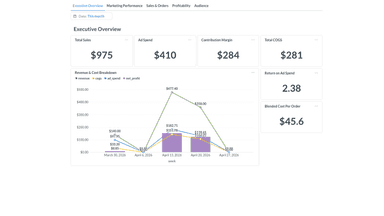
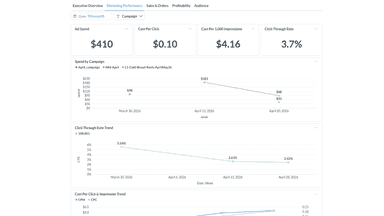
See every featureDataMetrics Connector syncs your Shopify store data with the DataMetrics analytics platform. See your sales, orders, ad spend, ROAS, and profitability in one clean dashboard, no more jumping between platforms. Built for small e-commerce brands who want clear numbers without the complexity or cost of enterprise tools. Your data is stored securely for analytical purposes only.
With Supermetrics, businesses can aggregate siloed data from a wide variety of marketing and sales platforms into their go-to reporting, analytics, and storage platforms. The result is greater insights into your marketing data, considerable time and cost savings by eliminating manual copy/paste, and improved marketing performance based on data-backed decisions. Spend less time moving the data and more time using it.
- Unified dashboard combining Shopify sales and Meta ad performance.
- Profitability tracking with revenue, COGS, and ad spend combined.
- Secure data storage with full deletion within 30 days on opt-out.
- Integrate with all major marketing platforms and make data analysis-ready.
- Streamline your marketing & sales data so you can focus on the insights.
- Analyse data in any BI, reporting or analytics tool.




All the numbers
Every figure, side by side
A green dot marks the app ahead on a measured figure. Estimates, gaps and apps that leave no storefront trace never take the lead.
Adoption
| Measure |  DataMetrics |  Supermetrics |
|---|---|---|
| Detected stores | Not published | Not published |
| Net store change, 28 days | 0 | 0 |
| Stores added, 28 days | Not enough data | Not enough data |
| Big-brand share | Not enough data | Not enough data |
| Top store categories | Not published | Not published |
| Top store countries | Not published | Not published |
Reviews
| Measure | DataMetrics | Supermetrics |
|---|---|---|
| App Store rating | Not published | 2.0 ★ |
| App Store reviews | Not published | 1 |
| New reviews, 28 days | Not enough data | 0 |
| Reviewers a year or more in | Not enough data | Not enough data |
Pricing
| Measure | DataMetrics | Supermetrics |
|---|---|---|
| Free plan | Not listed | Not listed |
| Lowest paid monthly plan | No monthly plan listed | $37/month |
| Longest free trial | Not listed | 14 days |
| Plans listed | Not published | 4 |
Listing
| Measure | DataMetrics | Supermetrics |
|---|---|---|
| Shopify category rank | #1237 | #48(ahead) |
| Shopify App Charts | Not on this week’s charts | Not on this week’s charts |
| Built for Shopify | No | No |
| Launched | Jul 13, 2026 | Dec 22, 2022 |
| Languages | 1 | 1 |
| Developer | DataMetrics | Supermetrics Oy |
FAQ
DataMetrics and Supermetrics: common questions
- What features does each app list that the other doesn’t?
- DataMetrics lists 5 the others don’t mention, such as Custom dashboards, Marketing attribution, Report scheduling, Segmentation. Supermetrics lists 6 the others don’t mention, such as Custom reports, Data export, GDPR compliance, Multi-store reports. A feature missing from a listing may still be supported; this compares what each App Store listing says.
- Where does this comparison’s data come from?
- Shoplist crawls Shopify storefronts to detect which apps each store runs, and reads each app’s Shopify App Store listing for reviews, pricing, features and integrations. Store counts are as of Jul 13, 2026 for DataMetrics, Oct 13, 2026 for Supermetrics; estimated figures are labeled.
How Shoplist compares apps
Store counts come from Shoplist’s crawl of Shopify storefronts, which detects the apps each store runs; they are as of Jul 13, 2026 for DataMetrics, Oct 13, 2026 for Supermetrics. Reviews, ratings, plans, features and integrations come from each app’s Shopify App Store listing. 28-day figures are labeled when estimated, and a figure that is missing or estimated never decides who leads. Read the methodology.