
DataDNA vs DataDock: Bulk Import Export
Two Shopify apps, side by side: detected stores, momentum, reviews, plans, listed features and who runs each. Store counts as of Nov 6, 2026 for DataDNA, Oct 29, 2026 for DataDock.
The short answer
- Only DataDock lists a free plan.
- DataDock lists 12 features DataDNA’s listing doesn’t mention, including Bulk import, Bulk updates, Collections.
Head to head


Demo
- · 10 Customers, 10 Companies
- · 10 Discounts, 10 Translations
- · 10 Files, 10 Metaobjects, 10 Metafields
- · 10 Orders & Draft Orders, 10 Payouts
- · 10 Pages, 10 Blogs, 10 Blog Posts
- · 10 Products, 10 Collections
Growth
- · 10K Files, 50 Metaobjects, 1K Metafields
- · 10K Redirects, ∞ Menus, 5K Inventory
- · 1K Orders & Draft Orders, 366 Payouts
- · 2K Customers, 50 Companies
- · 300 Discounts, 5K Translations
- · 50 Pages, 50 Blogs, 50 Blog Posts
Agency
- · Covers 10 stores at no extra charge
- · Everything in Growth
- · No caps: whole catalogue in one file
- · One link code for all stores, renewable
- · Priority support
- · See and remove linked stores
Coverage counts what each App Store listing names. Every feature, checked off app by app, is in Shoplist.
See every featureEfficiently manage your data by downloading only the essential columns from your store and exporting them directly to Excel. This streamlined process ensures that you have the specific data you need for custom reporting, reducing clutter and saving time. By focusing on the required data, you can create precise, tailored reports that meet your business needs.
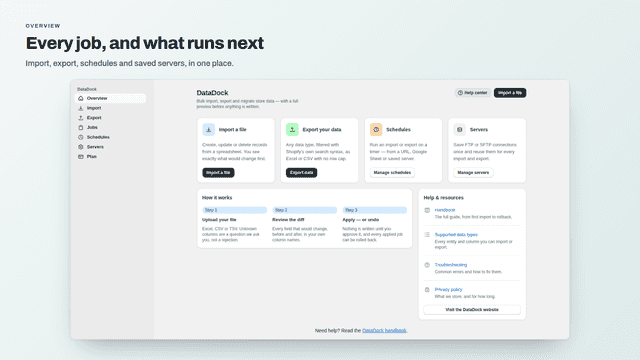
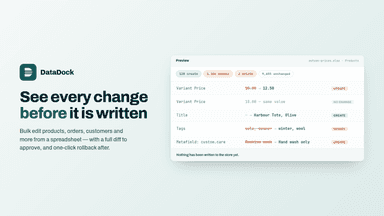
DataDock imports, exports and migrates sixteen kinds of store data from Excel, CSV or TSV files. An import runs in two phases. The first reads your file and builds a row-by-row plan without writing anything, so you see what would be created, updated and deleted in your own column names. Only after you approve it does anything change, and every applied job can be rolled back in one click.
- Download only essential data columns for focused analysis
- Export directly to Excel for easy custom reporting.
- Create tailored reports to enhance business productivity
- See every change before it is written, in your own column names
- Roll back any applied import in one click
- Blank cells leave stored values alone unless you say otherwise
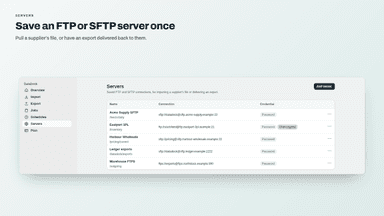
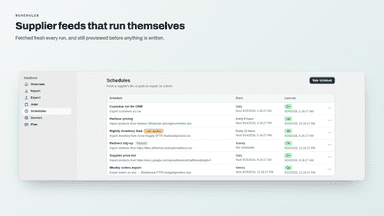
- Import from a file, a link, a Google Sheet or an FTP server
All the numbers
Every figure, side by side
A green dot marks the app ahead on a measured figure. Estimates, gaps and apps that leave no storefront trace never take the lead.
Adoption
| Measure |  DataDock | |
|---|---|---|
| Detected stores | 1 | Not published |
| Net store change, 28 days | 0 | 0 |
| Stores added, 28 days | Not enough data | Not enough data |
| Big-brand share | Not enough data | Not enough data |
| Top store categories | Home & Garden | Not published |
| Top store countries | Not published | Not published |
Reviews
| Measure | DataDock | |
|---|---|---|
| App Store rating | Not published | Not published |
| App Store reviews | Not published | Not published |
| New reviews, 28 days | Not enough data | Not enough data |
| Reviewers a year or more in | Not enough data | Not enough data |
FAQ
DataDNA and DataDock: common questions
- Is DataDNA or DataDock cheaper?
- Only DataDock lists a free plan. Shoplist compares base prices only between monthly plans in the same currency; usage charges and annual plans vary, so check each plan’s limits.
- What features does each app list that the other doesn’t?
- DataDock lists 12 the others don’t mention, such as Bulk import, Bulk updates, Collections, FTP/SFTP. A feature missing from a listing may still be supported; this compares what each App Store listing says.
- Where does this comparison’s data come from?
- Shoplist crawls Shopify storefronts to detect which apps each store runs, and reads each app’s Shopify App Store listing for reviews, pricing, features and integrations. Store counts are as of Nov 6, 2026 for DataDNA, Oct 29, 2026 for DataDock; estimated figures are labeled.
How Shoplist compares apps
Store counts come from Shoplist’s crawl of Shopify storefronts, which detects the apps each store runs; they are as of Nov 6, 2026 for DataDNA, Oct 29, 2026 for DataDock. Reviews, ratings, plans, features and integrations come from each app’s Shopify App Store listing. 28-day figures are labeled when estimated, and a figure that is missing or estimated never decides who leads. Read the methodology.