

QF CSV Shipping Rates vs Zonely | Shipping Rate CSV
Two Shopify apps, side by side: detected stores, momentum, reviews, plans, listed features and who runs each. Store counts as of Oct 17, 2026 for QF CSV Shipping Rates, Nov 5, 2026 for Zonely.
The short answer
- QF CSV Shipping Rates lists 4 features Zonely’s listing doesn’t mention, including Carrier-based, Distance-based, Multi-origin.
Head to head


Set your shipping rates table via CSV file
Standard
Coverage counts what each App Store listing names. Every feature, checked off app by app, is in Shoplist.
See every featureIt helps merchants manage shipping rates by calculating order weight and applying rate rules based on customer location and shipping zones. Merchants can import and maintain shipping rate configurations using CSV files, making it easier to manage complex or bulk shipping rules. At checkout, customers are shown accurate shipping options based on weight and destination.
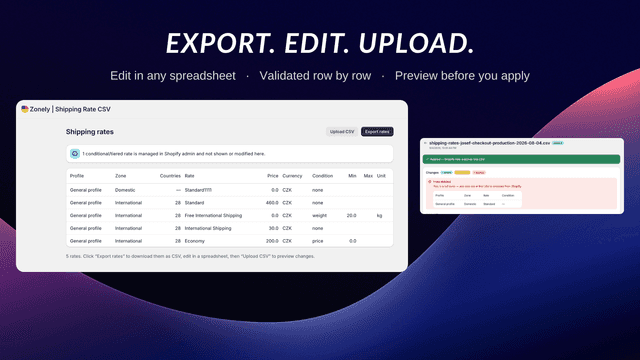
Export the shipping rates from every profile in your store as a CSV, edit them in any spreadsheet, then upload the file to write the changes back. Uploads are validated row by row, and a preview shows what will be added, changed, and deleted before you apply it. Applying a CSV is a full sync, so a rate you remove from the file is removed from your store. Each upload is kept in a history with its diff.
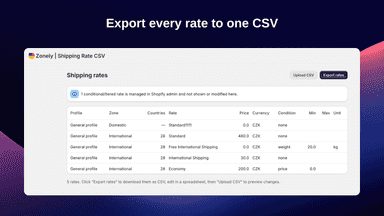
- Export shipping rates from every profile and zone to a single CSV
- Edit rates in any spreadsheet — no in-app grid to learn
- Row-by-row validation that blocks bad files before they touch your store
- A preview of every addition, change and deletion before you apply


All the numbers
Every figure, side by side
A green dot marks the app ahead on a measured figure. Estimates, gaps and apps that leave no storefront trace never take the lead.
Adoption
| Measure |  QF CSV Shipping Rates |  Zonely |
|---|---|---|
| Detected stores | Not published | Not published |
| Net store change, 28 days | 0 | 0 |
| Stores added, 28 days | Not enough data | Not enough data |
| Big-brand share | Not enough data | Not enough data |
| Top store categories | Not published | Not published |
| Top store countries | Not published | Not published |
Reviews
| Measure | QF CSV Shipping Rates | Zonely |
|---|---|---|
| App Store rating | Not published | 5.0 ★ |
| App Store reviews | Not published | 1 |
| New reviews, 28 days | Not enough data | Not enough data |
| Reviewers a year or more in | Not enough data | Not enough data |
Pricing
| Measure | QF CSV Shipping Rates | Zonely |
|---|---|---|
| Free plan | Not listed | Not listed |
| Lowest paid monthly plan | $20/month | No monthly plan listed |
| Longest free trial | 3 days | Not listed |
| Plans listed | 1 | Not published |
Listing
| Measure | QF CSV Shipping Rates | Zonely |
|---|---|---|
| Shopify category rank | #440 | #10 |
| Shopify App Charts | Not on this week’s charts | #1 on Climbers in Operations - Other |
| Built for Shopify | No | No |
| Launched | Mar 26, 2025 | Aug 19, 2026 |
| Languages | 1 | 1 |
| Developer | QF Network | Josef Rousek |
FAQ
QF CSV Shipping Rates and Zonely: common questions
- What features does each app list that the other doesn’t?
- QF CSV Shipping Rates lists 4 the others don’t mention, such as Carrier-based, Distance-based, Multi-origin, Weight-based. A feature missing from a listing may still be supported; this compares what each App Store listing says.
- Where does this comparison’s data come from?
- Shoplist crawls Shopify storefronts to detect which apps each store runs, and reads each app’s Shopify App Store listing for reviews, pricing, features and integrations. Store counts are as of Oct 17, 2026 for QF CSV Shipping Rates, Nov 5, 2026 for Zonely; estimated figures are labeled.
How Shoplist compares apps
Store counts come from Shoplist’s crawl of Shopify storefronts, which detects the apps each store runs; they are as of Oct 17, 2026 for QF CSV Shipping Rates, Nov 5, 2026 for Zonely. Reviews, ratings, plans, features and integrations come from each app’s Shopify App Store listing. 28-day figures are labeled when estimated, and a figure that is missing or estimated never decides who leads. Read the methodology.