

Countdown321 vs DC Countdown Timer Bar
Two Shopify apps, side by side: detected stores, momentum, reviews, plans, listed features and who runs each. Store counts as of Oct 14, 2026 for Countdown321, Oct 13, 2026 for DC Countdown Timer Bar.
The short answer
- Both list a free plan. Paid plans start at $4.99/month for Countdown321 and $6.99/month for DC Countdown Timer Bar.
- Countdown321 lists 11 features DC Countdown Timer Bar’s listing doesn’t mention, including Color and font, Daily deals, Flash sales.
Head to head


Start Free
- · 1 timer
- · 1,000 views/month
- · Basic customization
- · Product page only
Launch
- · Multiple countdown timers
- · No branding
- · Product, landing, and top/bottom bar tim
- · Scheduled timers
- · Up to 10,000 views/month
Grow
- · Built for growing stores
- · Everything in Launch
- · Higher traffic capacity
- · Unlimited timers
- · Up to 50,000 views/month
Scale
- · All features included
- · Built for high-traffic stores
- · Unlimited timers
- · Unlimited views
Free
- · 1 live timer at a time
- · Create unlimited timers
- · Top and bottom announcement bars
- · Up to 1,000 monthly views
Starter
- · End-date schedule
- · Product page timer
- · Sticky bar
- · Unlimited live timers
- · Up to 10,000 monthly views
Essential
- · Everything in Starter
- · Up to 50,000 monthly views
Professional
- · Everything in Essential
- · Unlimited monthly views
Coverage counts what each App Store listing names. Every feature, checked off app by app, is in Shoplist.
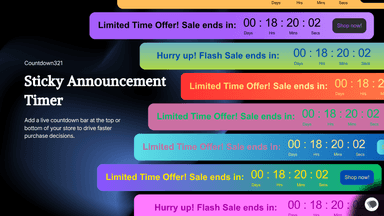
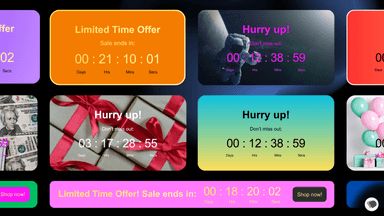
See every featureCountdown321 helps merchants create urgency across product pages and storefront campaigns with product timers, landing timers, and top/bottom bars. Merchants can run fixed-date, recurring, or evergreen countdowns, customize design and placement, and publish quickly without manual theme edits.
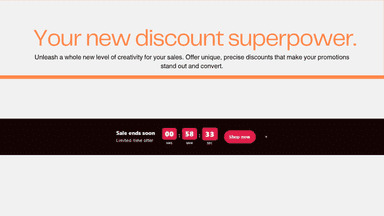
Add a countdown to your Online Store without editing theme code. Create a timer, write the promotion, and show it as a top bar, bottom bar, or product-page block. Bars can stay visible while shoppers scroll. Timers can end on a chosen date or restart for each shopper. When time runs out, hide the timer or show a finished message. A setup guide opens the theme editor to enable the bar embed and product block.
- Create product, landing, and bar countdown timers
- Use fixed-date, recurring, or evergreen schedules
- Customize style, placement, and mobile display
- Publish through Theme App Extension and App Embed
- Top and bottom announcement bars on every storefront page.
- Product-page countdown that sits next to add to cart.
- Evergreen timers that restart for each shopper.
- End-date timers that stop at a chosen campaign deadline.




All the numbers
Every figure, side by side
A green dot marks the app ahead on a measured figure. Estimates, gaps and apps that leave no storefront trace never take the lead.
Adoption
| Measure |  Countdown321 |  DC Countdown Timer Bar |
|---|---|---|
| Detected stores | Not published | Not published |
| Net store change, 28 days | 0 | 0 |
| Stores added, 28 days | Not enough data | Not enough data |
| Big-brand share | Not enough data | Not enough data |
| Top store categories | Not published | Not published |
| Top store countries | Not published | Not published |
Reviews
| Measure | Countdown321 | DC Countdown Timer Bar |
|---|---|---|
| App Store rating | Not published | Not published |
| App Store reviews | Not published | Not published |
| New reviews, 28 days | Not enough data | Not enough data |
| Reviewers a year or more in | Not enough data | Not enough data |
Pricing
| Measure | Countdown321 | DC Countdown Timer Bar |
|---|---|---|
| Free plan | Yes | Yes |
| Lowest paid monthly plan | $4.99/month(ahead) | $6.99/month |
| Longest free trial | 7 days | 3 days |
| Plans listed | 4 | 4 |
Listing
| Measure | Countdown321 | DC Countdown Timer Bar |
|---|---|---|
| Shopify category rank | #153(ahead) | #174 |
| Shopify App Charts | Not on this week’s charts | Not on this week’s charts |
| Built for Shopify | No | No |
| Launched | May 5, 2026 | Sep 23, 2026 |
| Languages | 1 | 1 |
| Developer | DENTOKU DEV | Dream Commerce |
FAQ
Countdown321 and DC Countdown Timer Bar: common questions
- Is Countdown321 or DC Countdown Timer Bar cheaper?
- Both list a free plan. Paid plans start at $4.99/month for Countdown321 and $6.99/month for DC Countdown Timer Bar. Shoplist compares base prices only between monthly plans in the same currency; usage charges and annual plans vary, so check each plan’s limits.
- What features does each app list that the other doesn’t?
- Countdown321 lists 11 the others don’t mention, such as Color and font, Daily deals, Flash sales, Landing pages. DC Countdown Timer Bar lists 6 the others don’t mention, such as Animations, Countdown, Custom text, Fixed end date. A feature missing from a listing may still be supported; this compares what each App Store listing says.
- Where does this comparison’s data come from?
- Shoplist crawls Shopify storefronts to detect which apps each store runs, and reads each app’s Shopify App Store listing for reviews, pricing, features and integrations. Store counts are as of Oct 14, 2026 for Countdown321, Oct 13, 2026 for DC Countdown Timer Bar; estimated figures are labeled.
How Shoplist compares apps
Store counts come from Shoplist’s crawl of Shopify storefronts, which detects the apps each store runs; they are as of Oct 14, 2026 for Countdown321, Oct 13, 2026 for DC Countdown Timer Bar. Reviews, ratings, plans, features and integrations come from each app’s Shopify App Store listing. 28-day figures are labeled when estimated, and a figure that is missing or estimated never decides who leads. Read the methodology.