

CostSentry: Margin Alerts vs SKU Surf
Two Shopify apps, side by side: detected stores, momentum, reviews, plans, listed features and who runs each. Store counts as of Oct 14, 2026 for CostSentry, Oct 27, 2026 for SKU Surf.
The short answer
- Only CostSentry lists a free plan. Paid plans start at $19/month for CostSentry and $39/month for SKU Surf.
- CostSentry lists 5 features SKU Surf’s listing doesn’t mention, including Bulk editing, Price alerts, Price history.
Head to head


Free
- · 1 supplier
- · 1,000 SKUs under watch
- · Weekly email digest
Starter
- · 10,000 SKUs under watch
- · 2 suppliers
- · Instant and daily alerts
- · One-click cost write-back
Pro
- · 100,000 SKUs under watch
- · 5 suppliers
- · Everything in Starter
Enterprise
- · 1,000,000 SKUs under watch
- · Everything in Pro
- · Unlimited suppliers
Professional
Coverage counts what each App Store listing names. Every feature, checked off app by app, is in Shoplist.
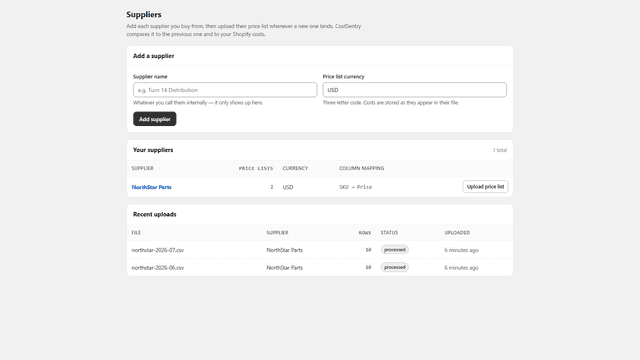
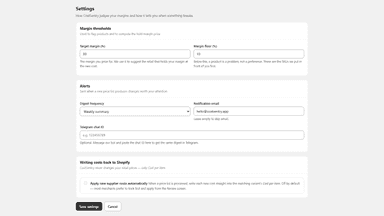
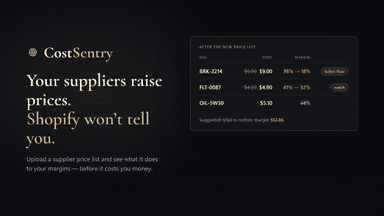
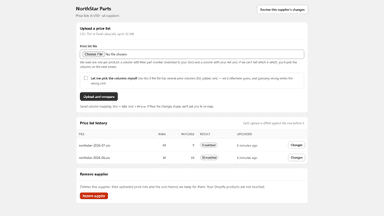
See every featureShopify keeps one cost per item, with no history and no supplier link. When a supplier raises prices, the field goes stale and profit reports drift. CostSentry tracks supplier price lists in your admin. Upload a CSV or XLSX file: rows match your catalog by SKU or brand and part number, get compared with the previous list, and every change shows its margin impact at current retail.
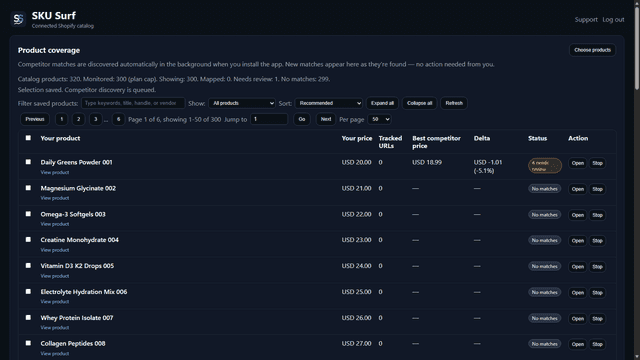
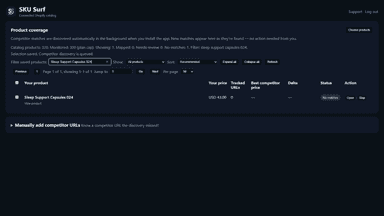
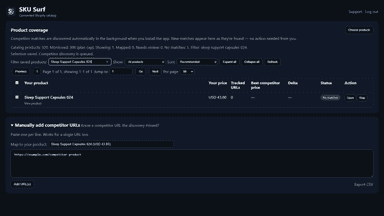
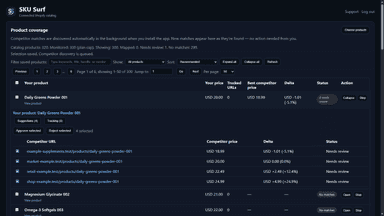
Compare your price with tracked competitor prices in Shopify. Review suggested matches or add known product URLs, then follow daily changes and configure alerts. You keep control of pricing: SKU Surf does not reprice your products. Price-difference comparisons require a single-variant Shopify product and a healthy tracked price in the same currency, checked within 26 hours.
- Import supplier price lists from CSV or XLSX with saved column mapping
- See every cost change with margin impact at your current retail prices
- Flag SKUs below your margin floor with a suggested new retail price
- Update cost per item in Shopify in one click, per SKU or in bulk
- Track up to 300 products across competitor channels
- Review AI-suggested competitor URLs before tracking
- See daily changes and MAP-style flags inside Shopify
All the numbers
Every figure, side by side
A green dot marks the app ahead on a measured figure. Estimates, gaps and apps that leave no storefront trace never take the lead.
Adoption
| Measure |  CostSentry |  SKU Surf |
|---|---|---|
| Detected stores | Not published | Not published |
| Net store change, 28 days | 0 | 0 |
| Stores added, 28 days | Not enough data | Not enough data |
| Big-brand share | Not enough data | Not enough data |
| Top store categories | Not published | Not published |
| Top store countries | Not published | Not published |
Reviews
| Measure | CostSentry | SKU Surf |
|---|---|---|
| App Store rating | Not published | Not published |
| App Store reviews | Not published | Not published |
| New reviews, 28 days | Not enough data | Not enough data |
| Reviewers a year or more in | Not enough data | Not enough data |
Pricing
| Measure | CostSentry | SKU Surf |
|---|---|---|
| Free plan | Yes | Not listed |
| Lowest paid monthly plan | $19/month(ahead) | $39/month |
| Longest free trial | 14 days | 14 days |
| Plans listed | 4 | 1 |
Listing
| Measure | CostSentry | SKU Surf |
|---|---|---|
| Shopify category rank | #331 | #315(ahead) |
| Shopify App Charts | Not on this week’s charts | Not on this week’s charts |
| Built for Shopify | No | No |
| Launched | Aug 19, 2026 | Jun 4, 2026 |
| Languages | 1 | 1 |
| Developer | StoreSentry | Raj Patel |
FAQ
CostSentry and SKU Surf: common questions
- Is CostSentry or SKU Surf cheaper?
- Only CostSentry lists a free plan. Paid plans start at $19/month for CostSentry and $39/month for SKU Surf. Shoplist compares base prices only between monthly plans in the same currency; usage charges and annual plans vary, so check each plan’s limits.
- What features does each app list that the other doesn’t?
- CostSentry lists 5 the others don’t mention, such as Bulk editing, Price alerts, Price history, Price tracking. SKU Surf lists 2 the others don’t mention, such as Competitor tracking, Price matching. A feature missing from a listing may still be supported; this compares what each App Store listing says.
- Where does this comparison’s data come from?
- Shoplist crawls Shopify storefronts to detect which apps each store runs, and reads each app’s Shopify App Store listing for reviews, pricing, features and integrations. Store counts are as of Oct 14, 2026 for CostSentry, Oct 27, 2026 for SKU Surf; estimated figures are labeled.
How Shoplist compares apps
Store counts come from Shoplist’s crawl of Shopify storefronts, which detects the apps each store runs; they are as of Oct 14, 2026 for CostSentry, Oct 27, 2026 for SKU Surf. Reviews, ratings, plans, features and integrations come from each app’s Shopify App Store listing. 28-day figures are labeled when estimated, and a figure that is missing or estimated never decides who leads. Read the methodology.