
CostBuffer ‑ Supplier Currency vs ProfitPulse
Two Shopify apps, side by side: detected stores, momentum, reviews, plans, listed features and who runs each. Store counts as of Nov 11, 2026 for CostBuffer, Oct 14, 2026 for ProfitPulse.
The short answer
- Only CostBuffer lists a free plan. Paid plans start at $9.99/month for CostBuffer and $19/month for ProfitPulse.
- ProfitPulse lists 8 features CostBuffer’s listing doesn’t mention, including Expense tracking, Historical data import, Multi-channel.
Head to head

Free
- · All supplier currencies
- · Daily official exchange rates
- · Up to 25 product variants
CostBuffer
- · Daily official exchange rates
- · Today's, 7, 30 or 90-day rates
- · Unlimited products and currencies
Pro
- · Ad spend from 5 platforms
- · COGS tracking + CSV import
- · Channel attribution
- · Customer lifetime profit
- · Email profit digests
- · Returns and refund analytics
Coverage counts what each App Store listing names. Every feature, checked off app by app, is in Shoplist.
See every featureShopify keeps each product's COGS as one number in your store's currency. When you buy in yuan, euros or dong, that number goes stale as exchange rates move, and your profit reports drift with it. CostBuffer stores each supplier's invoice amount in their currency, converts it with official exchange rates and updates Shopify's COGS field.
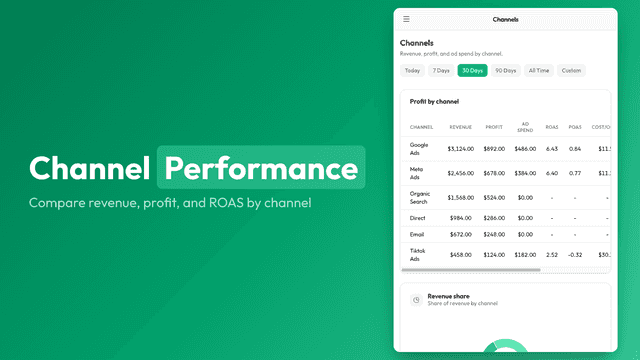
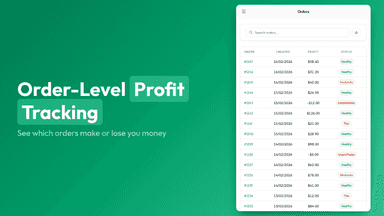
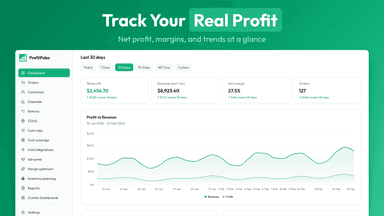
Most store owners track revenue but not true profit. ProfitPulse solves this by combining order data with every cost that eats into your margins: cost of goods, shipping, transaction fees, ad spend, and operating expenses. You see exactly which products, channels, and customers are profitable and which are losing money. Costs sync automatically from Shopify and your ad platforms, or you can import them via CSV.
- Enter supplier invoice amounts in their currency; Shopify's COGS is set for you
- Daily official rates; COGS updates when a rate moves past your threshold
- Use today's rate or a 7, 30 or 90-day mean to smooth out swings
- Blend each purchase with stock on hand, each at its own day's rate
- True profit dashboard combining COGS, shipping, fees, and expenses
- COGS tracking with CSV bulk import and Shopify metafield sync
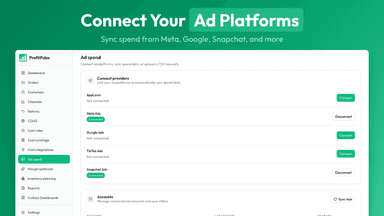
- Ad spend sync from Meta, Google, TikTok, Snapchat, and AppLovin
- Product and channel profitability ranking with margin insights
All the numbers
Every figure, side by side
A green dot marks the app ahead on a measured figure. Estimates, gaps and apps that leave no storefront trace never take the lead.
Adoption
| Measure | CostBuffer |  ProfitPulse |
|---|---|---|
| Detected stores | Not published | Not published |
| Net store change, 28 days | 0 | 0 |
| Stores added, 28 days | Not enough data | Not enough data |
| Big-brand share | Not enough data | Not enough data |
| Top store categories | Not published | Not published |
| Top store countries | Not published | Not published |
Reviews
| Measure | CostBuffer | ProfitPulse |
|---|---|---|
| App Store rating | Not published | Not published |
| App Store reviews | Not published | Not published |
| New reviews, 28 days | Not enough data | Not enough data |
| Reviewers a year or more in | Not enough data | Not enough data |
Pricing
| Measure | CostBuffer | ProfitPulse |
|---|---|---|
| Free plan | Yes | Not listed |
| Lowest paid monthly plan | $9.99/month(ahead) | $19/month |
| Longest free trial | 14 days | 14 days |
| Plans listed | 2 | 1 |
Listing
| Measure | CostBuffer | ProfitPulse |
|---|---|---|
| Shopify category rank | #359 | Not enough data |
| Shopify App Charts | Not on this week’s charts | Not on this week’s charts |
| Built for Shopify | No | No |
| Launched | Oct 21, 2026 | May 15, 2026 |
| Languages | 1 | 1 |
| Developer | Triple U Solutions | JRL Software |
FAQ
CostBuffer and ProfitPulse: common questions
- Is CostBuffer or ProfitPulse cheaper?
- Only CostBuffer lists a free plan. Paid plans start at $9.99/month for CostBuffer and $19/month for ProfitPulse. Shoplist compares base prices only between monthly plans in the same currency; usage charges and annual plans vary, so check each plan’s limits.
- What features does each app list that the other doesn’t?
- CostBuffer lists 1 the others don’t mention, such as Multi-currency. ProfitPulse lists 8 the others don’t mention, such as Expense tracking, Historical data import, Multi-channel, Order details. A feature missing from a listing may still be supported; this compares what each App Store listing says.
- Where does this comparison’s data come from?
- Shoplist crawls Shopify storefronts to detect which apps each store runs, and reads each app’s Shopify App Store listing for reviews, pricing, features and integrations. Store counts are as of Nov 11, 2026 for CostBuffer, Oct 14, 2026 for ProfitPulse; estimated figures are labeled.
How Shoplist compares apps
Store counts come from Shoplist’s crawl of Shopify storefronts, which detects the apps each store runs; they are as of Nov 11, 2026 for CostBuffer, Oct 14, 2026 for ProfitPulse. Reviews, ratings, plans, features and integrations come from each app’s Shopify App Store listing. 28-day figures are labeled when estimated, and a figure that is missing or estimated never decides who leads. Read the methodology.