

ConversionsKing Product Blocks vs Socivolve Modules
Two Shopify apps, side by side: detected stores, momentum, reviews, plans, listed features and who runs each. Store counts as of Oct 13, 2026.
The short answer
- Only Socivolve Modules lists a free plan. Paid plans start at $10/month for ConversionsKing Product Blocks and $9.95/month for Socivolve Modules.
- ConversionsKing Product Blocks lists 8 features Socivolve Modules’s listing doesn’t mention, including Borders, Homepage, Payment.
Head to head


Premium
Free
- · 1 Premium-Modul
- · Alle kostenlosen Module
- · Theme Editor Integration
Pro
- · Alle kostenlosen Module
- · Prioritäts-Support
- · Theme Editor Integration
- · Unbegrenzte Premium-Module
Coverage counts what each App Store listing names. Every feature, checked off app by app, is in Shoplist.
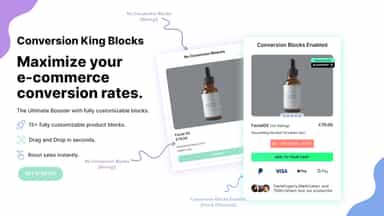
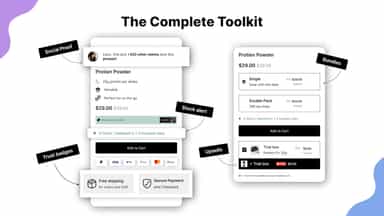
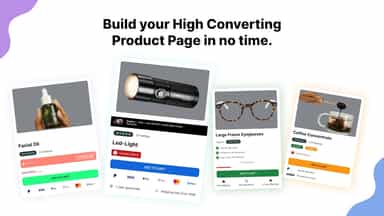
See every featureConversionsKing helps you turn more visitors into customers by adding proven, high-converting elements directly to your product pages — without coding. Most Shopify themes lack essential conversion elements, forcing merchants to rely on multiple apps or expensive custom development. ConversionsKing solves this by giving you a complete suite of optimized product blocks inside your theme editor.
Socivolve ergänzt deine Produktseiten um Module, die Vertrauen aufbauen und Kaufentscheidungen erleichtern. Du aktivierst Module einzeln und passt sie direkt im Theme Editor an — ohne Code. Die Bibliothek umfasst Storys (IG like), Trust Badges, Image Hotspots, Vorher/Nachher-Slider, Versandinfos und mehr. So verbesserst du gezielt die Stellen deiner Produktseite, die für den Kauf relevant sind.
- Increase Sales with Proven Conversion Elements
- Seamless Theme Integration (Online Store 2.0)
- Built for Performance
- Modulare Blöcke für Produktseiten — einzeln aktivierbar im Theme Editor
- Farben, Inhalte und Layout direkt im Theme Editor anpassen, ohne Code
- Kompatibel mit jedem Online Store 2.0 Theme
- Kostenlose Basis-Module und freischaltbare Premium-Blöcke



All the numbers
Every figure, side by side
A green dot marks the app ahead on a measured figure. Estimates, gaps and apps that leave no storefront trace never take the lead.
Adoption
| Measure |  ConversionsKing Product Blocks |  Socivolve Modules |
|---|---|---|
| Detected stores | Not published | Not published |
| Net store change, 28 days | 0 | 0 |
| Stores added, 28 days | Not enough data | Not enough data |
| Big-brand share | Not enough data | Not enough data |
| Top store categories | Not published | Not published |
| Top store countries | Not published | Not published |
Reviews
| Measure | ConversionsKing Product Blocks | Socivolve Modules |
|---|---|---|
| App Store rating | Not published | Not published |
| App Store reviews | Not published | Not published |
| New reviews, 28 days | Not enough data | Not enough data |
| Reviewers a year or more in | Not enough data | Not enough data |
Pricing
| Measure | ConversionsKing Product Blocks | Socivolve Modules |
|---|---|---|
| Free plan | Not listed | Yes |
| Lowest paid monthly plan | $10/month | $9.95/month(ahead) |
| Longest free trial | 7 days | 30 days |
| Plans listed | 1 | 2 |
Listing
| Measure | ConversionsKing Product Blocks | Socivolve Modules |
|---|---|---|
| Shopify category rank | #410 | #283 |
| Shopify App Charts | Not on this week’s charts | Not on this week’s charts |
| Built for Shopify | No | No |
| Launched | May 4, 2026 | May 7, 2026 |
| Languages | 1 | 1 |
| Developer | Conversions King LLC | Socivolve |
FAQ
ConversionsKing Product Blocks and Socivolve Modules: common questions
- Is ConversionsKing Product Blocks or Socivolve Modules cheaper?
- Only Socivolve Modules lists a free plan. Paid plans start at $10/month for ConversionsKing Product Blocks and $9.95/month for Socivolve Modules. Shoplist compares base prices only between monthly plans in the same currency; usage charges and annual plans vary, so check each plan’s limits.
- What features does each app list that the other doesn’t?
- ConversionsKing Product Blocks lists 8 the others don’t mention, such as Borders, Homepage, Payment, Product pages. A feature missing from a listing may still be supported; this compares what each App Store listing says.
- Where does this comparison’s data come from?
- Shoplist crawls Shopify storefronts to detect which apps each store runs, and reads each app’s Shopify App Store listing for reviews, pricing, features and integrations. Store counts are as of Oct 13, 2026; estimated figures are labeled.
How Shoplist compares apps
Store counts come from Shoplist’s crawl of Shopify storefronts, which detects the apps each store runs; they are as of Oct 13, 2026. Reviews, ratings, plans, features and integrations come from each app’s Shopify App Store listing. 28-day figures are labeled when estimated, and a figure that is missing or estimated never decides who leads. Read the methodology.