

Compare at Price on Checkout vs WF ‑ Compare At Amount
Two Shopify apps, side by side: detected stores, momentum, reviews, plans, listed features and who runs each. Store counts as of Nov 5, 2026 for Compare at Price on Checkout, Oct 13, 2026 for WF.
The short answer
- Only Compare at Price on Checkout lists a free plan. Paid plans start at $2.99/month for Compare at Price on Checkout and $1.99/month for WF.
Head to head


Development Store
- · Custom Banner Image on Thank You page
- · Free for non-Plus and development stores
- · Line item savings on Thank You page
- · Live chat, email support
- · Total Savings Banner on Thank You page
Plus Stores
- · Custom text, colors & labels
- · Line item editor — edit at checkout
- · Multi-currency & market support
- · Save badge on every line item
- · Shopify Plus: all 4 checkout blocks
- · Strikethrough compare-at prices
Monthly fee
- · 24/7 Support
- · Customizable Compare At Amount App and variants in admin settings
- · Easy Integration
- · Localization Support
- · Mobile-Friendly Design
Coverage counts what each App Store listing names. Every feature, checked off app by app, is in Shoplist.
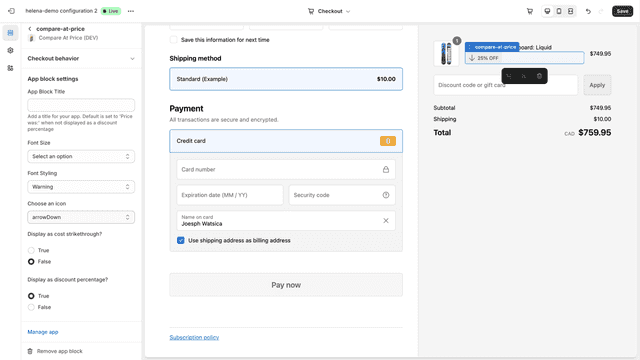
See every featureCompare at Price adds savings blocks to your Shopify Plus checkout. Each block targets a different position: a flexible total savings banner you can place — and repeat — anywhere in checkout, strikethrough price and save badges on every line item, a custom banner image, and a line item editor for changing variant or quantity without leaving checkout. Savings update automatically with discount codes.
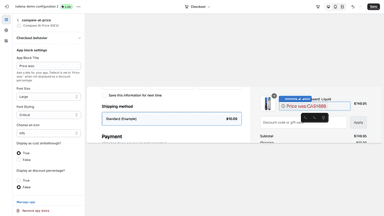
Enhance your Shopify store's checkout experience with WF - Compare At Amount App! Our app allows you to display the original amount alongside your discounted amount, or as a simple discount percentage, helping your customers see the value they're getting. With customizable text labels, icons, font sizes, and styles, you can match the widget to your store's aesthetic perfectly!
- Strikethrough prices and savings amounts shown next to each checkout item
- Total savings banner displayed above the payment step at checkout
- Savings update automatically when discount codes or promotions apply
- Displays accurate savings in the buyer's local market currency
- Display original Compare at Price with discounted amount
- Customizable icons, font sizes, styles, and discount label texts to your liking!
- Easy installation and seamless integration with Shopify checkout


All the numbers
Every figure, side by side
A green dot marks the app ahead on a measured figure. Estimates, gaps and apps that leave no storefront trace never take the lead.
Adoption
| Measure |  Compare at Price on Checkout |  WF |
|---|---|---|
| Detected stores | Not published | Not published |
| Net store change, 28 days | 0 | 0 |
| Stores added, 28 days | Not enough data | Not enough data |
| Big-brand share | Not enough data | Not enough data |
| Top store categories | Not published | Not published |
| Top store countries | Not published | Not published |
Reviews
| Measure | Compare at Price on Checkout | WF |
|---|---|---|
| App Store rating | Not published | Not published |
| App Store reviews | Not published | Not published |
| New reviews, 28 days | Not enough data | Not enough data |
| Reviewers a year or more in | Not enough data | Not enough data |
Pricing
| Measure | Compare at Price on Checkout | WF |
|---|---|---|
| Free plan | Yes | Not listed |
| Lowest paid monthly plan | $2.99/month | $1.99/month(ahead) |
| Longest free trial | 14 days | 14 days |
| Plans listed | 2 | 1 |
Listing
| Measure | Compare at Price on Checkout | WF |
|---|---|---|
| Shopify category rank | #136(ahead) | #284 |
| Shopify App Charts | Not on this week’s charts | Not on this week’s charts |
| Built for Shopify | No | No |
| Launched | May 12, 2026 | Aug 14, 2024 |
| Languages | 1 | 1 |
| Developer | K&M Development | Widgets Factory |
FAQ
Compare at Price on Checkout and WF: common questions
- Is Compare at Price on Checkout or WF cheaper?
- Only Compare at Price on Checkout lists a free plan. Paid plans start at $2.99/month for Compare at Price on Checkout and $1.99/month for WF. Shoplist compares base prices only between monthly plans in the same currency; usage charges and annual plans vary, so check each plan’s limits.
- Where does this comparison’s data come from?
- Shoplist crawls Shopify storefronts to detect which apps each store runs, and reads each app’s Shopify App Store listing for reviews, pricing, features and integrations. Store counts are as of Nov 5, 2026 for Compare at Price on Checkout, Oct 13, 2026 for WF; estimated figures are labeled.
How Shoplist compares apps
Store counts come from Shoplist’s crawl of Shopify storefronts, which detects the apps each store runs; they are as of Nov 5, 2026 for Compare at Price on Checkout, Oct 13, 2026 for WF. Reviews, ratings, plans, features and integrations come from each app’s Shopify App Store listing. 28-day figures are labeled when estimated, and a figure that is missing or estimated never decides who leads. Read the methodology.