
CN PDF Viewer vs Easy File Uploader
Two Shopify apps, side by side: detected stores, momentum, reviews, plans, listed features and who runs each. Store counts as of Oct 27, 2026 for CN PDF Viewer, Oct 13, 2026 for Easy File Uploader.
The short answer
- On the Shopify App Store: CN PDF Viewer 5.0 from 2 reviews and Easy File Uploader 5.0 from 1 reviews.
- Both list a free plan. Paid plans start at $5/month for CN PDF Viewer and $8.99/month for Easy File Uploader.
- Easy File Uploader lists 5 features CN PDF Viewer’s listing doesn’t mention, including Excel, Images, JPEG.
Head to head


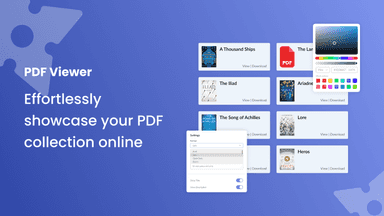
Offer Valuable Information and Promote Your PDF Products
Momentum
New reviews each month
Review pace is the clearest public read on how fast an app is winning new merchants.
Free Plan
- · 300 Views
- · 8 PDF Files
- · Full RTL Support
- · Upload PDF Files
Basic Plan
- · 2,000 Views
- · 20 PDF Files
- · Ads Removal
- · Custom Design
- · Multilingual support
- · Premium Layouts
Pro Plan
- · 100,000 Views
- · 50 PDF Files
- · Ads Removal
- · Custom Design
- · Multilingual support
- · Premium Layouts
Business Plan
- · 250 PDF Files
- · 3,000,000 Views
- · Ads Removal
- · Custom CSS
- · Custom Design
- · Multilingual support
Free
- · File securely stored for up to 1 month.
- · Multiple file upload supported
- · Unlimited product configuration
- · Up to 2 custom fields
Professional
- · 3-day free trial
- · File securely stored for up to 3 month.
- · Multiple file uploads supported
- · Unlimited custom fields
- · Unlimited product configurations
Lifetime plan
- · Files securely stored for up to 6 months
- · Lifetime access to Professional features
- · Multiple file uploads supported
- · Unlimited custom fields
- · Unlimited product configurations
Coverage counts what each App Store listing names. Every feature, checked off app by app, is in Shoplist.
See every featureThe PDF Viewer app lets visitors view and download PDF files without leaving your store. Share ebooks, product manuals, support docs, menus, catalogs, and more in a seamless, branded experience. Keep users engaged on-site while providing valuable content that informs and builds trust. Perfect for showcasing any PDF-based information, directly and beautifully on your storefront.
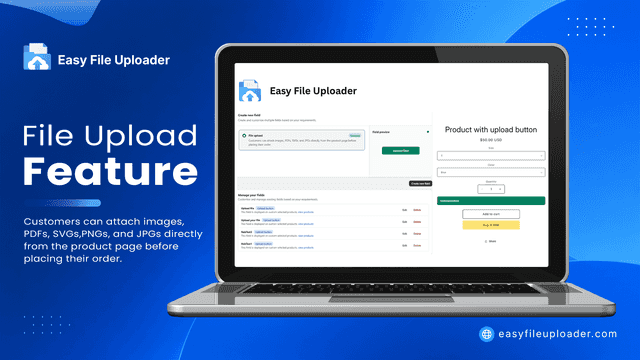
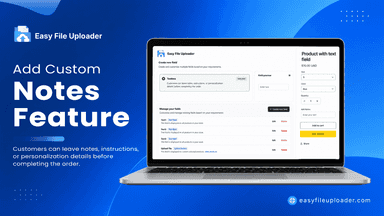
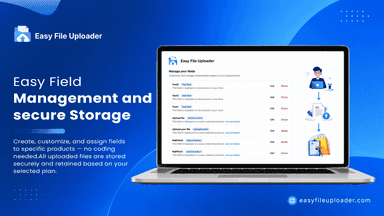
Easy File Uploader lets customers upload files, images, and photos on product pages before checkout—perfect for custom printing, personalized gifts, and print on demand. Every file upload attaches automatically to the order, so you never chase customers for artwork. Add custom text fields for engraving and order notes. Drag and drop, Google Drive and Dropbox supported.
- Multiple Skins & Layouts: Lots of beautifully designed templates to choose from.
- Rich styling options with fully customizable design features.
- Fully responsive and looks great on any device — desktop or mobile.
- A simple user interface with easy content management features.
- Drag-and-drop file upload fields seamlessly integrated on product pages.
- Supports HD images, large photos, artwork, and custom PDFs.
- Manage, view, and download customer-uploaded files directly from your admin.


All the numbers
Every figure, side by side
A green dot marks the app ahead on a measured figure. Estimates, gaps and apps that leave no storefront trace never take the lead.
Adoption
| Measure |  CN PDF Viewer |  Easy File Uploader |
|---|---|---|
| Detected stores | Not published | Not published |
| Net store change, 28 days | 0 | 0 |
| Stores added, 28 days | Not enough data | Not enough data |
| Big-brand share | Not enough data | Not enough data |
| Top store categories | Not published | Not published |
| Top store countries | Not published | Not published |
Reviews
| Measure | CN PDF Viewer | Easy File Uploader |
|---|---|---|
| App Store rating | 5.0 ★ | 5.0 ★ |
| App Store reviews | 2(ahead) | 1 |
| New reviews, 28 days | 1 | Not enough data |
| Reviewers a year or more in | Not enough data | Not enough data |
Pricing
| Measure | CN PDF Viewer | Easy File Uploader |
|---|---|---|
| Free plan | Yes | Yes |
| Lowest paid monthly plan | $5/month(ahead) | $8.99/month |
| Longest free trial | 3 days | 3 days |
| Plans listed | 4 | 3 |
Listing
| Measure | CN PDF Viewer | Easy File Uploader |
|---|---|---|
| Shopify category rank | #30 | #36 |
| Shopify App Charts | Not on this week’s charts | Not on this week’s charts |
| Built for Shopify | No | No |
| Launched | Jan 3, 2022 | Jul 20, 2026 |
| Languages | 1 | 1 |
| Developer | Common Ninja | Uforia Infotech Inc |
FAQ
CN PDF Viewer and Easy File Uploader: common questions
- Is CN PDF Viewer or Easy File Uploader cheaper?
- Both list a free plan. Paid plans start at $5/month for CN PDF Viewer and $8.99/month for Easy File Uploader. Shoplist compares base prices only between monthly plans in the same currency; usage charges and annual plans vary, so check each plan’s limits.
- Which has better reviews, CN PDF Viewer or Easy File Uploader?
- On the Shopify App Store: CN PDF Viewer 5.0 from 2 reviews and Easy File Uploader 5.0 from 1 reviews.
- What features does each app list that the other doesn’t?
- CN PDF Viewer lists 2 the others don’t mention, such as Preview, Printing. Easy File Uploader lists 5 the others don’t mention, such as Excel, Images, JPEG, PNG. A feature missing from a listing may still be supported; this compares what each App Store listing says.
- Where does this comparison’s data come from?
- Shoplist crawls Shopify storefronts to detect which apps each store runs, and reads each app’s Shopify App Store listing for reviews, pricing, features and integrations. Store counts are as of Oct 27, 2026 for CN PDF Viewer, Oct 13, 2026 for Easy File Uploader; estimated figures are labeled.
How Shoplist compares apps
Store counts come from Shoplist’s crawl of Shopify storefronts, which detects the apps each store runs; they are as of Oct 27, 2026 for CN PDF Viewer, Oct 13, 2026 for Easy File Uploader. Reviews, ratings, plans, features and integrations come from each app’s Shopify App Store listing. 28-day figures are labeled when estimated, and a figure that is missing or estimated never decides who leads. Read the methodology.