

Leverage: Profit Analytics vs Q‑Tracker
Two Shopify apps, side by side: detected stores, momentum, reviews, plans, listed features and who runs each. Store counts as of Oct 13, 2026.
The short answer
- Only Leverage lists a free plan. Paid plans start at $9.99/month for Leverage and $29/month for Q‑Tracker.
Head to head


Free
- · Per-order profit breakdown
- · Per-product margins, inline editing
- · Profit dashboard & P&L, last 30 days
Pro
- · AI recommendations & CSV import
- · Everything in Free, any date range
- · Expenses & discount impact analysis
Starter plan
- · 1 Shopify store
- · Auto exchange rate
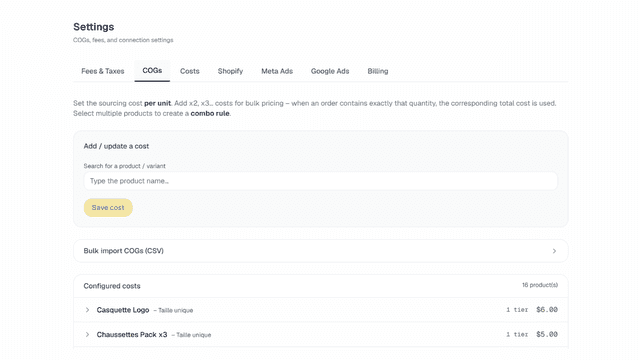
- · COGs per variant
- · Meta Ads sync
- · Monthly fixed costs + One-time costs
- · Real-time P&L dashboard
Pro plan
- · 1 Shopify store
- · Accounting export
- · Bundle COGs (combo rules)
- · COGs temporal versioning
- · Everything in Starter
- · Google Ads sync
Coverage counts what each App Store listing names. Every feature, checked off app by app, is in Shoplist.
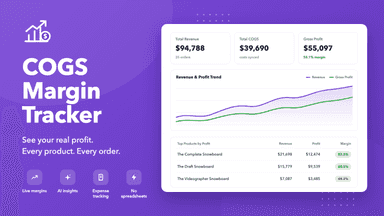
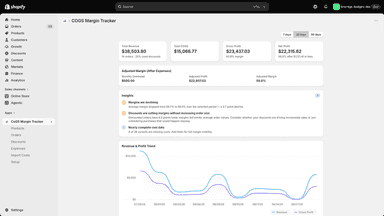
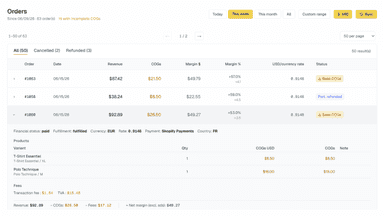
See every featureCOGS Margin Tracker turns the COGS data already stored in Shopify into a complete profit picture. See net profit after COGS, payment fees, and business expenses on a dashboard with revenue vs. profit trends. View margins on every product with inline COGS editing, see profit and discount impact on every order, track recurring expenses, and get AI-powered recommendations based on your real numbers.
Most Shopify store owners think they're profitable. Then they subtract their actual product costs, ad spend, payment fees, and VAT, the number changes. Q-Tracker does that math automatically, on every order, in real time. Connect your store & ad accounts once. Set your costs per product variant. Q-Tracker handles the rest. No more spreadsheets. No more end-of-month surprises. Just accurate numbers you can act on.
- Profit dashboard showing net profit after COGS, payment fees, and expenses
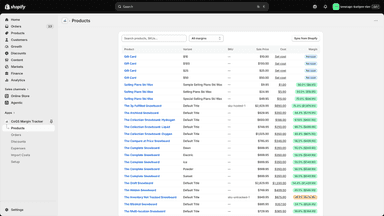
- Per-product margins with inline COGS editing and bulk CSV import
- Per-order profit breakdown with discount impact and AI recommendations
- P&L calculated per order: revenue, costs, fees, and taxes in one view
- COGs versioning: cost changes never rewrite your profit history
- Exchange rate locked per transaction, not a monthly average
- Meta & Google Ads synced: see real ROAS against actual margin



All the numbers
Every figure, side by side
A green dot marks the app ahead on a measured figure. Estimates, gaps and apps that leave no storefront trace never take the lead.
Adoption
| Measure |  Leverage |  Q‑Tracker |
|---|---|---|
| Detected stores | Not published | Not published |
| Net store change, 28 days | 0 | 0 |
| Stores added, 28 days | Not enough data | Not enough data |
| Big-brand share | Not enough data | Not enough data |
| Top store categories | Not published | Not published |
| Top store countries | Not published | Not published |
Reviews
| Measure | Leverage | Q‑Tracker |
|---|---|---|
| App Store rating | Not published | Not published |
| App Store reviews | Not published | Not published |
| New reviews, 28 days | Not enough data | Not enough data |
| Reviewers a year or more in | Not enough data | Not enough data |
FAQ
Leverage and Q‑Tracker: common questions
- Is Leverage or Q‑Tracker cheaper?
- Only Leverage lists a free plan. Paid plans start at $9.99/month for Leverage and $29/month for Q‑Tracker. Shoplist compares base prices only between monthly plans in the same currency; usage charges and annual plans vary, so check each plan’s limits.
- Where does this comparison’s data come from?
- Shoplist crawls Shopify storefronts to detect which apps each store runs, and reads each app’s Shopify App Store listing for reviews, pricing, features and integrations. Store counts are as of Oct 13, 2026; estimated figures are labeled.
How Shoplist compares apps
Store counts come from Shoplist’s crawl of Shopify storefronts, which detects the apps each store runs; they are as of Oct 13, 2026. Reviews, ratings, plans, features and integrations come from each app’s Shopify App Store listing. 28-day figures are labeled when estimated, and a figure that is missing or estimated never decides who leads. Read the methodology.