
ClickUp Sync ‑ Orders to Tasks vs SIDWMS Fulfillment
Two Shopify apps, side by side: detected stores, momentum, reviews, plans, listed features and who runs each. Store counts as of Oct 13, 2026.
The short answer
- Only ClickUp Sync lists a free plan.
- ClickUp Sync lists 1 features SIDWMS Fulfillment’s listing doesn’t mention, including Order updates.
Head to head


Free
- · 20 synced orders per month
- · Automatic order-to-task sync
- · Filters and custom fields
Starter
- · 300 synced orders per month
- · Automatic order-to-task sync
- · Email support
- · Filters and custom fields
Growth
- · Automatic order-to-task sync
- · Filters and custom fields
- · Priority support
- · Unlimited synced orders
Free
Coverage counts what each App Store listing names. Every feature, checked off app by app, is in Shoplist.
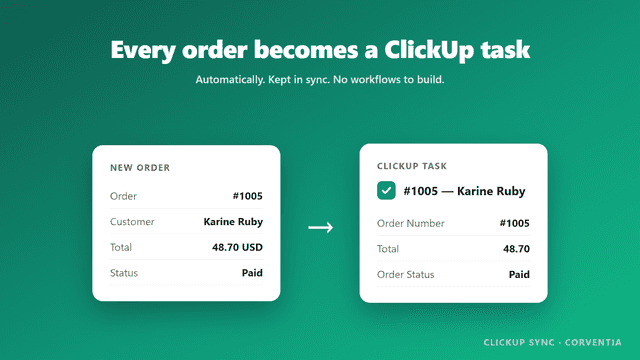
See every featureClickUp Sync creates a task in your ClickUp list for every new order, including the order number, customer, line items, totals and shipping address. Tasks stay updated automatically as orders are paid, fulfilled, cancelled or refunded. You can filter which orders sync by tag, sales channel or minimum amount, and choose which ClickUp status a task moves to when an order is fulfilled.
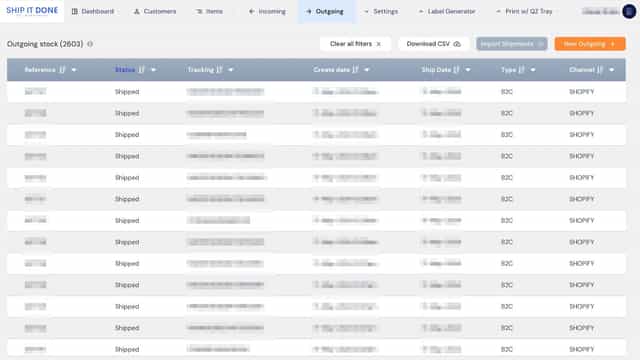
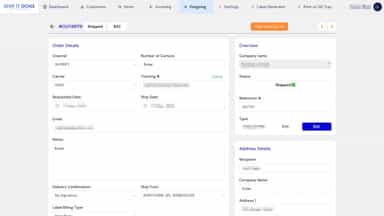
Syncing new orders, handling order changes and cancellations, and posting back fulfillment tracking numbers are made simple for users of SIDWMS using this app.
- Every order becomes a ClickUp task with full order details
- Tasks update automatically on fulfillment, cancellation and refund
- Filter which orders sync by tag, sales channel or minimum amount
- Custom fields auto-filled; pick the ClickUp status for fulfilled orders
- Syncs new orders from your store to SIDWMS
- Updates orders with changes and cancellations not yet shipped to SIDWMS
- Posts tracking numbers to SIDWMS once orders are shipped.



All the numbers
Every figure, side by side
A green dot marks the app ahead on a measured figure. Estimates, gaps and apps that leave no storefront trace never take the lead.
Adoption
| Measure |  ClickUp Sync |  SIDWMS Fulfillment |
|---|---|---|
| Detected stores | Not published | Not published |
| Net store change, 28 days | 0 | 0 |
| Stores added, 28 days | Not enough data | Not enough data |
| Big-brand share | Not enough data | Not enough data |
| Top store categories | Not published | Not published |
| Top store countries | Not published | Not published |
Reviews
| Measure | ClickUp Sync | SIDWMS Fulfillment |
|---|---|---|
| App Store rating | Not published | Not published |
| App Store reviews | Not published | Not published |
| New reviews, 28 days | Not enough data | Not enough data |
| Reviewers a year or more in | Not enough data | Not enough data |
Pricing
| Measure | ClickUp Sync | SIDWMS Fulfillment |
|---|---|---|
| Free plan | Yes | Not listed |
| Lowest paid monthly plan | $9/month | No monthly plan listed |
| Longest free trial | 14 days | Not listed |
| Plans listed | 3 | 1 |
Listing
| Measure | ClickUp Sync | SIDWMS Fulfillment |
|---|---|---|
| Shopify category rank | #275(ahead) | #521 |
| Shopify App Charts | Not on this week’s charts | Not on this week’s charts |
| Built for Shopify | No | No |
| Launched | Jul 17, 2026 | Jul 31, 2024 |
| Languages | 1 | 1 |
| Developer | Corventia | ShipItDone 3PL Warehouse |
FAQ
ClickUp Sync and SIDWMS Fulfillment: common questions
- Is ClickUp Sync or SIDWMS Fulfillment cheaper?
- Only ClickUp Sync lists a free plan. Shoplist compares base prices only between monthly plans in the same currency; usage charges and annual plans vary, so check each plan’s limits.
- What features does each app list that the other doesn’t?
- ClickUp Sync lists 1 the others don’t mention, such as Order updates. SIDWMS Fulfillment lists 1 the others don’t mention, such as Automated alerts. A feature missing from a listing may still be supported; this compares what each App Store listing says.
- Where does this comparison’s data come from?
- Shoplist crawls Shopify storefronts to detect which apps each store runs, and reads each app’s Shopify App Store listing for reviews, pricing, features and integrations. Store counts are as of Oct 13, 2026; estimated figures are labeled.
How Shoplist compares apps
Store counts come from Shoplist’s crawl of Shopify storefronts, which detects the apps each store runs; they are as of Oct 13, 2026. Reviews, ratings, plans, features and integrations come from each app’s Shopify App Store listing. 28-day figures are labeled when estimated, and a figure that is missing or estimated never decides who leads. Read the methodology.