
Chat and Inquire via WhatsApp vs Ploqo Chat Button for WhatsApp
Two Shopify apps, side by side: detected stores, momentum, reviews, plans, listed features and who runs each. Store counts as of Oct 13, 2026 for Chat and Inquire via WhatsApp, Nov 6, 2026 for Ploqo Chat Button for WhatsApp.
The short answer
- Chat and Inquire via WhatsApp lists 3 features Ploqo Chat Button for WhatsApp’s listing doesn’t mention, including Color and font, Live chat, Multi-language.
Head to head

Starter
- · 9 message languages, custom templates
- · Product page button and chat widget
- · Theme editor styling, no code
- · Views, clicks and click rate
Pro
- · 30-day views and clicks trend
- · Everything in Starter
- · Full history, not just this period
- · Top products and CSV export
Coverage counts what each App Store listing names. Every feature, checked off app by app, is in Shoplist.
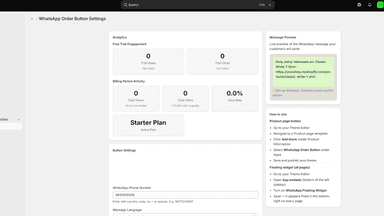
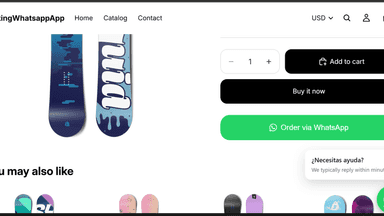
See every featureSome shoppers never finish a checkout form, but they will happily send a message. Chat via WhatsApp adds a chat button to your product pages and a floating button across your store. One tap opens WhatsApp with the product name, link and amount already written, so the shopper starts by telling you what they are asking about. Style it all from the theme editor - no code.
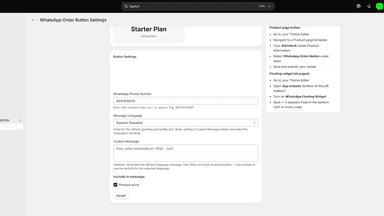
Add a floating WhatsApp button to your store. A tap opens a WhatsApp chat with your number and a message you write. On a product page the message can name the product and link to it, so you know which item the shopper means. Set it up in the theme editor: number, messages, side, distance from the edges on desktop and mobile, which pages show it, color, size, button text and a greeting.
- WhatsApp chat button on product pages, plus a floating button on every page
- Messages auto-filled with the product name, link, and amount
- 9 message languages, or custom templates with {title} and {url}
- Full styling control: colour, size, shape, and position — no code
- Opens a WhatsApp chat with your number and a message you write
- On product pages, the message can name the product and link to it
- Separate position settings for desktop and mobile, and a choice of pages
- No button shows on your store until a valid number is set

All the numbers
Every figure, side by side
A green dot marks the app ahead on a measured figure. Estimates, gaps and apps that leave no storefront trace never take the lead.
Adoption
| Measure |  Chat and Inquire via WhatsApp | |
|---|---|---|
| Detected stores | Not published | Not published |
| Net store change, 28 days | 0 | 0 |
| Stores added, 28 days | Not enough data | Not enough data |
| Big-brand share | Not enough data | Not enough data |
| Top store categories | Not published | Not published |
| Top store countries | Not published | Not published |
Reviews
| Measure | Chat and Inquire via WhatsApp | |
|---|---|---|
| App Store rating | Not published | Not published |
| App Store reviews | Not published | Not published |
| New reviews, 28 days | Not enough data | Not enough data |
| Reviewers a year or more in | Not enough data | Not enough data |
Pricing
| Measure | Chat and Inquire via WhatsApp | |
|---|---|---|
| Free plan | Not listed | Not listed |
| Lowest paid monthly plan | $5/month | No monthly plan listed |
| Longest free trial | 14 days | Not listed |
| Plans listed | 2 | Not published |
Listing
| Measure | Chat and Inquire via WhatsApp | |
|---|---|---|
| Shopify category rank | #353 | Not enough data |
| Shopify App Charts | Not on this week’s charts | Not on this week’s charts |
| Built for Shopify | No | No |
| Launched | Sep 29, 2026 | Nov 3, 2026 |
| Languages | 1 | 1 |
| Developer | Nascode | Ploqo |
FAQ
Chat and Inquire via WhatsApp and Ploqo Chat Button for WhatsApp: common questions
- What features does each app list that the other doesn’t?
- Chat and Inquire via WhatsApp lists 3 the others don’t mention, such as Color and font, Live chat, Multi-language. Ploqo Chat Button for WhatsApp lists 2 the others don’t mention, such as Social media, Welcome messages. A feature missing from a listing may still be supported; this compares what each App Store listing says.
- Where does this comparison’s data come from?
- Shoplist crawls Shopify storefronts to detect which apps each store runs, and reads each app’s Shopify App Store listing for reviews, pricing, features and integrations. Store counts are as of Oct 13, 2026 for Chat and Inquire via WhatsApp, Nov 6, 2026 for Ploqo Chat Button for WhatsApp; estimated figures are labeled.
How Shoplist compares apps
Store counts come from Shoplist’s crawl of Shopify storefronts, which detects the apps each store runs; they are as of Oct 13, 2026 for Chat and Inquire via WhatsApp, Nov 6, 2026 for Ploqo Chat Button for WhatsApp. Reviews, ratings, plans, features and integrations come from each app’s Shopify App Store listing. 28-day figures are labeled when estimated, and a figure that is missing or estimated never decides who leads. Read the methodology.